
calRegisterSpecialFunction
calRegisterSpecialFunction(l_specialFunctionInfo) =>l_specialFunctionInfo/nil
Description
Registers the specified information about the special (user-defined) function, if it is not already registered.
Arguments
|
List specifying the following information about the user-defined function: |
|
Value Returned
|
Name and callback procedure set for the user-defined function. |
|
|
The user-defined function cannot be registered because of an error. |
|
Examples
The following example defines a form myForm for a user-defined function. The form is represented by a symbol specialForm.
This form takes four arguments: Start, Stop, Threshold, and Edge Type.
These arguments are represented by symbols a, b, c, and d, respectively.
The first three arguments are string fields and the fourth argument Edge Type is a cyclic field. Valid values for the argument Edge Type are Rising and Falling. The default value is Rising.
procedure(myForm()
let((a b c d fieldList)
a=ahiCreateStringField(
?name 'a
?prompt "Start"
?value ""
)
b=ahiCreateStringField(
?name 'b
?prompt "Stop"
?value ""
)
c=ahiCreateStringField(
?name 'c
?prompt "Threshold"
?value ""
)
d=ahiCreateCyclicField(
?name 'd
?prompt "Edge Type"
?choices '("Rising" "Falling")
?value "Rising"
?defValue "Rising"
)
fieldList=list(
list(a 20:10 230:10 90)
list(b 20:40 230:10 90)
list(c 20:70 230:10 90)
list(d 20:110 230:10 90)
)
calCreateSpecialFunctionsForm('specialForm fieldList)
)
)
=> myForm
The following example defines a callback procedure myFunctionPlotCB that calls the function calCreateSpecialFunction, which creates and displays the form My Test Function Form created for the user-defined function. The user-defined function is represented by a symbol myTestFunction.
procedure(myFunctionPlotCB()
calCreateSpecialFunction(
?formSym 'specialForm
?formInitProc 'myForm
?formTitle "My Test Function Form"
?formCallback "calSpecialFunctionInput('myTestFunction '( a b c d))"
)
)
=> myFunctionPlotCB
The following example registers the function myTestFunction with its callback myFunctionPlotCB.
calRegisterSpecialFunction(
list("myTestFunction" 'myFunctionPlotCB)
)
=> nil
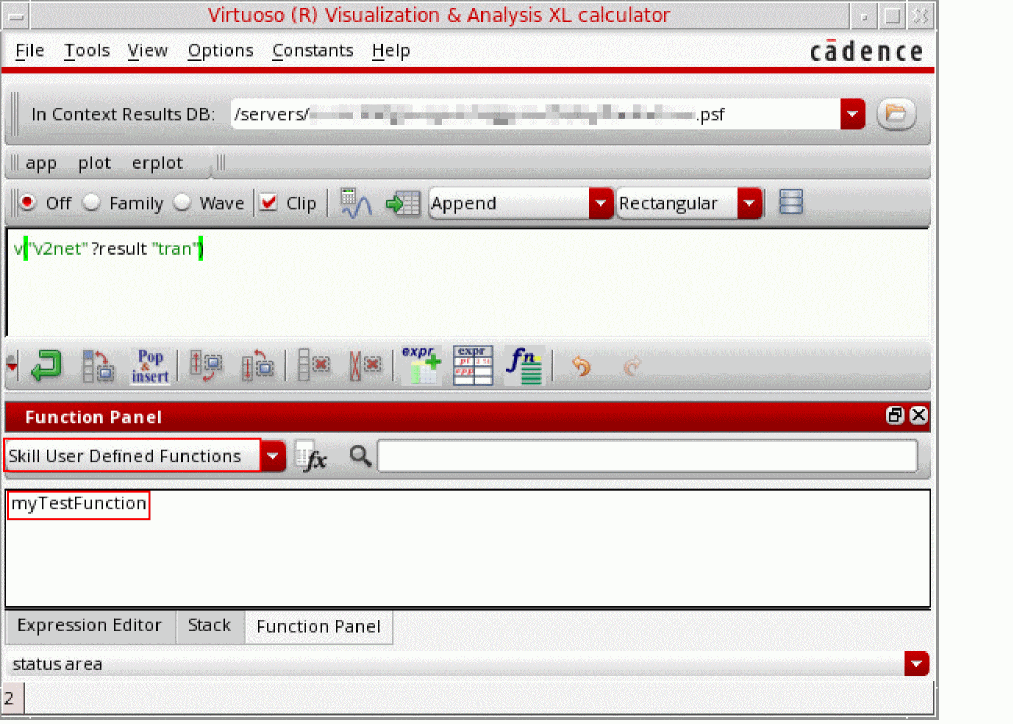
The next time you open the Calculator, the function myTestFunction, which you defined using the function calCreateSpecialFunction appear in the SKILL User Defined Functions category of the Function Panel, as shown in the following figure.
When you click myTestFunction from the SKILL User Defined Functions category in the Function Panel, the form that you created for the user-defined function using the function calCreateSpecialFunctionsForm opens.
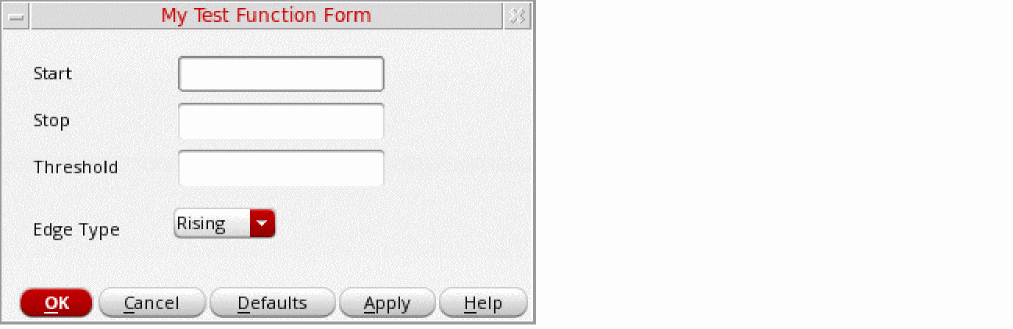
Specify the arguments Start, Stop, Threshold, and Edge Type to 20u, 100u, 1.5, and Falling, respectively and then click OK.
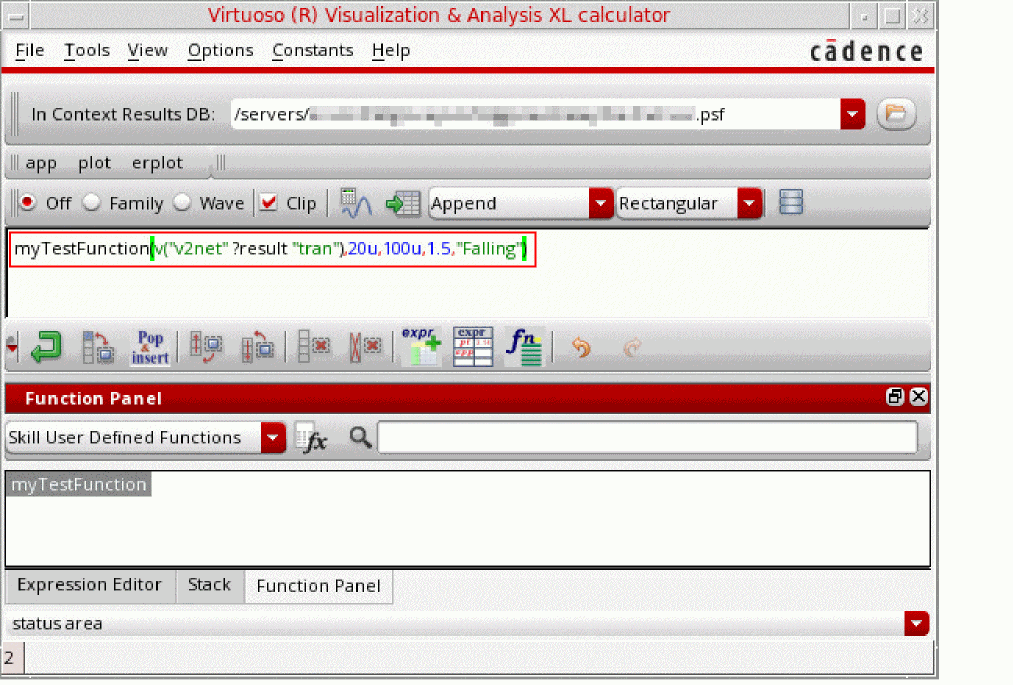
The following expression is built in the buffer with the specified form fields.
myTestFunction(v("v2net" ?result "tran"),20u,100u,1.5,"Falling")
Return to top