
rfThresholdXing
rfThresholdXing( [?resultt_result] [?resultsDirt_resultsDirectory] ) =>o_waveform/nil
Description
Calculates the threshold crossing value according to the jitter event time from the results of pnoise or hbnoise sample (jitter) analysis.
Arguments
|
Path to the results directory where simulation results of |
|
Value Returned
Examples
The following example opens simulation results of pnoise sample analysis stored in the results directory.
openResults("/servers/user/rfJitter/testcase/simulation/Lib/Cell/View/results/maestro/ExplorerRun.0/1/pss_pnoise_trannoise/psf")
=> "/servers/user/rfJitter/testcase/simulation/Lib/Cell/View/results/maestro/ExplorerRun.0/1/pss_pnoise_trannoise/psf"
The following example lists the results stored in the currently open results directory.
results()
(pss_tran pss_td pss_fd pnoise_sample_pm0 model
instance output designParamVals primitives subckts
variables
)
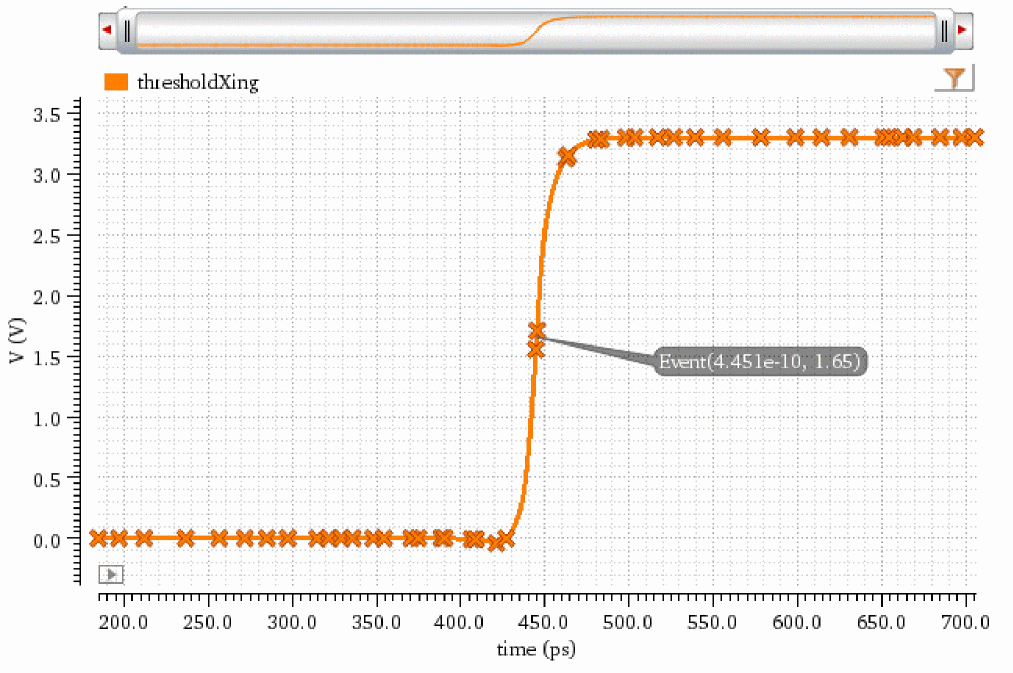
The following example creates a waveform object wave1 that represents the waveform of threshold crossing values plotted against a time range. The waveform is plotted from the pnoise_sample_pm0 result.
wave1=rfThresholdXing(?result "pnoise_sample_pm0")
=> srrWave:0x35d19050
The following example creates a Waveform window and returns its window ID.
win1=awvCreatePlotWindow()
=> window:3
The following example plots the waveform object wave1 in the Waveform window win1.
awvPlotWaveform(
win1
list(wave1)
?expr list("thresholdXing")
?color list("y6")
?index list(1)
?lineType list("line")
?lineStyle list("solid")
?lineThickness list("thick")
?showSymbols list(t)
?dataSymbol list("X")
)
=> t
Note that the time is plotted on x axis and voltage is plotted on y axis. The marker on the waveform shows the time and threshold value.
Return to top