
Object Highlighting When Quick Align is Active
The Quick Align snapping mechanism uses different object highlighting schemes to set the reference and select the target. You can use the environment variable to specify the time required to hold the pointer over an object. If the pointer remains stationary over an object for longer than the specified time, the potential points, edges, and centerlines in the object are highlighted.
The following sections demonstrate the results of the Quick Align command in various scenarios with pre-selection of objects. Similar results are obtained with post-selection of objects, except that in post-selection, the command remains active and the objects do not remain selected after the alignment.
Reference Highlighting
Reference highlighting scheme is dependent on the following factors:
Additionally, highlighting of reference is different after the reference is set.
The following figure shows pre-select highlighting when the selection mode is Full Select and edge + point is active.
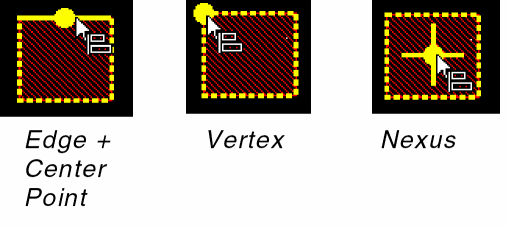
Nexus is the midpoint of the given shape. In case of a polygon, nexus is the center of its bounding box.
The following figure shows pre-select highlighting when the selection mode is Partial Select and edge + point is active.
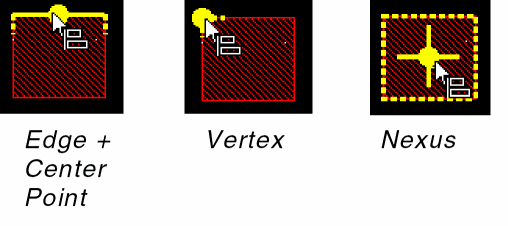
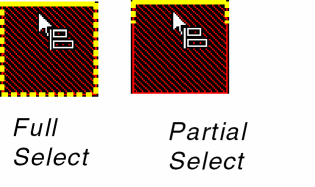
The following figure shows pre-select highlighting in the edge-only mode.
The following figure shows highlighting after the reference is set for both Full and Partial selection modes. Highlighting is same for nexus in both cases.
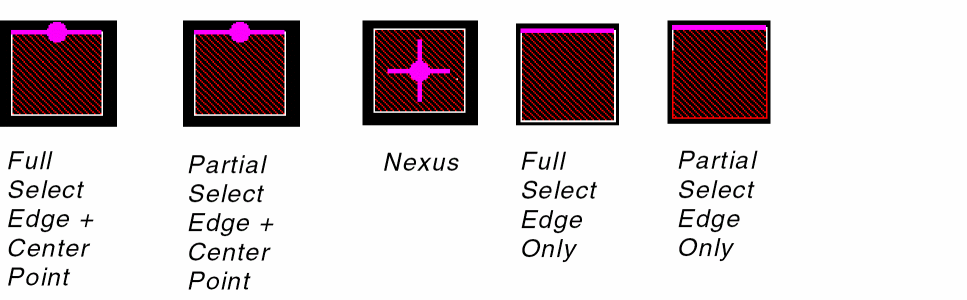
The reference point is discarded when the Backspace key is pressed.
Target Object Highlighting
The following figure shows highlighting for the target.
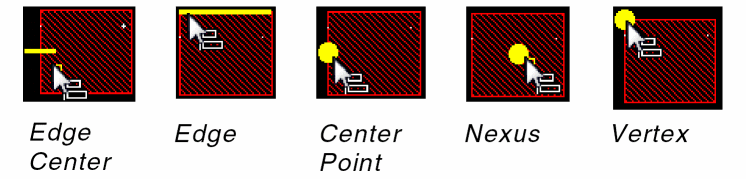
If quick align is invoked during edit-in-place (EIP), you can snap the target at a level higher than the current edit level.
Related Topics
Object Alignment by Using the Quick Align Command
Return to top