
Selection Protection Highlight Options Form
Use the Selection Protection Highlight Options form to specify the protection highlight options during the selection of objects.
| Field | Description |
|---|---|
|
This section lets you specify the halo mode, color, level and width. |
|
|
Determines the type of halo around a protected object. The normal mode does not generate any halo. The default mode is fadeout. The figures below show the effect of different modes on objects marked protected.
Environment variable: 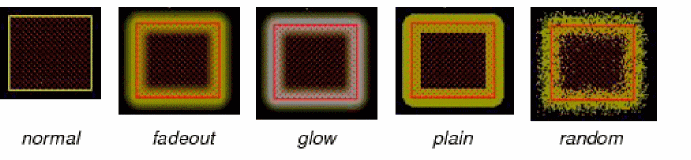 |
|
|
Determines the color of the halo. The default halo color is yellow. When the Halo Mode is set to glow, the Halo Color appears on the outer edges of the halo. The figures below show examples of the halo in three colors. 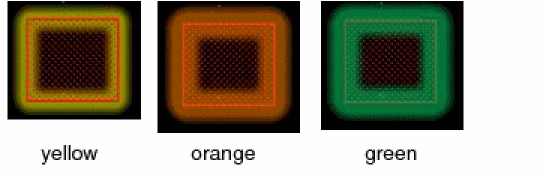 |
|
|
Determines the placement of the halo relative to the object boundary box. The default level is under.
Environment variable: 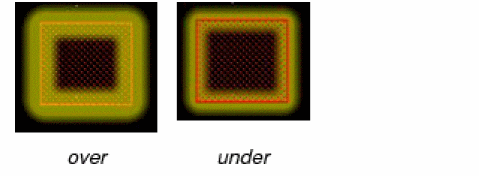 |
|
|
Specifies the thickness of the halo on a protected object. The default width is normal. The figures below show halos with different thickness.
Environment variable: 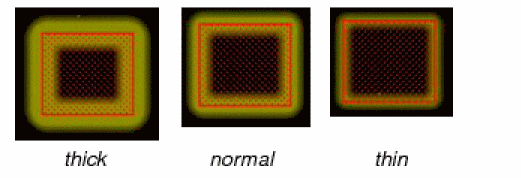 |
|
|
Controls the visibility of the halo. The visibility of the halo is the maximum at the lowest transparency setting. The default transparency value is
Environment variable: 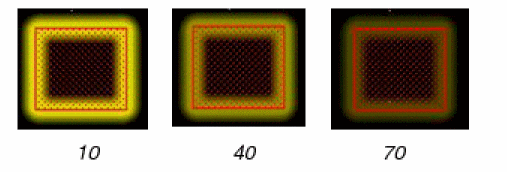 |
Related Topics
Return to top