Color Shifting
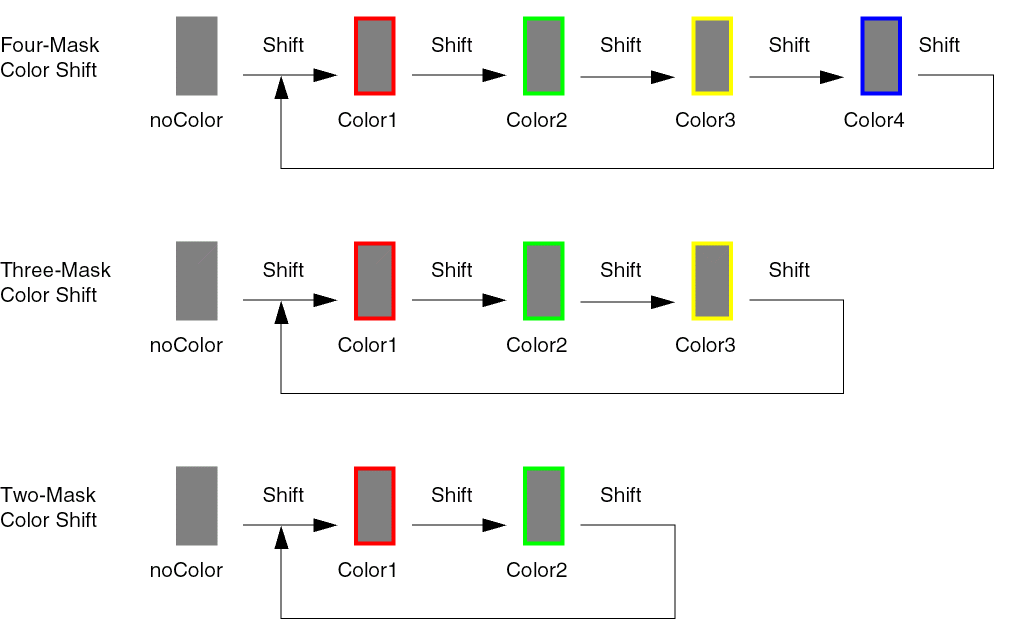
For layers with more than one mask, shapes can be assigned to a specific mask color. The mask for a shape can be manually shifted through the available masks using the Multiple Patterning toolbar, as described in Shifting Colors.
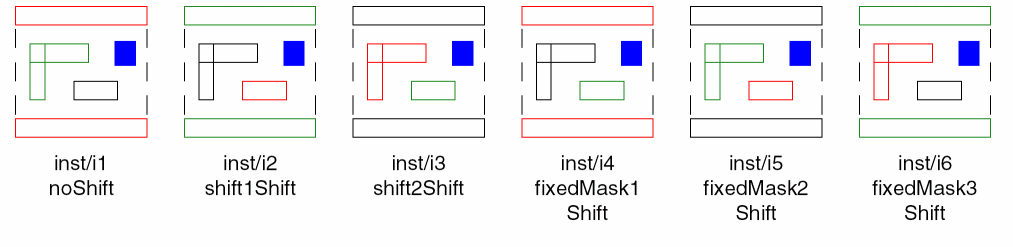
Virtuoso MPT supports instance color shifting by layer. The following table lists the layer shift types that are available:
|
Layer Shift Type
|
Description
|
|
noShift
|
Colors are not shifted on this layer
|
|
shift1Shift
|
(2-mask and 3-mask layers only) Shift colors by one.
|
|
shift2Shift
|
(3-mask layers only) Shift colors by two.
|
|
fixedMask1Shift
|
(3-mask layers only) Shapes with mask1Color are not changed; shift mask2Color to mask3Color, and mask3Color to mask2Color.
|
|
fixedMask2Shift
|
(3-mask layers only) Shapes with mask2Color are not changed; shift mask1Color to mask3Color, and mask3Color to mask1Color.
|
|
fixedMask3Shift
|
(3-mask layers only) Shapes with mask3Color are not changed; shift mask1Color to mask2Color, and mask2Color to mask1Color.
|
Gray or uncolored shapes in an instance are not affected by layer shifts on the instance.
The following table shows the effective color for a shape on a three-mask layer based on its original mask color and the layer shift that is applied to the instance.
|
Original Mask Color
|
noShift
|
shift1Shift
|
shift2Shift
|
fixedMask1
Shift
|
fixedMask2
Shift
|
fixedMask3
Shift
|
|
mask1Color
|
mask1Color
|
mask2Color
|
mask3Color
|
mask1Color
|
mask3Color
|
mask2Color
|
|
mask2Color
|
mask2Color
|
mask3Color
|
mask1Color
|
mask3Color
|
mask2Color
|
mask1Color
|
|
mask3Color
|
mask3Color
|
mask1Color
|
mask2Color
|
mask2Color
|
mask1Color
|
mask3Color
|
Use the SKILL functions in the following table to initialize, set, retrieve, and clear the layer shift information on a cellview:
|
SKILL Function
|
Description
|
|
dbCellViewInitForLayerShifting
|
Initializes the layer shift information for the specified cellview.
|
|
dbCellViewUpdateLayerShifts
|
Creates or rebuilds the layer shift information cache using the layers that are in the tech bound to the specified cellview. As a result, the layer shift information on the instances in the cellview is removed.
|
|
dbCellViewAreLayerShiftsValid
|
Indicates whether the layer shift information on the instances in the specified cellview is synchronized with the layers and color information in the bound tech.
|
|
dbCellViewClearLayerShifts
|
Clears the layer shift information from all the instances in the specified cellview.
|
|
dbCellViewHasLayerShifts
|
Indicates whether layer shift information is present on any instance in the specified cellview.
|
|
dbInstGetLayerShifts2
|
Returns a list of shifts that are applied to the layers in the master of the specified instance.
|
|
dbInstHasLayerShifts
|
Indicates whether layer color shifts are specified on the instance.
|
|
dbInstSetLayerShifts2
|
Sets layer shifts on an instance.
|
|
dbInstClearLayerShifts
|
Removes all the layer shifting information from the specified instance.
|
Example
cv = geGetEditCellView()
dbCellviewUpdateLayerShifts( cv )
I2 = dbFindAnyInstByName( cv "I2" )
I3 = dbFindAnyInstByName( cv "I3" )
shiftVals = list(list("Metal2" "fixedMask1Shift") list("Metal3" "shift2Shift"))
dbInstSetLayerShifts2( I2 shiftVals )
dbInstSetLayerShifts2( I3 shiftVals )
Sets the layer shift for Metal2 to fixedMask1Shift and for Metal3 to shift2Shift for instances I2 and I3 of the current edit cellview.
Related Topics
Interactive Coloring in Layout
Visibility and Selectability of Colored Data
Colored Data Inspection
Methods to Change Color of Existing Shapes
Color Locking
Pre-defined Setup Driven MPT Flows
Using the Multiple Patterning Toolbar
Coloring Methods
Track-Based Coloring
Displaying Track Patterns in Layout
Assign Track Patterns to Nets
Migrate from the Multiple Patterning Assistant
Limitations of Multi-Patterning Technology
Return to top