
Virtuoso Placer Support for Module Generators
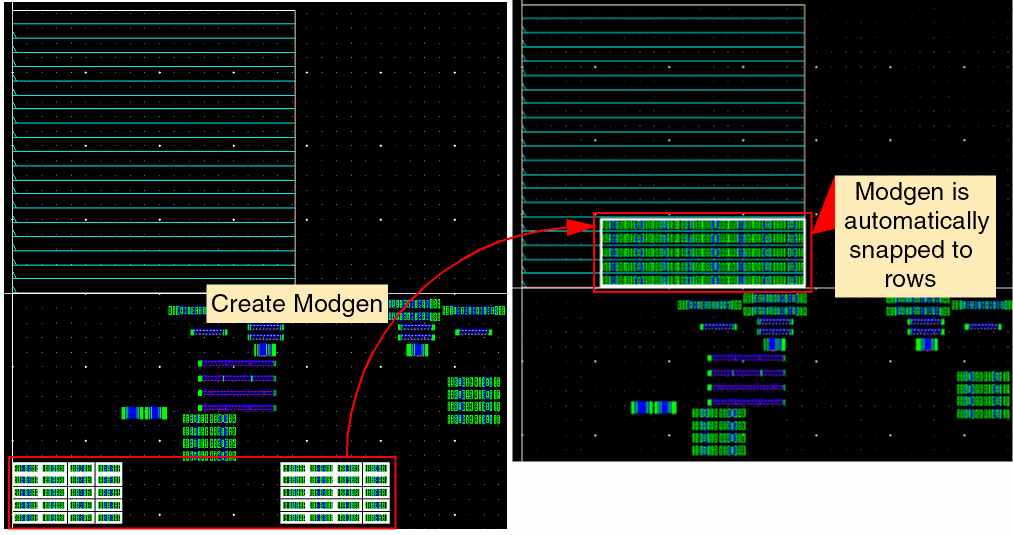
When you run Virtuoso Placer, Modgens are automatically snapped to compatible rows, if they exist. If the Modgen instances do not align exactly to the rows, then one of the Modgen instances is snapped to the nearest row. Use the snapFigGroupRowCorrect to control the snapping behavior of Modgens.
Modgens that are created after the rows exist are automatically correct by construction, as shown below:
Support for Modgen On-Canvas Commands
You can use the various Modgen on-canvas commands that are available under the Place – Modgen menu to perform simple editing operations directly in the layout editor without invoking the Modgen Editor. For example, you can use the Split Modgen Rows and UnSplit Modgen Rows commands to ensure that Modgens use as few rows as possible, while still fitting comfortably inside the PR boundary.
Support for Modgen Pattern Editors
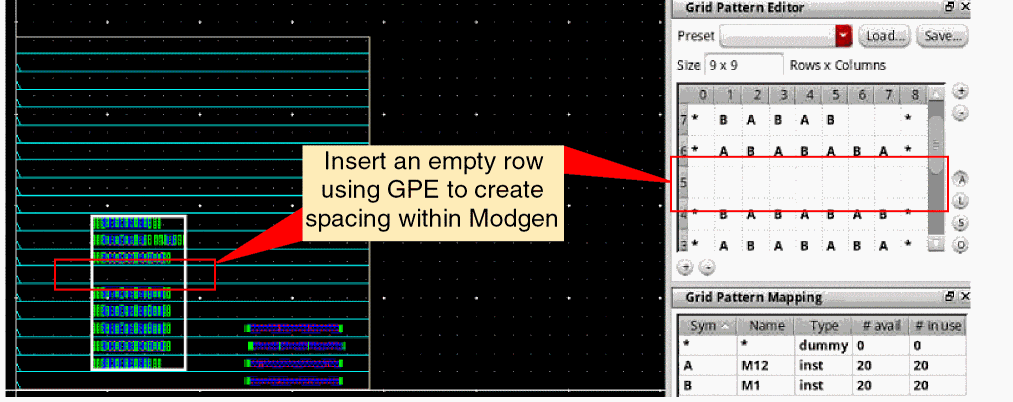
The Grid Pattern Editor (GPE) and Grid Pattern Mapping (GPM) assistants are available on-canvas. The Modgen grids directly map to the rows in the layout canvas. Therefore, whenever you make changes to the grid pattern, the Modgen instances always snap to the nearest rows.
Insertion of Spaces within Modgens
The alignment and spacing settings defined for the rows override the Modgen alignment and spacings settings made using the Set Member Alignment and Spacing form. Therefore, in the Virtuoso Placer flow, it is recommended that you do not use this form for making vertical alignment and spacing settings.
If you want to create an empty space within a Modgen, use the GPE to create an empty row, as shown below:
Guard Rings in Virtuoso Placer Flow
In the Virtuoso Placer flow, it is recommended to use either identical guard rings or MPP guard rings. Fluid guard rings can be created, but they are not compatible with the row infrastructure.
Related Topics
Return to top