
oaMinRectArea
Specifies the minimum area for rectangular shapes on a layer. Optionally, you can also specify a minimum and maximum width for the shape beyond which the constraint does not apply.
To specify the minimum area for non-rectangular, polygonal shapes, use the minArea constraint.
oaMinRectArea Quick Reference
Value Type
|
Specifies the minimum area in user units2 for rectangular shapes on the layer. 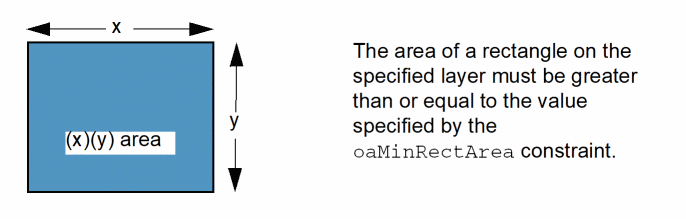 |
Optional Parameters
|
Specifies that the constraint applies only to shapes with width greater than or equal to this value.
Type: |
|
|
Specifies that the constraint applies only to shapes with width less than or equal to this value.
Type: |
Examples
Example 1: oaMinRectArea
Sets the minimum rectangular area for a shape on Metal1 to 5.0 user units2.
set_layer_constraint -constraint oaMinRectArea -layer Metal1 -AreaValue 5.0
Example 2: oaMinRectArea with width and maxWidth
Sets the minimum rectangular area for a shape on Metal1 to 0.08 user units2 if the width of the shape is greater than or equal to 0.4 and less than or equal to 0.5.
set_constraint_parameter -name width -Value 0.4
set_constraint_parameter -name maxWidth -Value 0.5
set_layer_constraint -layer Metal1 -constraint oaMinRectArea -AreaValue 0.08
Related Topics
Return to top