
allowedWidthRange
Specifies that a particular set of width values are legal for a given layer, instead of defining a minimum and maximum width.
In some advanced node processes, there is an additional requirement for special checking at wire jogs. Specifically, either the vertical or horizontal direction width between two inside corners of a rectilinear object must be greater than or equal to the first width value in the allowedWidthRange table for the corresponding direction if there are different widths specified for different directions. If there is only one set of allowed widths (or width ranges), then either the vertical or horizontal width between the corners must be greater than or equal to the smallest width value in the width range table.
allowedWidthRange Quick Reference
Value Types
|
Specifies a list of |
|
|
The table headers are index values and the table values are legal widths, in user units, for rectangles on the layer. The last value is interpreted as greater than or equal to the given width. |
Optional Parameters
|
Specifies that the constraint does not apply to wires shorter than this length in user units.
Type: |
|
|
Specifies the measurement direction.
Type: |
|
|
Specifies that either the horizontal or vertical distance between two internal corners of a rectilinear shape must be greater than or equal to the first width value in the
Type: |
|
|
Specifies the direction in which the constraint is measured, regardless of whether this is the width direction or not. The default value,
Type: |
|
|
Restricts the allowed spacing to integer multiples of this value. Use
Type: |
|
|
Specifies that the
Type: |
Examples
Example 1: allowedWidthRange Using OneDTblValue
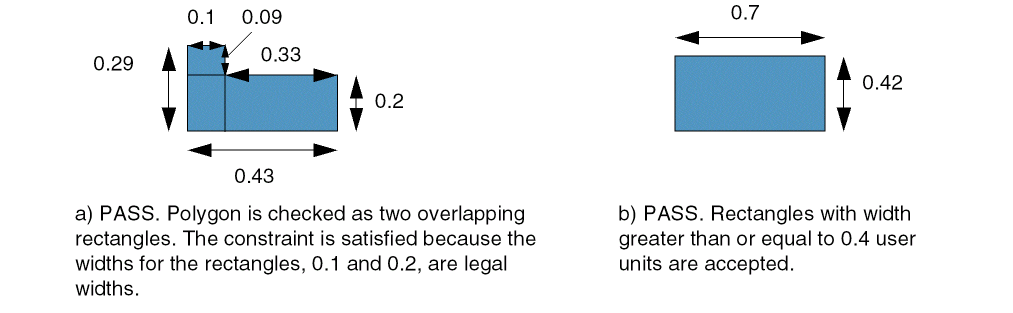
This example sets legal widths for rectangles on Metal1 to 0.10, 0.20, 0.30 and greater than or equal to 0.40 user units.
set_layer_constraint -layer Metal1 -constraint maxWidth -Value 0.4
set_layer_constraint -layer Metal1 -constraint allowedWidthRange \
  -OneDTblValue {0 0.1 1 0.2 2 0.3 3 0.4}
Example 2: allowedWidthRange Using RangeArrayValue
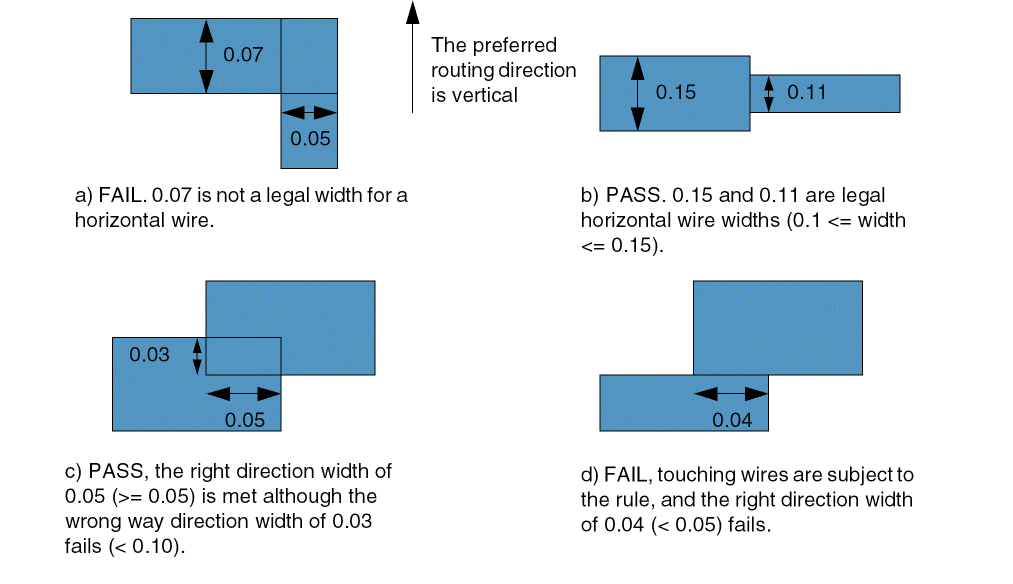
The following example specifies that:
- Either orthogonal distance between two internal corners must be greater than or equal to the smallest width in the corresponding direction.
- Legal widths for vertical wires measured in user units in the horizontal direction are 0.05, 0.07, 0.12, and 0.15 user units.
- Legal widths for horizontal wires measured in the vertical direction are greater than or equal to 0.10 and less than or equal to 0.15 user units.
# preferred direction vertical; oaSpacingDirection=1 (horizontal)
set_constraint_parameter -name oaSpacingDirection 1
set_constraint_parameter -name orthogonal true
set_layer_constraint -layer Metal1 -constraint allowedWidthRange \
  -RangeArrayValue {0.05 0.07 0.10 0.12 0.15}
# wrong way is horizontal, oaSpacingDirection=2 (vertical)
set_constraint_parameter -name oaSpacingDirection 2
set_layer_constraint -layer Metal1 -constraint allowedWidthRange \
  -RangeArrayValue {"[0.10 0.15]"}
Related Topics
Return to top