
minWidth
Determines the minimum orthogonal width, in user units, for shapes on a specified layer.
For some processes, the minimum width constraint does not apply for one or more of these cases:
minWidth Quick Reference
Value Type
minWidth constraints have a Value that represents the minimum width, in user units, for any shape on the layer.

Parameters
-
distanceMeasureType(IntValue, optional) specifies the spacing measurement method as Euclidean (0, default) or Manhattan (1). For information on this parameter, see “Euclidean and Manhattan Spacing Constraints”. -
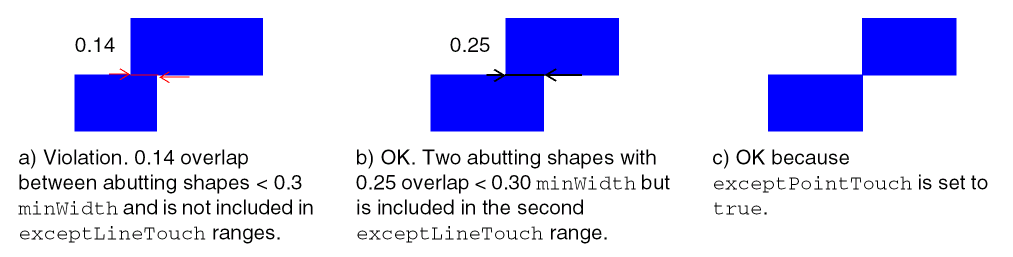
exceptLineTouch(DualValueTbl, optional) specifies thatminWidthviolations caused by two shapes abutting for an overlap distance within the given ranges must be ignored. Each DualValue pair represents a range. Normally, when the overlap distance is less thanminWidth, a violation occurs. However, if the overlap distance is greater than or equal to the first value of a DualValue pair and less than or equal to the second value of a DualValue pair, the violation is ignored. -
exceptPointTouch(BoolValue, optional) specifies thatminWidthviolations caused by two shapes touching at corner points must be ignored. -
oaSpacingDirection(StringAsIntValue, optional) specifies the measurement direction. anyDirection 0 Horizontally and vertically (default) horizontalDirection 1 Horizontally only verticalDirection 2 Vertically only
Examples
Example 1—minWidth Fixed Value
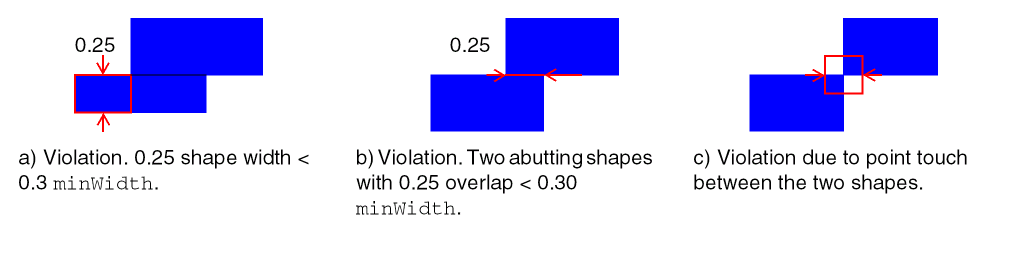
This example sets the minimum width for shapes on Metal1 to 0.3 μm.
| Format | Example |
|---|---|
set_layer_constraint -constraint minWidth -layer Metal1 -Value 0.3 |
|
LAYER Metal1 |
|
spacings( |
Example 2—minWidth with exceptPointTouch and exceptLineTouch
This example sets the minimum width for shapes on Metal1 to 0.3 μm and excludes violations caused by two shapes touching at a point and by two shapes that abut with an overlap of 0.1, or an overlap >= 0.2 and <= 0.3.
Related Topics
Return to top