
rectangularShapeDirection
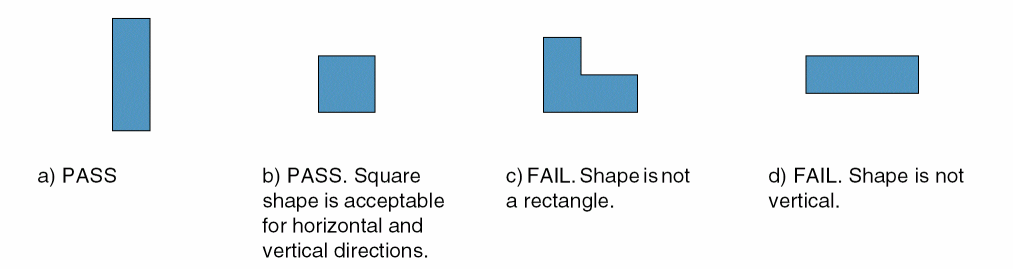
Specifies that shapes on a given layer must be rectangular and in a specified direction. Square shapes would meet both vertical and horizontal directions. You can optionally specify that the direction of the shape is dependent on the shape’s width and that the constraint does not apply to metal shapes of a specified size that contain vias on a given layer and of a given size.
This constraint is used with allowedWidthRange which specifies a set of discrete widths for the layer. There should also be a corresponding allowedLengthRange to specify a minimum length greater than or equal to the minimum width to avoid ambiguity when determining the direction.
rectangularShapeDirection Quick Reference
Value Types
|
Specifies the direction for shapes on the layer, indexed by the width of the shape in user units. |
Optional Parameters
|
Specifies that all end-of-line edges between two convex corners must be extended by this distance in user units before checking. This parameter must be specified together with
Type: |
|
|
Specifies that the
Type: |
|
|
Together with
After removing the metal shapes that satisfy these conditions, the remaining shape must be a either a single rectangle or multiple completely aligned rectangles.
Type: |
|
|
Specifies the xSpan and ySpan of via that causes a metal shape to be excluded from the constraint. See
Type: |
|
|
Specifies the via layer that causes a metal shape to be excluded from the constraint. See
Type: |
Examples
Example 1: rectangularShapeDirection using IntValue
Specifies that all shapes on layer Metal1 must be rectangular and vertical.
set_layer_constraint -layer Metal1 \
 -constraint rectangularShapeDirection -IntValue 2
Example 2: rectangularShapeDirection using Int1DTblValue
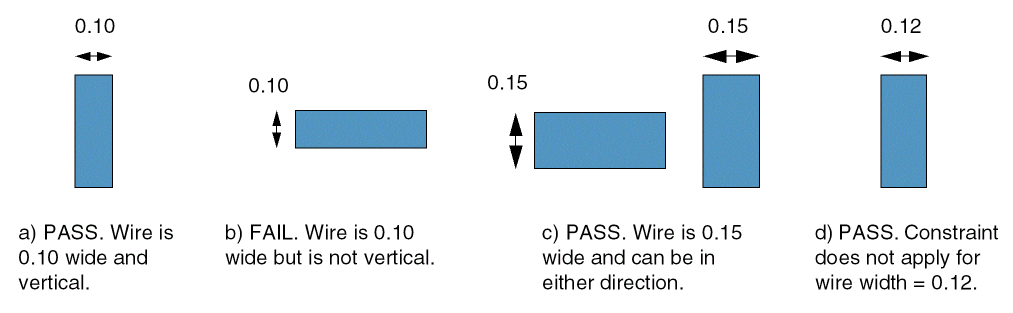
Specifies that all shapes on layer Metal1 must be rectangular and shapes that are 0.10 user units wide must be vertical, shapes that are 0.15 user units may be horizontal or vertical.
set_layer_constraint -layer Metal1 \
 -constraint rectangularShapeDirection -row_name width \
 -Int1DTblValue {0.10 2 0.15 0} -row_interpolation snap_down \
 -row_extrapolation {snap_up snap_down}
Example 3: rectangularShapeDirection with widthRangeArray and extendBy
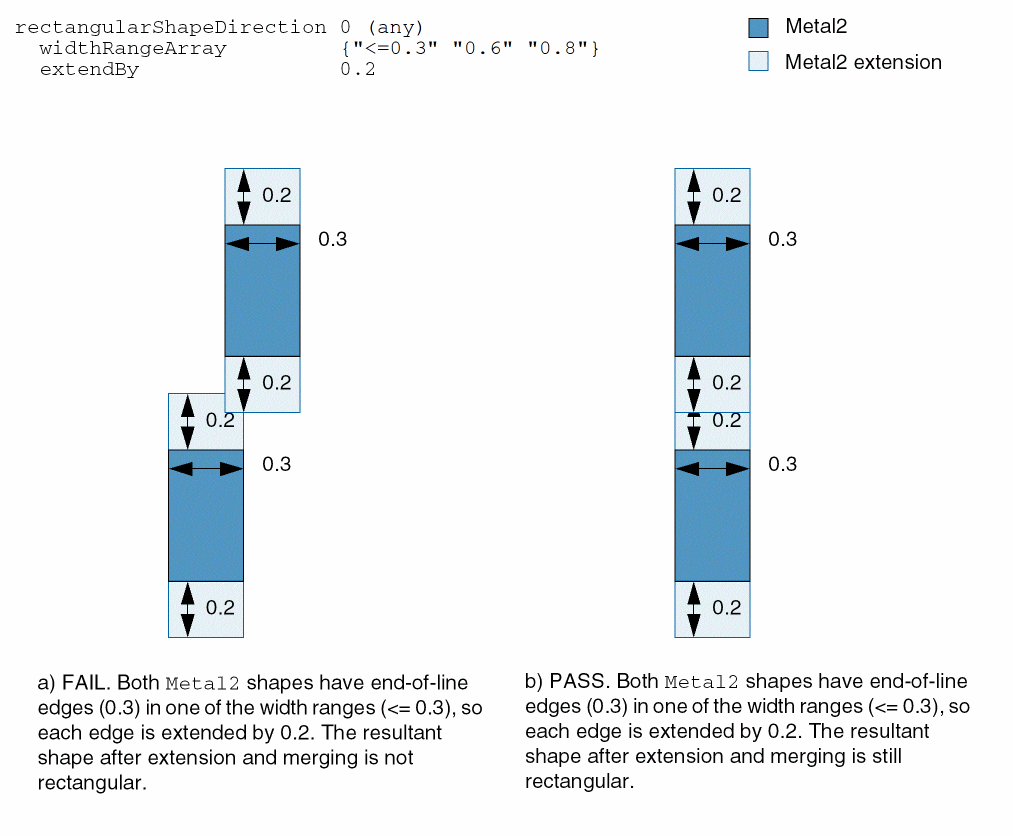
Specifies that all end-of-line edges that are less than or equal to 0.3 user units or equal to 0.6 or 0.8 user units in length are to be extended by 0.2 user units. All resulting shapes must be rectangular.
set_constraint_parameter -name widthRangeArray \
 -RangeArrayValue {"<=0.3" "0.6" "0.8"}
set_constraint_parameter -name extendBy -Value 0.2
set_layer_constraint -constraint rectangularShapeDirection \
 -layer Metal2 -IntValue 0
Example 4: rectangularShapeDirection with exceptViaLayer, exceptViaSize, and exceptExactSize
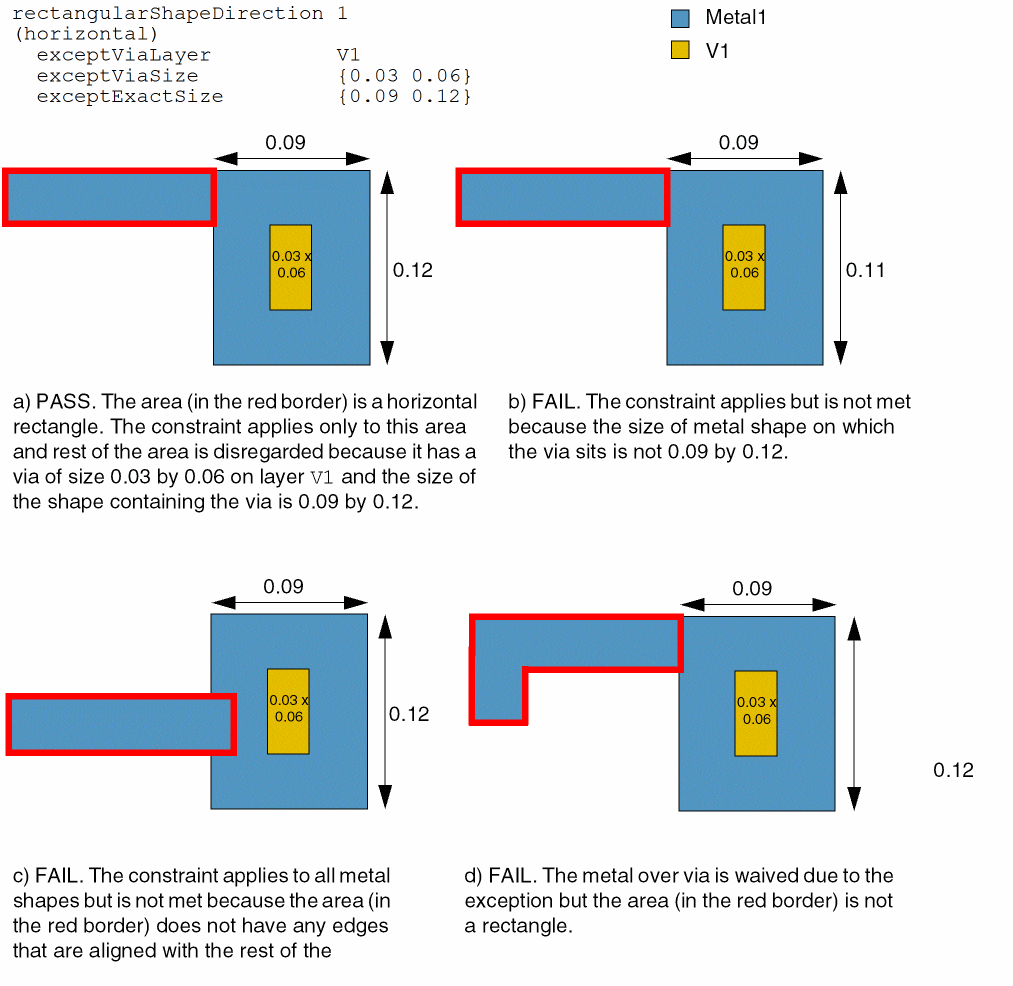
Specifies that any metal shapes on layer Metal1 must be horizontal rectangles, apart from metal shapes of size 0.09 by 0.12 that contain a via of size 0.03 by 0.06 on layer V1.
set_constraint_parameter -name exceptViaLayer -LayerValue "V1"
set_constraint_parameter -name exceptViaSize -DualValue {0.03 0.06}
set_constraint_parameter -name exceptExactSize -DualValue {0.09 0.12}
set_layer_constraint -layer Metal1 -constraint rectangularShapeDirection \
 -IntValue 1
Related Topics
Return to top