
orthogonalSnappingLayer
Specifies the stopping points to align end-of-line edges on layer1 with the routing grid on layer2, based on the widths of the routing tracks. The routing grid on layer2 can be specified using a number of ways, including track patterns, snapPatternDefs, and widthSpacingSnapPatternDefs. Both layers must have orthogonal direction.
orthogonalSnappingLayer Quick Reference
Value Type
|
Specifies the stopping points to align end-of-line edges on layer1 with the routing grid on layer2, based on the widths of the routing tracks. |
Required Parameters
Optional Parameters
|
Specifies in user units the stopping-point distances for the right and upper edges of the shapes on layer1; the constraint value specifies the stopping point distances for the left and lower edges of the shapes on layer1. If this parameter is not specified, the constraint value applies to all edges, lower and left and upper and right.
Type: |
|
Examples
set_layerpair_constraint -layer1 Metal2 -layer2 Metal3 \
  -constraint orthogonalSnappingLayer -row_name width \
  -RangeArray1DTblValue {0.0    1   0 \
                         0.02   3   -0.05  0  0.1}
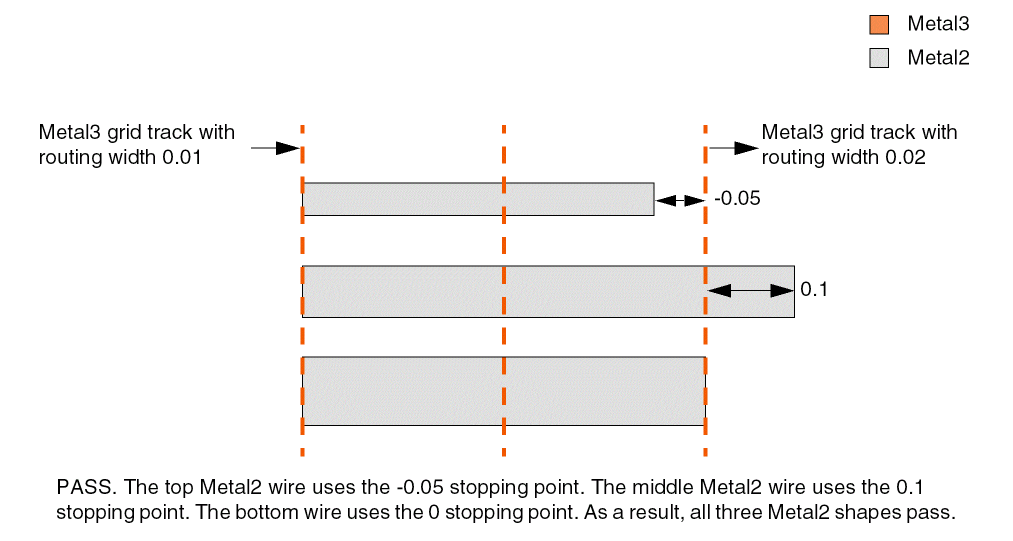
Specifies that the end-of-line edges of Metal2 shapes must stop as follows:
-
At a distance equal to 0 from the centerline of the track if the width of a routing track on
Metal3is greater than or equal to 0.0. -
At a distance equal to -0.05, 0, or 0.1 from the centerline of the track if the width of a routing track on
Metal3is greater than or equal to 0.02.
The table is indexed by track width. Each row contains a track width, the count of RangeArrayValue for the given track width, and the RangeArrayValue list that specifies the allowed stopping-point distances.
Related Topics
Return to top