
allowedCutClass
Specifies whether a cut class on the given cut layer is allowed between shapes of certain widths. If lowerLayer and upperLayer are not specified, the viaDefs for the cut layer are used to determine the lower and upper layers. The lower and upper direction is determined by the wider dimension of the shape.
allowedCutClass constraint need not be defined.allowedCutClass Quick Reference
Value Type
Required Parameter
|
Specifies the cut class width and length.
Type: |
Optional Parameters
|
The metal layer below the cut layer. If not specified, the default stack is used to determine the lower metal layer.
Type: |
|
|
The metal layer above the cut layer. If not specified, the default stack is used to determine the upper metal layer.
Type: |
|
|
The direction of the shape on the lower layer. The direction is determined by the wider dimension of the shape. The constraint applies if the shape has the specified direction. The values that can be specified for the lower direction are:
Default is
Type: |
|
|
The direction of the shape on the upper layer. The direction is determined by the wider dimension of the shape. The constraint applies if the shape has the specified direction. The values that can be specified for the upper direction are:
Default is
Type: |
Examples
set_constraint_parameter -name cutClass -DualValue {0.1 0.1}
set_constraint_parameter -name lowerLayer -LayerValue Metal1
set_constraint_parameter -name upperLayer -LayerValue Metal2
set_constraint_parameter -name lowerDirection -IntValue 1
set_constraint_parameter -name upperDirection -IntValue 1
set_layer_constraint -constraint allowedCutClass \
-layer Via1 -TblCols {0.1 0.2} -Int2DTblValue {0.1 1 0 0.2 0 1}
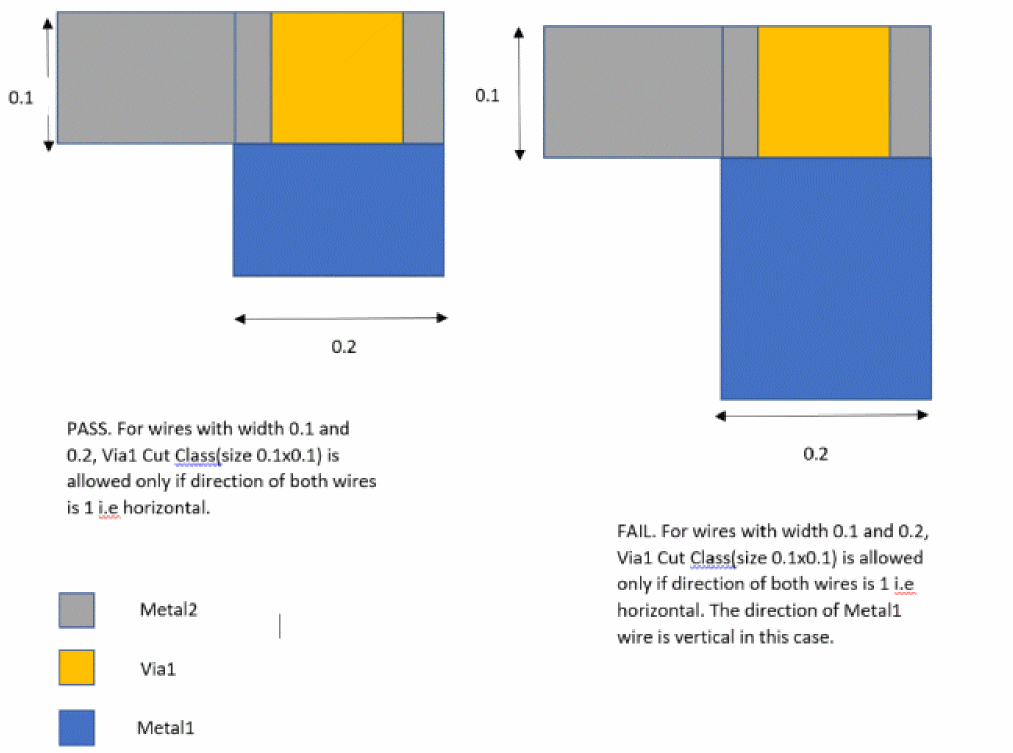
Specifies that a 0.1x0.1 cut class on layer Via1 is allowed between Metal1 and Metal2 wires only if both wires are greater than 0.1 or 0.2 user units in width and direction for both Metal1 and Metal2 wire is horizontal.
Related Topics
Return to top