
forbiddenCutClassSpacingRange
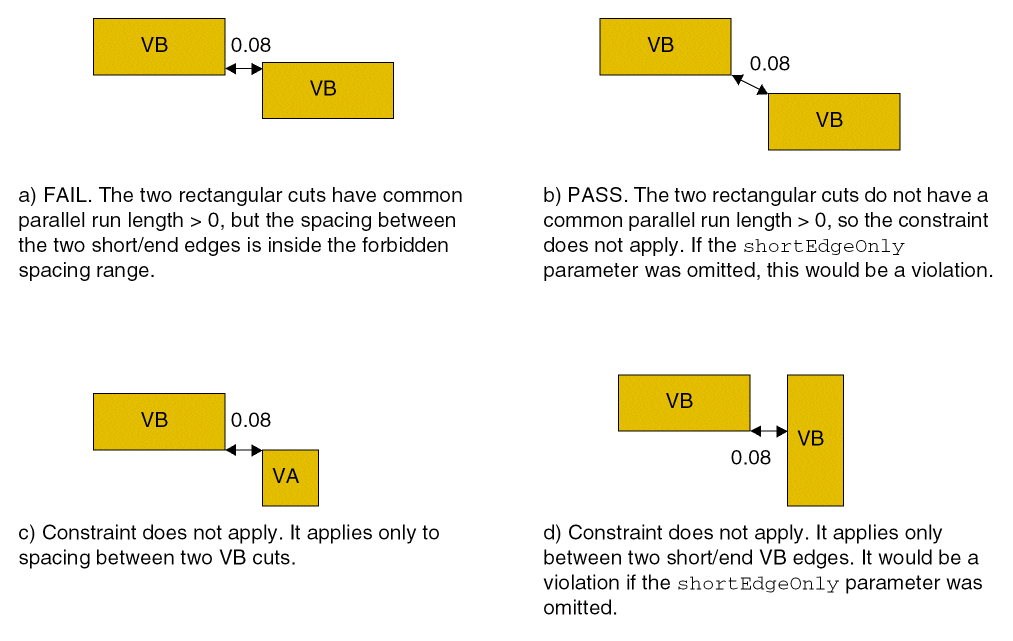
Restricts the spacing between two shapes of a given cut class on the given layer. This constraint can optionally apply only for the spacing between short (or end) edges of a rectangular cut class with a common parallel run length greater than zero.
forbiddenCutClassSpacingRange Quick Reference
Value Types
|
Specifies the spacing between cut shapes that is considered illegal. Any spacing that falls within the range is forbidden.
For example, if |
Required Parameter
|
Specifies that the constraint applies only to cut shapes of the specified cut class.
Type: |
Optional Parameter
|
Specifies that the constraint only applies between short sides of the cut class shapes. If this parameter is specified, the specified cutClass should be a rectangular cut class. Default is
Type: |
Examples
set_constraint_parameter -name cutClass -DualValue {0.3 0.4}
set_constraint_parameter -name shortEdgeOnly -BoolValue true
set_layer_constraint -constraint forbiddenCutClassSpacingRange \
  -layer v1 -RangeValue {"[0.7 0.9]"}
Specifies that the spacing between two end edges of VB (0.3x0.4) rectangular cut shapes on cut layer v1 with parallel run length greater than 0 must not be greater than or equal to 0.07 or less than or equal to 0.09 user units.
Related Topics
Return to top