
minCutClassClearance
Specifies the minimum spacing between cuts of different classes on different layers.
minCutClassClearance Quick Reference
Value Type
Optional Parameters
|
Specifies whether the cut spacing is measured from cut-center-to-cut-center (1) or cut-edge-to-cut-edge (0). By default, cut spacing is performed cut-edge-to-cut-edge. The column header (
Type: |
|
|
Specifies the default cut spacing between cut classes.
Type: |
|
|
Specifies the vias for which this constraint does not apply, based on their connectivity.
Type: |
|
|
Specifies the shapes to which this constraint applies, based on their connectivity.
Type: |
|
|
Specifies that the constraint applies only if the parallel run length (prl) between the two via cuts is greater than or equal to this value. Both positive and negative values are allowed.
If multiple Actual length (prl) Use constraint value for length <-1 The constraint does not apply.
Type: |
|
|
Specifies that the minimum cut class spacing between cut classes on different layers optionally applies only to the cut edges of the layer1 shape enclosed by the metal layer above with an enclosure greater than 0, and that the cut edges have a nonzero parallel overlap with cut shapes on layer2. The enclosing metal layer condition does not apply to cut shapes that do not have a parallel overlap. |
|
|
Specifies the spacing between cut class shapes and non-cut class shapes (for example, blockages).
Type: |
|
|
Specifies an extension distance that is applied to cut shapes of certain cut classes before cut spacing is measured. The table layout is identical to the constraint value table. This parameter is valid only if there is no parallel overlap between cut shapes.
Type: |
|
|
Specifies the cut size required for the cut class. If there are n rows and m columns in the constraint value table, this parameter should specify (n+m) extension values.
Type: |
|
|
Stores the cut class dimensions in an array.
Type: |
|
|
Specifies that the constraint should be applied as specified for each cut class combination.
Type: |
|
|
Specifies an array of DualValue pairs. The first value in each pair specifies the width of a square cut class. The second value specifies the spacing (or clearance) required between completely aligned horizontal or vertical cuts of the cut class.
Type: |
|
Examples
# edge-to-edge spacing by default

# parallel run length >= 0
set_constraint_parameter -name parallelRunLength -Value 0
set_layerpair_constraint -constraint minCutClassClearance \
  -layer1 V1 -layer2 V2 \
  -TblCols           {  0.10 0.10 0.10 0.25 } \
  -TwoDTblValue { 0.10  0.00 0.00 0.00 0.20   \
                  0.10  0.00 0.00 0.00 0.20   \
                  0.10  0.00 0.00 0.00 0.00   \
                  0.25  0.20 0.20 0.00 0.00   }
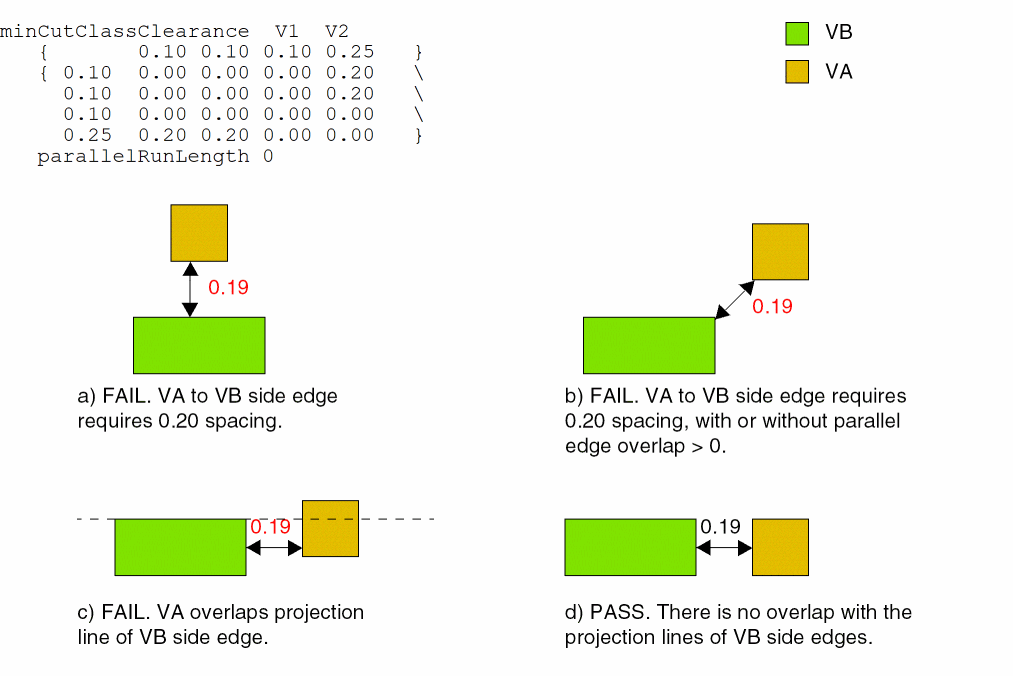
Sets the minimum clearance between VA (0.1 x 0.1) and VB (0.1 x 0.25) cut classes on V1 and V2 as follows:
- 0.20 user units is the edge-to-edge spacing between the side (long) edge of a VB via to a VA via.
-
0.00 user units is the edge-to-edge spacing for all other combinations.
Related Topics
Return to top