
9
Yield Improvement
Virtuoso Variation Option provides the Improve Yield run mode that returns a design to a state where it meets all of the design criteria and has the highest possible yield. If no such point is reached, it runs iterative analyses on the current criteria and determines the conditions for highest possible yield for that design.
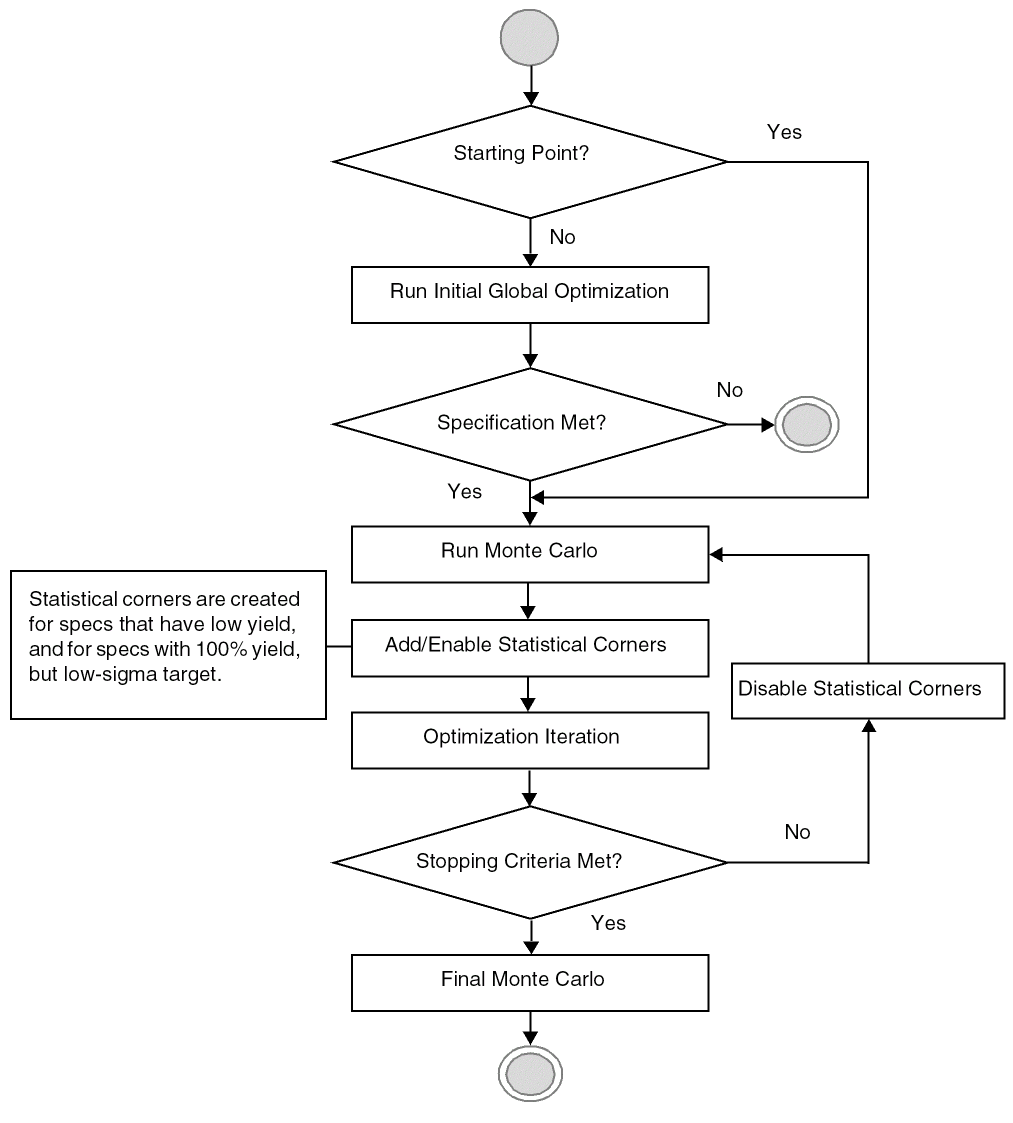
The Improve Yield run mode runs iterations of sizing and Monte Carlo analysis to arrive at a solution. When you start the Improve Yield run, Virtuoso Variation Option first generates the statistical corners, then, as the run progresses, evaluates points on a subset of those corners. Promising points are then evaluated on a larger set of corners. Eventually, the tool arrives at the best point—one that has been evaluated at all statistical corners and has the highest possible yield.
Also available are a number of stopping criteria, including time and points limits. Once the tool hits any of the specified options, it will end the improvement process.
Your design must include devices or device models for which you have specified statistically varying parameter values. You must have one or more specs defined and enabled. You must specify either global (process) or mismatch (per-instance) variations or both. You can also specify correlation information. After simulating, you can select the yield view to view mean and standard deviation information.
The following figure shows the workflow of the Improve Yield run mode.
Related Topics
Full Evaluation and Conditional Evaluation
Return to top