
Match and Fix Flow
The Match and Fix Flow uses a layout pattern and an associated fixing rule that is defined in the rule deck to determine any inconsistencies that need to be fixed before the design is manufactured.
A layout pattern can be described as a layout area that is defined using one or many layers, as shown in the figure below:
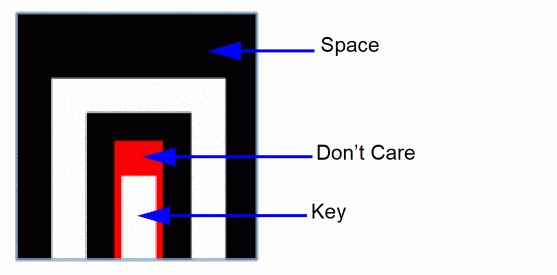
The “space” area is inferred as the region within the bounding box that is not designated as “key” or “don’t care”.
A region of the target search layout is reported as “matching” the pattern if the following conditions are fulfilled:
The list of layout patterns to be used for matching and the list of associated fixing rules are contained within a rule deck.
Therefore, a rule deck comprises the following:
- The list of layout patterns (such as stream file, layer definitions, and filtering rules)
- The list of Match and Fix rules (such as pattern, layers, and fixing rules)
The format for writing a rule deck is XML and the syntax is as shown below:
<?xml version="1.0" ?>
<MatchAndFixRules version="0.1">
<!-- Pattern definitions section -->
<!-- Match and fix rule definitions section -->
</MatchAndFixRules>
Pattern Definition
A single-layer layout pattern can be described in the rule deck as shown below:
0 <!-- Single layer Pattern -->
1 <Pattern name="single_pattern1" version="v2">
2 <Source type="oasis">
3 <File name="pattern/ single_pattern1.oas" />
4 <BBoxPurpose>5000</BBoxPurpose>
5 <Purposes type="key">10</Purposes> <!-- Key Purpose -->
6 <Purposes type="dc">50</Purposes> <!-- Don’t care Purpose -->
7 </Source>
8 <Description>
9 Necking Pattern 1
10 </Description>
11 <Severity>1</Severity>
12 <FilteringRule type="CatenaDRC" name="minSpaceRule">
13 <DRCRuleValue type="UserUnits">90 nm</DRCRuleValue>
14 </FilteringRule>
15 </Pattern>
The description of each line in the pattern definition is given in the table below.
| Line # | Description |
|
Pattern name (mandatory). Engine version (optional; default is v2). |
|
|
Pattern source type (mandatory). Pattern source can be either “oasis” or “gdsii”. |
|
The Filtering rule is used by the Match and Fix flow to filter out and return only matching regions that also fail the given rule. Currently, the following filtering rules are supported:
-
Min space rule<FilteringRule type="CatenaDRC" name="minSpaceRule"><DRCRuleValue type="UserUnits">90 nm</DRCRuleValue></FilteringRule> -
Min notch rule<FilteringRule type="CatenaDRC" name="oaMinNotchSpacing"><DRCRuleValue type="UserUnits">90 nm</DRCRuleValue>
Let us now consider a sample pattern definition in the rule deck for a multi-layer layout pattern.
1 <!—Multi Layer Pattern -->
2 <Pattern name="multi_pattern2" version="v2">
3 <Source type="gdsii">
4 <File name="pattern/ multi_pattern2.gds2" />
5 <BBoxPurpose>5000</BBoxPurpose>
6 <PatternLayer name="custom_M02">
7 <Purposes type="key">20</Purposes>
8 <Purposes type="dc">50</Purposes>
9 </PatternLayer>
10 <PatternLayer name="custom_M03">
11 <Purposes type="key">30</Purposes>
12 </PatternLayer>
13 </Source>
14 <Description>
Multi layer pattern 1
15 </Description>
16 <Severity>1</Severity>
17 <FilteringRule type="CatenaDRC" name="minSpaceRule">
18 <DRCRuleValue type="UserUnits">90 nm</DRCRuleValue>
19 </FilteringRule>
20 </Pattern>
Notice that the lines 6-9 and 10-13 illustrate how the individual layers of a two-layer pattern can be specified.
Related Topics
Return to top