
Soft Block Table Folders
When you move into the Soft Block mode, the instances in the design are automatically moved into one of the Core, Custom, Hard block, IO, and Soft block folders based on the existence of one of the physical views specified in the Physical stop list.
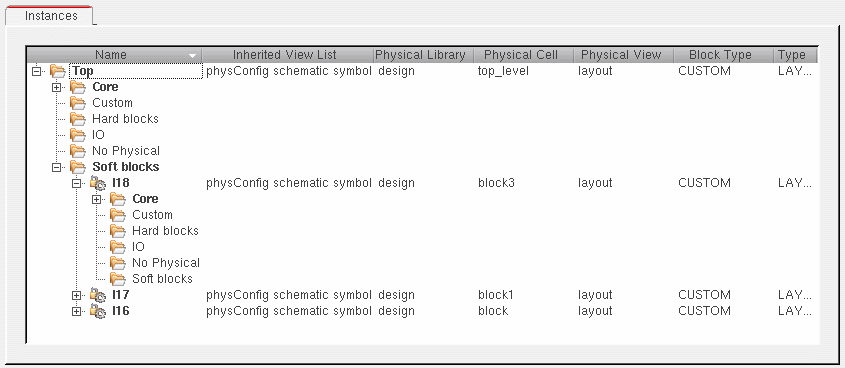
If a soft block has already been generated, it will be listed under Soft block. If it does not exist yet, it is displayed under No Physical.
By default, instances with no physical representation are put into the No Physical directory. If you change the Physical Library, Physical Cell, and Physical Cell to point to a cellview that does exist, the cellview is put into the appropriate directory based on its cell type.
-
The Physical Library, Physical Cell, and Physical Cell fields indicate only the potential binding for the instance in question.
The Generate Physical Hierarchy command flattens the instance because there is no binding defined. -
If you change the Physical Library, Physical Cell, and Physical Cell to point to a cellview that does not exist, the instance remains in the No Physical directory.
The Generate Physical Hierarchy command attempts to find the specified view during layout generation; however, the view does not exist and the logical node is flattened instead.
To clear the physical binding, click the right mouse button and choose Clear Physical Binding. -
If you define soft block parameters for any instance in the No Physical directory, the Generate Physical Hierarchy command generates the appropriate view and uses it during layout generation.
To clear the physical binding and remove the soft block parameters, click the right mouse button and choose Clear Physical Binding.
To remove any soft block parameters but preserve the physical binding, click the right mouse button and choose Remove Soft Block Parameters.
Related Topics
Soft Block Mode in the CPH Window
Return to top