
Abutment Event 1
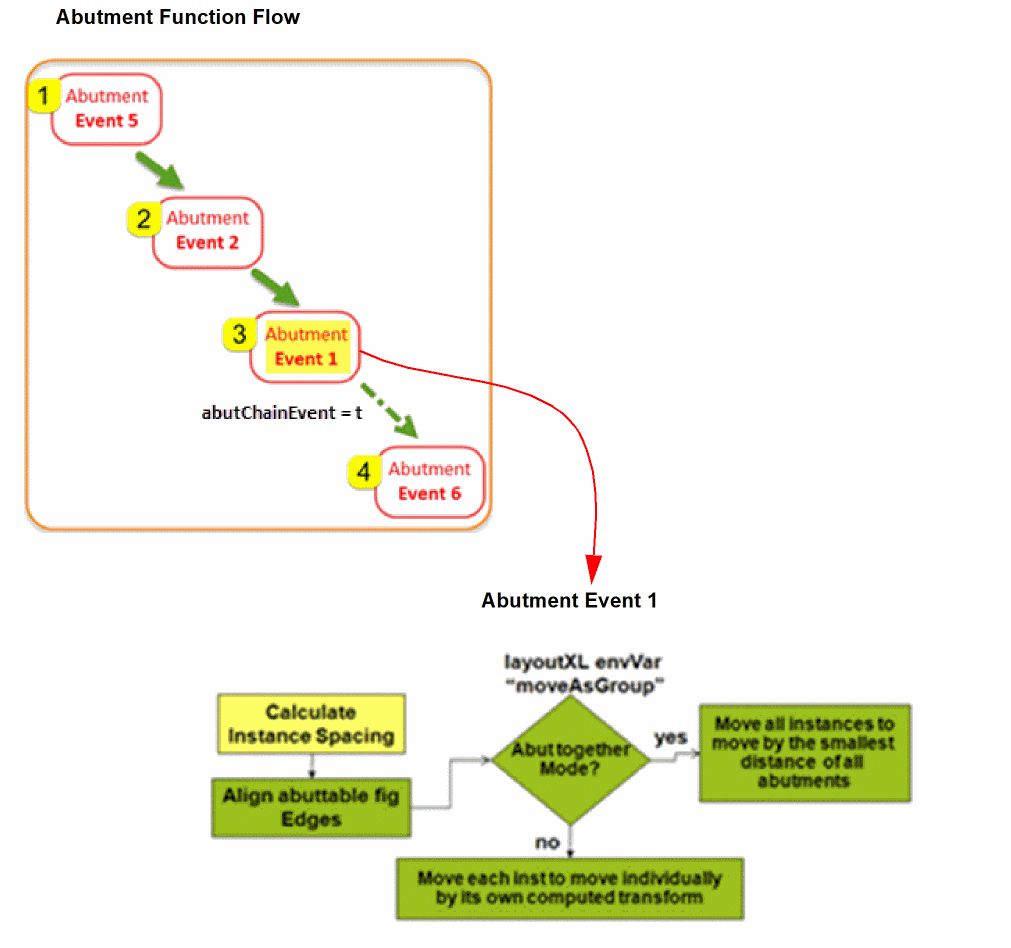
During the processing of Event 1, the abutment function calculates the spacing between two figs—pin figures or shapes—and returns the value. The use of abutNames takes precedence over the use of pin figure names to find the abuttable pin figures from the new master.
The abutment engine uses the abutment direction to determine how the instances should move so that the reference edges of the figures are properly spaced. If necessary, the perpendicular edges of the abuttable instances are aligned.
-
If you have
abutTogethermode selected, which implies that the Virtuoso Layout XL environment variablemoveAsGroupis set totrue, the instances move as a group by the smallest distance of all the abutments. - By default, the abutment group ID is passed to abutment Event 1. You can use the group ID to store the Pcell properties or the Pcell state information at intermediate stages of abutment. You can also use the abutment group ID to retrieve the previously saved Pcell state information.
To prevent the abutment group ID to be passed to Event 1, set the lxAbutPassGroupIdToEvent1 environment variable to nil.
Alignment Support During Abutment Event 1
-
Horizontal and Vertical abutment is supported, depending on the abutting pinFigs
accessDir. - Based on the value specified during event1, abutting instances offset in x and y direction and determine the snapping mode.
The following data types can be returned during Event1:
- Number: Determines the total offset in the direction of abutment.
-
String: Determines the snapping mode to be one of (
dbcAbutSnapTop,dbcAbutSnapBottom,dbcAbutSnapMiddle,dbcAbutSnapLeft,dbcAbutSnapRight,dbcAbutSnapCenter) corresponding to the values provided (“top”, “bottom”, “middle”, “left”, “right”, “center”). -
List of two numbers (
x y): First number decides the total offset in the direction of abutment and the second number decides the perpendicular offset. -
List with one number and one string (
x“left”): First number decides the total offset in the direction of abutment and the string value decides the snapping offset to be applied.
The supported snapping modes (dbcAbutSnapTop, dbcAbutSnapBottom, dbcAbutSnapMiddle, dbcAbutSnapLeft, dbcAbutSnapRight, dbcAbutSnapCenter are detailed below. These snapping modes are useful when devices are of different heights and widths.
-
Snapping modes (
dbcAbutSnapTop,dbcAbutSnapBottom,dbcAbutSnapMiddle) are useful for horizontal abutment. -
Snapping modes (
dbcAbutSnapLeft,dbcAbutSnapRight,dbcAbutSnapCenter) are useful for vertical abutment. -
dbcAbutSnapTop: Snaps the smaller device at the top edge of the bigger device. -
dbcAbutSnaBottom: Snaps the smaller device at the bottom edge of the bigger device. -
dbcAbutSnapMiddle: Snaps the smaller device in the middle of the bigger device inYdirection. -
dbcAbutSnapLeft: Snaps the smaller device at the left edge of the bigger device. -
dbcAbutSnapRight: Snaps the smaller device at the right edge of the bigger device. -
dbcAbutSnapCenter: Snaps the smaller device in the middle of the bigger device in theXdirection.
Related Topics
Return to top