
Dummy Abutment Example
Let us now consider an example depicting abutment of dummy shapes. Here, D1 and S2, displayed in the figure below, are connected to a top-level net, netA, which has only two instance terminals.
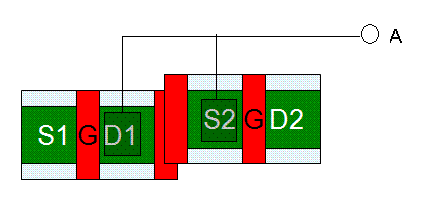
The overlap of the two dummy poly shapes triggers abutment Event 5. This results in the parameters of the overlapping Pcell instances to be updated, causing removal of dummy poly on both the Pcell instances, as shown in the figure below.
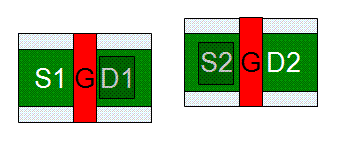
After the dummies are removed, the abutment engine identifies that D1 and S2 are connected to the same upper-level net, netA. This enables the engine to compute the contact condition to be passed to the abutment Event 2.
In this case, since both the pinFigs are connected to the same upper-level net, the contact condition 1 is applicable, indicating that contacts need to be dropped.
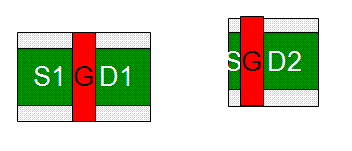
During Event 2, the Pcell parameters are adjusted further. In this example, the further parameter adjustment results in removal of S2 from the second instance and dropping the connection contacts, as shown in the figure below.
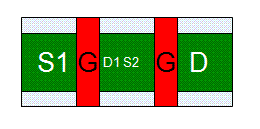
Finally, the engine returns the alignment offset for aligning the abutted pinFigs in the direction of abutment. In this example, the alignment offset is 0, so the instances are abutted and aligned, as shown in the figure below.
Related Topics
Return to top