
Make Cell
When used in Layout XL, the Edit – Hierarchy – Make Cell command enables you to create a new cellview carrying a transparent cell instance by using existing layout objects such as devices, nets, and pins. The made cell is saved on the disk and can be consumed within the layout from which it is generated or in some other layout.
What is worth noting is that when the made cell instance is generated using Layout XL, it is XL-compliant because:
- The made cell instance created in Layout XL has logical connectivity and pins. Each made cell instance has instTerms connecting to nets, making the made cell instance connectivity-aware.
- The made cell instance created in Layout XL is, by default, transparent. This means that the binder can create one-to-one bindings to the instances inside the made cell instance.
You can benefit from creating a transparent made cell instance, if working on a half-cell design because reusing the made cell instances can expedite the layout generation for such designs.
Alternatively, you can create a transparent made cell instance using one layout and consume it in another layout.
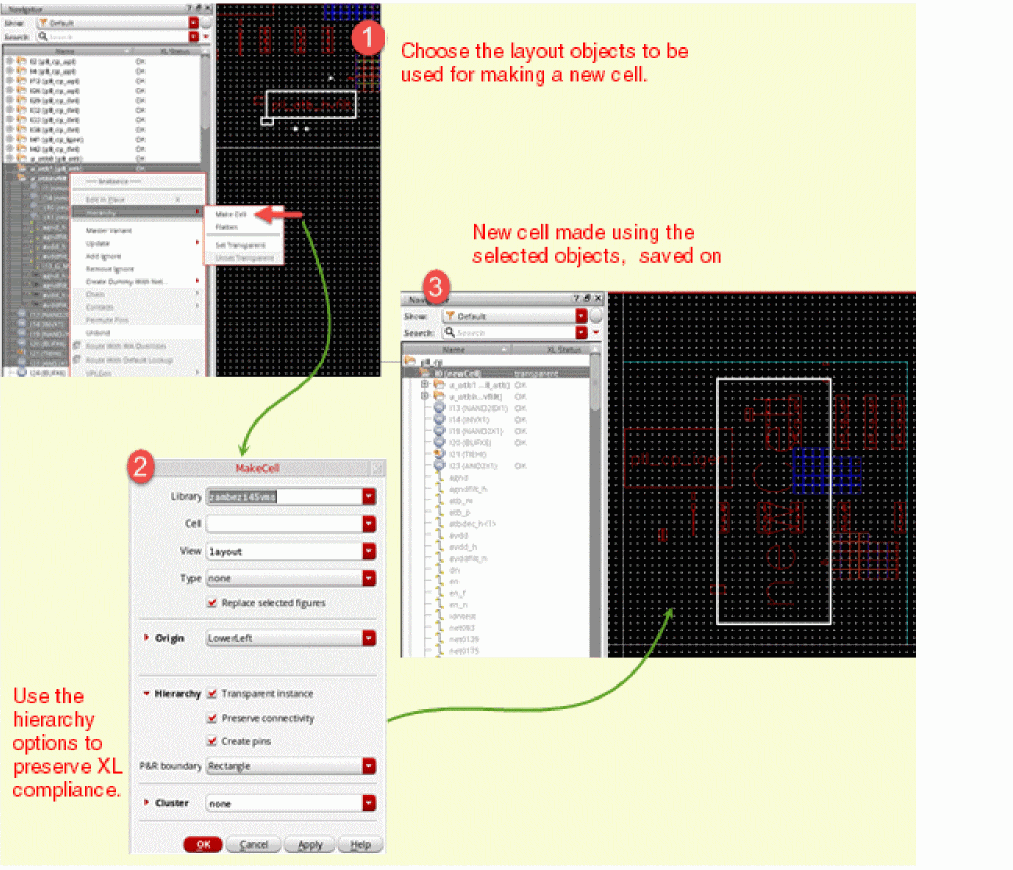
As mentioned above, when used in Layout XL, the Make Cell command generates a cell that is by default:
Related Topics
Return to top