
lxCombination Property
lxCombination string t_expression
Description
Builds a complex set of devices comprising series (sfactor) and parallel (mfactor) connections.
You typically use lxCombination to split a single resistor into multiple smaller devices in order to achieve maximum density in the layout by placing devices in spaces otherwise not utilized. This lets you approximate the resistance value defined in the schematic without violating the manufacturing grid.
The
| Symbol master Add Property form | |
|---|---|
| Add CDF Parameter form | |
|---|---|
Example
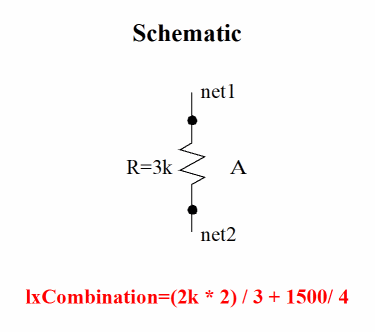
In a schematic cellview, a resistor called A with resistance 3k is connected to net1 and net2, and has the following lxCombination expression defined.
(2k*2)/3+1500/4
-
2k,2,3,1500, and4are device parameter values -
*and+are series connections (+can be followed by an expression;*must be followed by an integer) -
/is a parallel connection (and must be followed by an integer)
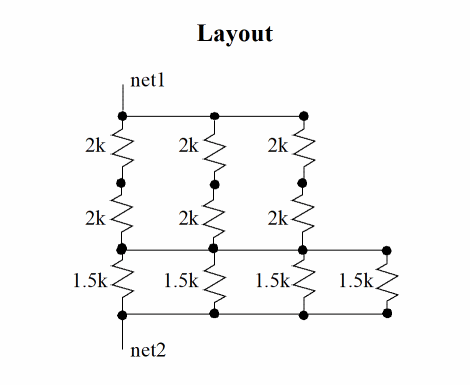
During layout generation, Layout XL reads the lxCombination property, ignores the 3k value, and instead generates a total of 10 resistors: two 2k resistors connected in series, connected in parallel three times; and four parallel-connected 1.5k resistors connected in series to the 2k resistors.
Additional Information
-
To ensure that
lxCombinationexpressions are evaluated correctly, you must set the lxEvalCDFCallbacks environment variable totbefore generating your resistors. -
You can also use
lxCombinationto define the topology for a network of capacitors. However, in this case, the property describes only the topology of the network; the values entered do not equate to the total capacitance of the network. -
If the
lxCombinationproperty is defined on the schematic symbol, therparameter is ignored by the Generate All From Source and Update Components And Nets commands. The layout instances will have the correct parameters based on thelxCombinationfactor setting. -
Devices defined using
lxCombinationare named instName.msinteger in the layout. In our example above, if the schematic instance is calledR0, the layout instances generated are named as follows.
Schematic Layout |R0.ms1
|R0.ms2
|R0.ms3
|R0.ms4
|R0.ms5
|R0.ms6
|R0.ms7
|R0.ms8
|R0.ms9
|R0.ms10
Nets associated withlxCombinationdevices are named instName.sinteger.expandedNetinteger in the layout.
For example,
where “R0.s1.expandedNet1expandedNet” signifies that the layout net has no real match in the schematic.
Related Topics
Return to top