|
Menu
|
Description
|
|
Search
|
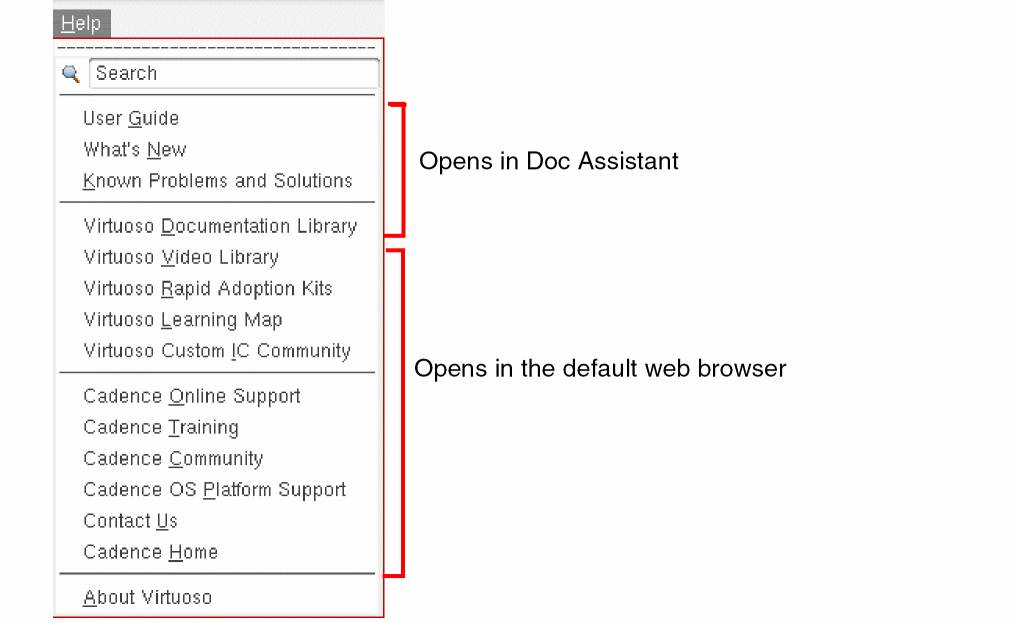
A text field that lets you enter a search string. Press Enter to view the search results.
Do not enclose the search string in double quotes.
|
|
User Guide
|
Opens the CIW documnetation available in the Virtuoso Studio Design Environment User Guide on Doc Assistant.
|
|
What’s New
|
Opens the Virtuoso What’s New document in Doc Assistant.
|
|
Known Problems and Solutions
|
Opens the Virtuoso Known Problems and Solutions document in Doc Assistant.
|
|
Virtuoso Documentation Library
|
Opens the Doc Assistant home page, which provides quick access to the following resources:
-
Getting Started
-
How-To Guides
-
Reference
-
Articles and App Notes
-
Browse All Manuals
-
Browse All Topics
|
|
Virtuoso Video Library
|
Opens the Video Library page available on Cadence Learning and Support portal. This page lists the videos available for various Virtuoso products.
You must have a registered account to access the content on the Cadence Learning and Support portal. Contact your IT support to ensure that the Internet ports required for video playback are enabled.
|
|
Virtuoso Rapid Adoption Kits
|
Opens the Rapid Adoption Kits page on the Cadence Learning and Support portal. This page lists Rapid Adoption Kits (RAKs) available for various Virtuoso products. A RAK contains design databases and instructions on how to run the design flow.
|
|
Virtuoso Learning Map
|
Lists domain-specific training available on Cadence Training Services.
Cadence Training Services learning maps provide a comprehensive visual overview of the learning opportunities for Cadence customers. They provide recommended course flows as well as tool experience and knowledge levels to guide customers through a complete learning plan.
|
|
Virtuoso Custom IC Community
|
Opens the Virtuoso Custom IC Community web page. This page provides access to the latest blogs and discussion threads on various Virtuoso products and design topics, information about software downloads and support and training, and other related information. You too can contribute to the community forum by creating a Cadence account. This gives you additional benefits such as alerts about topics of interest and access to online webinars.
|
|
Cadence Online Support
|
Opens the Cadence Learning and Support portal, which you can use to access information about Cadence products, documentation, videos, RAKs, application notes, troubleshooting information, alerts, and so on. Improvements are regularly made to the Cadence Learning and Support portal to make it easy for you to look up the information you want. We recommend that you bookmark this web site and use it as your first point of reference for any Virtuoso-related information.
You can also access the Cadence Learning and Support portal by clicking the Cadence logo available in the upper-right banner in each Virtuoso window.
To disable this behavior, you need set the following shell variable:
Setenv CDS_LOGO_ACTION OFF
|
|
Cadence Training
|
Opens the Cadence training web page. You can find on this page information about the training courses available in different regions. Information is available about both classroom and online courses.
|
|
Cadence Community
|
Opens the Cadence Community web page. This page provides access to the latest blogs and discussion threads on various Cadence products and solutions, and EDA Industry Insights. You too can contribute to the community forum by creating a Cadence account. This gives you additional benefits such as alerts about topics of interest and access to online webinars.
|
|
Cadence OS Platform Support
|
Provides information about the current Cadence software releases and the supported platforms.
|
|
Contact Us
|
Opens the Cadence Customer Support Contacts web page, which provides customer support contact information for different regions.
|
|
Cadence Home
|
Opens the Cadence corporate web site.
|
|
About Virtuoso
|
Displays Virtuoso Studio Design Environment version information.
|