
Anonymization of Diagnostic Logs
When diagnostic logs are sent to Cadence, you might want to anonymize the collected data to hide confidential information.
The following types of data can be removed, replaced, or anonymized (hashed) in the diagnostic logs:
- Personally identifiable data, such as user names, host names, and IP addresses.
- Customer-sensitive information, such as PDK and design names.
You define the rules used to anonymize data in a configuration file and place the file at the following location:
install_dir/share/cdssetup/vails/vailsAnonymizeLog.cfg
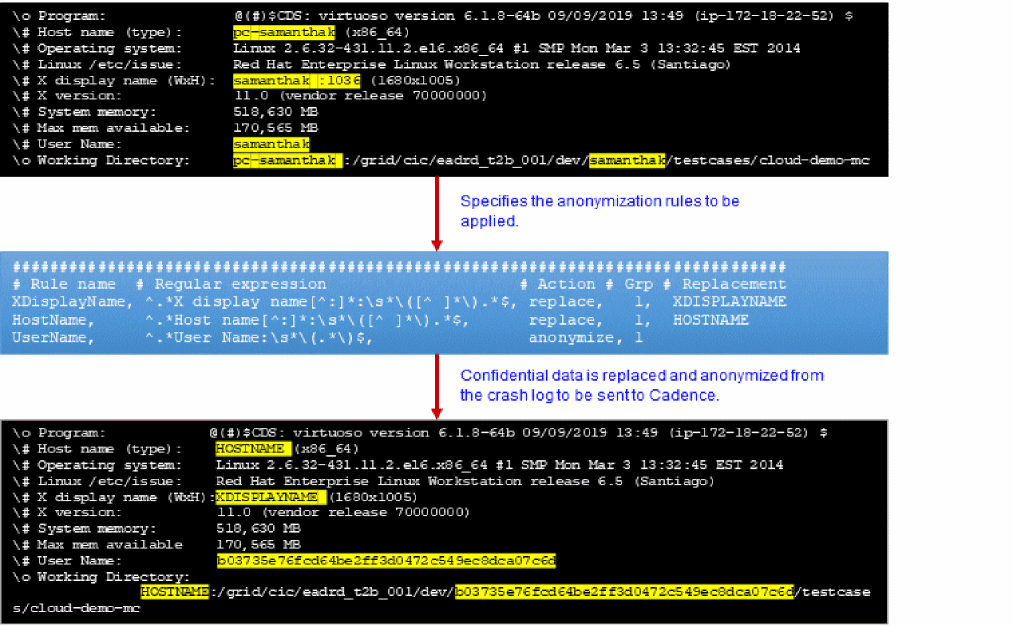
vailsAnonymizeLog.cfg file is not available in the vails folder and cannot be parsed because conditions required for anonymization are not fulfilled. The following is an example of an anonymization configuration file:
###################################################################################
# Rule name # Regular expression # Action # Grp #Replacement
XDisplayName, ^.*X display name[^:]*:\s*\([^ ]*\).*$, replace, 1, XDISPLAYNAME
HostName, ^.*Host name[^:]*:\s*\([^ ]*\).*$, replace, 1, HOSTNAME
UserName, ^.*User Name:\s*\(.*\)$, anonymize, 1
You can customize this configuration file based on your requirements. Each row in this file has the following fields:
-
Rule name: Specifies the name of the rule. -
Regular expression: Describes the item that gets replaced. This expression uses the sed regular expression syntax. -
Action: Specifies which action to take when an expression matching the specified criteria is found. You can specifyremove,replace, oranonymize. -
Grp: Specifies the name of the regular expression group to which the option specified in the Action field is applied. -
Replacement: Specifies the expression to replace the regular expression identified for replacement. This field is used only when theActionis set toreplace.
The anonymization process is run prior to sending diagnostic logs to Cadence. By default, the vailsAnonymizeLog.cfg file shipped with the release anonymizes user, host, and display names.
In this process, the regular expressions are first applied only to the CDS.log file to identify the items to be anonymized. These actions are then applied to both the CDS.log and diagnostic log files to anonymize these items.
The following example shows how personal and confidential information in diagnostic logs is anonymized:
Related Topics
Return to top