
SKILL Commands Execution
The separate commands appear with alternating white and gray background colors. Each color separated command is referred to as a command block. The CIW syntax checker checks the syntax of the command entered in a command block and provides immediate feedback. Incorrect or incomplete commands are indicated with light yellow or light gray-yellow background colors, respectively.
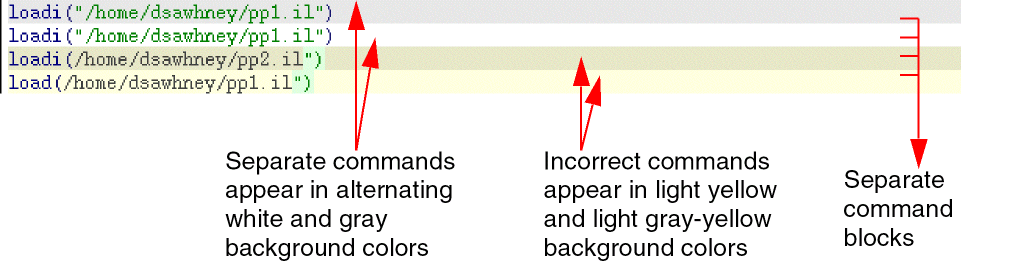
To execute a command block, press Enter. When a command is executed, the complete command block is sent to the SKILL parser for further syntax checking.
Unlike the SKILL parser, the CIW syntax checker only checks the “syntax complete” status of SKILL commands. Commands are considered syntax complete if they do not contain unmatched parentheses, braces, brackets, double quotes or multi-line comments. Syntax complete commands need not necessarily be syntax correct.
You can also select and execute partial commands. To select a partial command, use the key combination Shift+Ctrl+Q. The key combination Shift+Ctrl+Q selects the nearest command expression if no commands are currently selected in a command block. If the selection is within a command block, Shift+Ctrl+Q extends the selection to include more of the command block, first upwards, and then downwards, until the entire command block is selected.
If commands from multiple command blocks are selected, the key combination Shift+Ctrl+Q does no further selection.
To execute a selected command, use the key combination Alt+Enter or Alt+Return. If, however, the selected text contains incomplete or incorrect syntax, the syntax only gets copied to the edit area as text.
For a detailed list of bindkey combinations that you can use to select and execute commands, see "Bindkeys and Access Keys".
Return to top