Design Intent Workspace
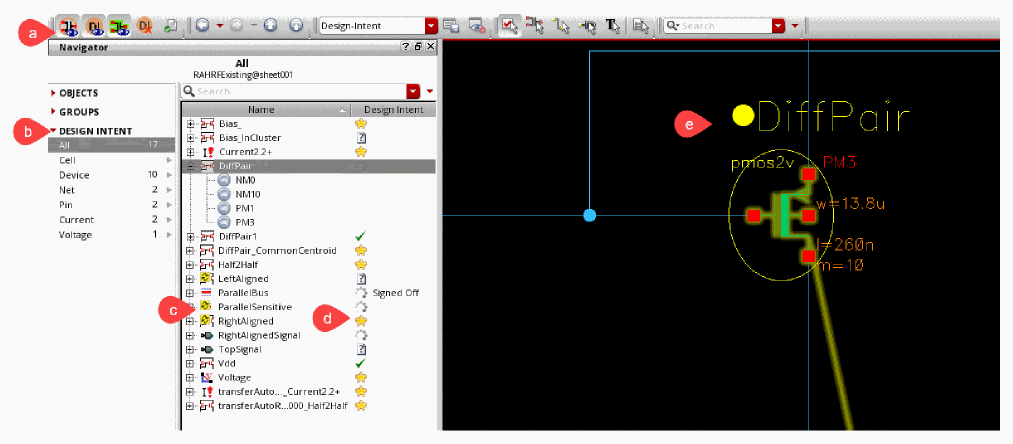
The Design Intent workspace is designed to help you create and manage design intents using the Navigator assistant and on the canvas.
The workspace comprises the following elements:
|
a
|
Design Intent toolbar
|
Lets you toggle the display of design intent with a single mouse click.
|
|
b
|
Navigator assistant
|
Shows the sync icons and implementation status icons, and the Design Intent category in the Summary pane of the Navigator assistant. There is a set for each design intent category and the number of design intents within each set is displayed.
|
|
c
|
Sync icons 
|
Alerts designer to any design specification or implementation status changes.
|
|
d
|
Implementation Status icons
|
Indicates the current implementation status for each design intent.
|
|
e
|
Design Intent Annotations
|
Holds key design intent requirements, stores detailed instructions for individual objects, and can easily be identified on the canvas.
|
Related Topics
Navigator Interaction with Design Intent
Design Intent Toolbar
Design Intent Icons in Navigator
Design Intent Annotations
Return to top