
Antenna Calculation by Abstract Generator
Abstract Generator computes the antenna data for a given layer. The antenna parameters for some of these layers are defined in the LEF technology file. Abstract Generator calculates the following (for metal, cut, and poly layers):
Antenna data calculation is complete only after the Abstract step is run, which is the next step in flow after the Extract step. Consequently, the Export LEF Form always takes antenna data from the abstract view rather than from the extracted view.
The computation of antenna data happens in two steps:
- The main antenna calculation is performed at the end of the Extract step, where Abstract Generator computes antenna data (assuming that all of the extracted geometry is turned into pins in the abstract).
- During the Abstract step (at the Adjust stage), some of the extracted geometry is not turned into pins (for example, if the Create boundary pins options for signal and power nets are active), and the process antenna data is removed from layers lower than the lowest pin layer.
For example, assume that you have an extracted net that has M3 metal, down to M2 metal, down to M1 metal, which then connects to a polysilicon gate. This means that there are three computations of ANTENNAGATEAREA for M1, M2, and M3 (same values) and a further three for ANTENNAPARTIALMETALAREA (different values). If, during the Adjust stage, M3 and M2 become pin shapes but M1 becomes an obstruction, the computed ANTENNAMETALAREA is removed along with the ANTENNAGATEAREA for M1.
-
When a local interconnect layer connects to a polysilicon gate, the local interconnect layer is considered for calculating the
ANTENNAPARTIALMETALAREAandANTENNAMAXAREACAR. The poly layer is considered for calculatingANTENNAPARTIALMETALAREAandANTENNAMAXAREACAR. -
Abstract Generator generates antenna numbers for any terminal direction type of a pin, including
input,output,inout,tristate,unused,switch, andjumper.
Irrespective of whether the Extract signal nets option on the Signal tab in the Extract step is turned on or off, Abstract Generator generates antenna numbers for a terminal considering all the shapes of that terminal as pin shapes. Also, all the paths from top metal to the gate or drain are considered in calculating the antenna numbers, irrespective of whether the paths contain pin shapes or not.
The following options on the Antenna tab are used for calculating process antenna data:
- Calculation of ANTENNAMAXCUTCAR:This feature is available through a SKILL function
- Calculate hierarchical antenna
- Calculate input pin antenna
- Calculate output pin antenna
- Calculate inout pin antenna
- Calculate antenna metal area
- Calculate antenna metal side area
OpenAccess supports antenna ratios based on only either side area or non-side area specification in the technology file and not both of them simultaneously. If both side and non-side values are specified in the technology file, the side value overrides the non-side value either when the technology file is updated or when LEF IN is used.
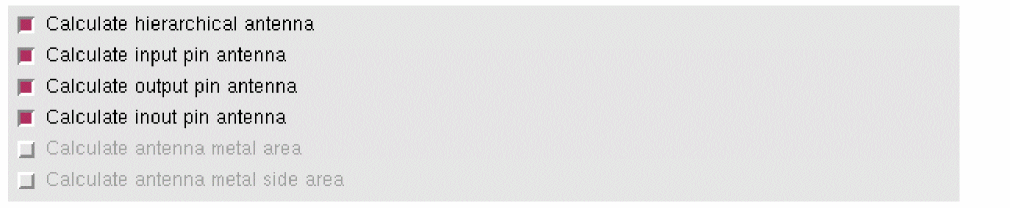
If both Calculate antenna metal area and Calculate antenna metal side area options are selected, only one of the two antenna metal areas is calculated at any time based on the side and non-side information specified in the technology file. The Calculate antenna metal area option becomes active when the non-side area value is specified in the antennaModels section of the technology file and the Calculate antenna metal side area option remains disabled (grayed out). Similarly, the Calculate antenna metal side area option becomes active when the side area value is specified in the antennaModels section and the Calculate antenna metal area option remains disabled.
As shown in the figure below, because the antennaModels section in the technology file contains the non-side area specification, the Calculate antenna metal area option is active and can be selected and the Calculate antenna metal side area option is disabled.
Related Topics
Processing Antenna Information in Standalone Abstract Generator
Calculation of ANTENNAMAXCUTCAR
Calculation of ANTENNAMAXCUTCAR
If you select the Calculate antenna metal area option, Abstract Generator also calculates ANTENNAMAXCUTCAR. This value is calculated for the cut layer just above the lowest metal layer on which the pin is present.
Cut_(i,i+1) CAR = Cut_(i,i+1) PAR + max{ Cut_(i-1,i) CAR, (Cut_(i,i+1) MAX_CAR(H) - Cut_(i+1) PAR(H)) }
|
Partial cut area divided by gate area under the |
|
|
|
By default, the calculation of ANTENNAMAXCUTCAR does not take the CUT01 layer into account. To enable Abstract Generator to consider CUT01 layer while calculating ANTENNAMAXCUTCAR, use the SKILL option ExtractAntennaMaxCutCARLowestCut.
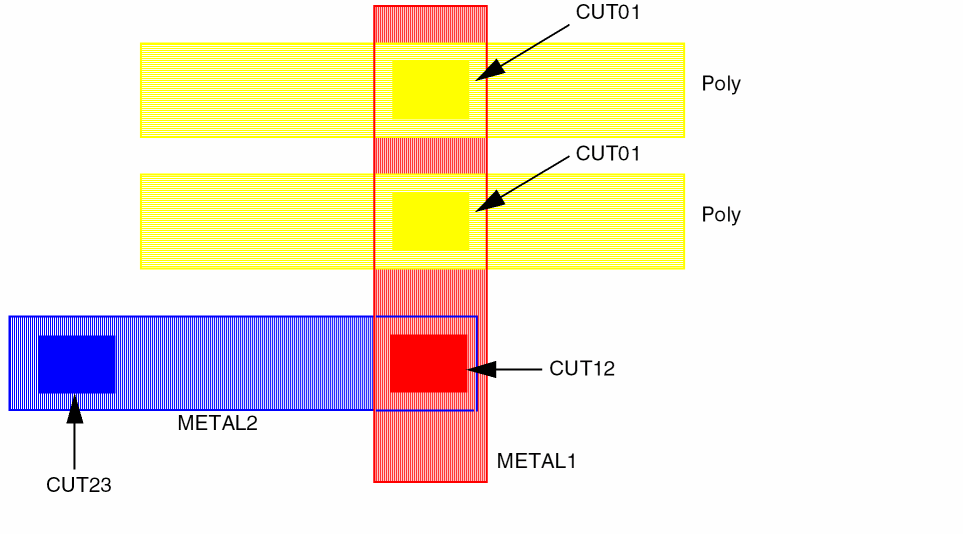
Consider PINA is on METAL2 layer. In this case, Abstract Generator will calculate ANTENNAMAXCUTCAR for CUT23 layer as this cut layer is above the lowest metal layer containing the pin. By default, the partial cut areas of CUT23 and CUT12 will be considered for ANTENNAMAXCUTCAR calculation for CUT23. If you set the ExtractAntennaMaxCutCARLowestCut option to true, ANTENNAMAXCUTCAR for CUT23 calculation will also include the partial cut area of CUT01.
Similarly, if PINA is on METAL1 layer and ExtractAntennaMaxCutCARLowestCut is true, then ANTENNAMAXCUTCAR calculation will be considered for CUT12 as well as CUT01 layers.
ANTENNAMAXCUTCAR value CUT01
ANTENNAMAXCUTCAR value CUT12
If the ExtractAntennaMaxCutCARLowestCut option is true, ANTENNAMAXCUTCAR value is displayed for CUT01 only if the pin is on METAL1.
Related Topics
Processing Antenna Information in Standalone Abstract Generator
Antenna Calculation by Abstract Generator
Keywords Used in Antenna Calculation
The following table describes antenna keywords related to per layer library data.
Related Topics
Processing Antenna Information in Standalone Abstract Generator
Antenna Calculation by Abstract Generator
Checks Performed During Antenna Calculation
If you activate antenna extraction by selecting any Calculate option, Abstract Generator checks for the following:
- Extraction of poly silicon layer
- Extraction of diffusion layer
-
Specification of diffusion layer in terms of
(Diff (Diff andnot Poly))
If any of the above checks fail, the following corresponding error messages will be displayed:
-
Failure of extraction of polysilicon layer generates the following error message:
ABS-606: Cell name: layer POLY is not listed in any of the layer assignment for extraction tables. This is required for antenna extraction. -
Failure of extraction of diffusion layer generates the following error message:
ABS-607: Cell name: layer DIFF is not listed in any of the layer assignment for extraction tables. This is required for antenna extraction. -
Missing specification of diffusion layer in terms of
(Diff (Diff andnot Poly))
ABS-608: Cell name: layer DIFF must be specified in one of the layer assignment for extraction tables as type (diff diff andnot poly) for full antenna extraction to take place. -
Failed to extract because the number of shapes that were extracted for net name exceeds the current extraction limit of value.
(ABS-13009) Use theExtractShapeLimitoption to increase the extraction limit and rerun the command.
This situation might result because of one of the following reasons:- The number of shapes being extracted from the current design exceeds the maximum permitted value. The default value is 10000.
- The net has the wrong terminal type set.
- The design contains a short between nets.
You can take one of the following actions to overcome this error:- Increase the extract shape limit by using the following setting either in the GUI or in the .abstract.options file:
absSetOption( “ExtractShapeLimit” “<any positive number>” )
For example,
absSetOption( “ExtractShapeLimit” “400500” )- Additionally, you can set the stack size for the abstract process to unlimited by typing the following in the terminal window before invoking Abstract Generator:
limit stacksize unlimited -
(ABS-13010) Cell "%s": Extraction has been aborted because a short has been detected between the nets name and name.
Check the following:- If you are performing antenna extraction, ensure that the Layer Assignment for Antenna Extraction table on the Antenna tab has been populated correctly. The geometry specification for the diffusion layer in the table should read 'diff diff and not poly'.
- Ensure that the Layer connectivity on the General tab is set up correctly for all layers, especially for polysilicon and metal1 and diffusion and metal1, such as '(poly metal1 contact) (diff metal1 contact)'.
-
(ABS-13020) Cell name: matching of the gate region with correct antenna oxide type has failed. This type of failure occurs when the abstract generator is unable to identify the diffusion layer for gate calculation. Check the settings in the Layer Assignment for Antenna Regions table on the Antenna tab.
Abstract Generator is unable to identify which diffusion type a gate is over. This can occur if you specify the antenna regions like the one below.Layer Geometry Specification Region Oxide ----- ---------------------- ------ -----
Where poly, diff, diff2 and Oxide1 are replaced by the real names of the layers in question.polypolyand (diffordiff2) GatediffdiffandnotpolyDrainOxide1
Any Oxide option can be set here (or even none), but the antenna style must be LEF 5.5.
In the above example diff2 has not been specified as a drain region but has been specified in the Geometry Specification. This means that any gates over diff2 will not be identified with a particular oxide.
The fix for this example is to add the following extra line:Layer Geometry Specification Region Oxide ----- ---------------------- ------ -----
Another scenario that can cause this message to appear, is where there is a complicated size operator specified in the Geometry Specification for the polysilicon layer. If you have then sized up the diffusion layer in the Gate specification, it is possible that this could create a gate area which would not overlap the unsized diffusion layer.polypolyand (diffordiff2) GatediffdiffandnotpolyDrainOxide1 diff2diff2andnotpoly1DrainOxide2
To avoid receiving the above extraction-related error messages, ensure that you have entered a valid expression in the Layer Assignment for Signal Extraction table on the Signal tab and Layer Assignment for Antenna Extraction table on the Antenna tab. For example, you can specify the following in these tables:
| Layer | Geometry Specification |
|---|---|
Related Topics
Processing Antenna Information in Standalone Abstract Generator
Antenna Calculation by Abstract Generator
Comparison of Geometry Specifications for Antenna Regions and Antenna Extraction
When defining the geometry specification for the polysilicon layer in the Layer Assignment for Antenna Extraction table, do not use the same specification as the one you used in the Layer Assignment for Antenna Regions table. If you do, Abstract Generator cannot extract the full polysilicon shape and cannot output antenna values for the input gate.
In the following example, notice the different geometry specifications in the two tables.
| Layer Assignment Table | Geometry Specification |
|---|---|
Excluding Signal Nets from Antenna Calculation
The Signal nets to be excluded from antenna calculation field allows you to specify the nets that should not be considered for antenna extraction and therefore, lets you avoid antenna calculations for the specified pins. For example, by specifying the expression as in* for the signal nets to be excluded, you can exclude all nets with names beginning with in from antenna calculation.
This field is enabled only if one of the calculate antenna options is selected.
Related Topics
Processing Antenna Information in Standalone Abstract Generator
FinFET Support in Abstract Generator
FDSOI Support in Abstract Generator
Return to top