
Text Labels-to-Pins Mapping
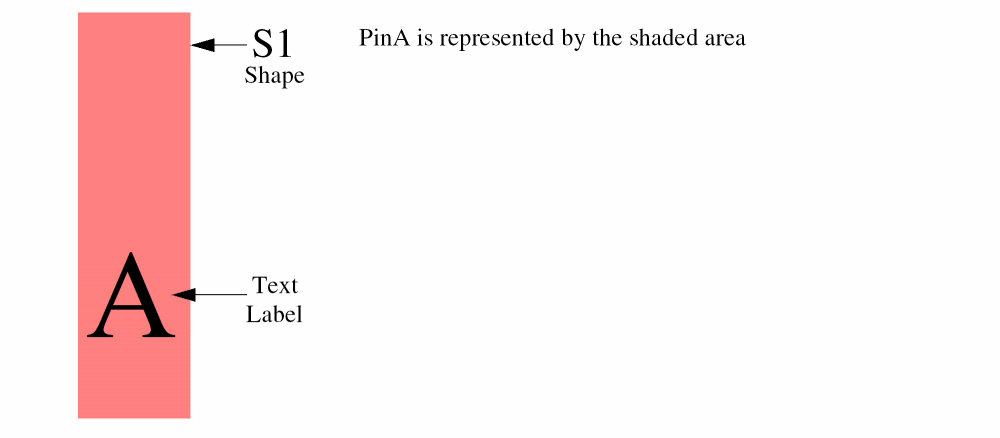
In the Map text labels to pins field on the Map tab of the Running step Pins form, you can specify the text labels in the layout view that are to be mapped to the pins on nets in the pins view. For each statement, Abstract Generator first identifies all the text labels on the specified textLPP. For each occurrence of a text label that overlaps a shape on the first geomLPP, it creates a pin of the same size as the shape on the metal layer overlapping the text label. This is depicted in the figure below. The text label A on metal1 pin overlaps the shape S1 on metal1 drawing. So Abstract Generator creates the vertical PinA, which is of the same size as S1.
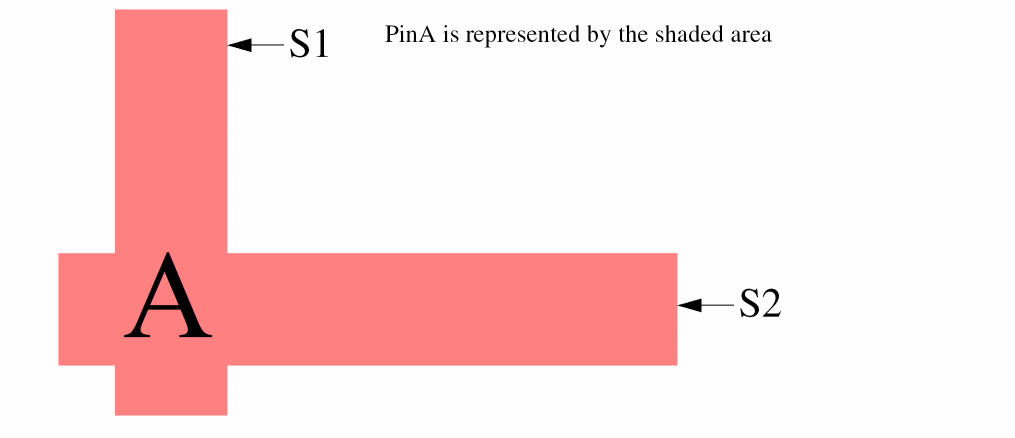
In case the text label overlaps more than one shape, Abstract Generator creates a single merged pin for the overlapped shapes. As shown in the figure below, the text label A overlaps two intersecting shapes S1 and S2. In this case, Abstract Generator merges the vertical and horizontal pin shapes and creates the single L-shaped PinA, which is cornered at left.
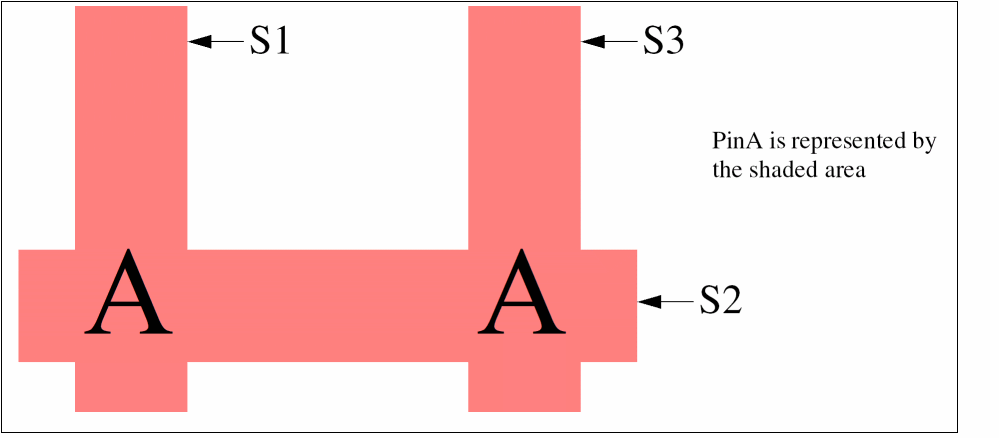
Furthermore, Abstract Generator creates pins for all the text labels with the same name, irrespective of whether a shape has already been made into a pin by a previously evaluated text label. It also merges the overlapping pin shapes generated from the text labels with the same name. This is illustrated in the figure below where another text label with the same name A overlaps the shapes S2 and s3. Even though Abstract Generator already created a pin on S2 from the first text label A, it creates another pin shape from the overlap of the second text label A with the shapes S2 and S3. The overlapping pin shapes in this situation result in a single merged U-shaped PinA.
Abstract Generator proceeds in the similar manner for all other text labels on textLPP. The order in which Abstract Generator analyzes shapes is from the first specified geomLPP to the next.
Consider the following examples as the text that can be specified in the Map text labels to pins field:
-
(textLayer (metal1 drawing) (metal2 drawing))
This means that text labels ontextLayerfor all purposes except the ignored purpose(s) are mapped first to shapes on layermetal1purposedrawingand then to shapes on layer-purpose pairmetal2 drawing. -
(textLayer metal1) (textLayer metal2)
This means that labels ontextLayerfor all purposes except the ignored purpose(s) are mapped first to shapes onmetal1excluding the ignored purpose(s). Then, in a second pass, Abstract Generator maps labels ontextLayerto shapes onmetal2excluding the ignored purpose(s). To do this, Abstract Generator takes the first mapping,(textLayer metal1), and creates appropriate pins on themetal1layer. If there are text labels overlappingmetal2shapes, they are not matched by this rule and Abstract Generator issues a number of ABS-12006 warnings informing you about labels that could not be mapped to pins. These labels are picked up in the second pass.
Unless there are terminals already present, you must specify a value in the Map text labels to pins field to generate a valid pins view. If you leave the field empty, Abstract Generator does not generate pins in the abstract view and the warning message ABS-12004 is displayed. To generate these pins, specify valid values in the Map text labels to pins field, and rerun the Pins step.
Pins Step for Routed Blocks
You do not need to specify a value in the Map text labels to pins field when running the Pins step on routed blocks. Routed blocks already have terminals, so Abstract Generator does not create any new terminals. If the existing terminals have physical pins, as is usually the case with signal nets, these are retained in the Pins step. If these pins are not on valid LEF layers, Abstract Generator deletes these pins after generating the ABS-12023 message.
Otherwise, all the routed shapes attached to the net are turned into pins on the net. This is the case with power nets, which usually have terminals but no physical pins.
Related Topics
Specifying Pin Mappings for Abstract Generation
Regular Expressions for Creating Pin Names
Return to top