
Options and Status Files in Abstract Generator
Abstract Generator saves the options file (.abstract.options) in the.abstract/<library name> directory in your current working directory. It no longer saves the file in the current design library. The .abstract directory is created in your current working directory when Abstract Generator runs.
Consider, for example, that you are working with the design library myLib and your current working directory is /home/user1. In this case, Abstract Generator saves the options file in /home/user1/.abstract/myLib/.abstract.options. Abstract Generator also saves the existing options file as .abstract.options.prev in the same directory where the .abstract.options file is saved.
Abstract Generator loads the options file in a specific sequence.
-
It first loads the options file (
.abstract.options) from the <current working directory>/.abstract/<library name>directory. - If not available in the above location, it reads the file first from the attached technology library directory and then from the design library directory.
If the same options are available in the next file loaded, the options are overwritten accordingly.
Abstract Generator saves the status file (.abstract.status) in the.abstract/<library name>/cellStatus directory in your current working directory. It no longer saves the file in the cell directory. Information about each cell is stored in a separate status file. The status file stores the following information:
- Name of the active cell in the selected bin
- View statuses (Pins, Abstract, or Extract View) of all cells in the selected bin
- Status of the cell when it is moved from one bin to another
The status file is read when a library is loaded. The file is updated when the pins, extract, and abstract steps are run, and also when the library is closed.
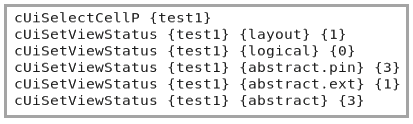
For backward compatibility, Abstract Generator copies information from the .abstract.status file at the cell level to the .abstract.status.cellName file at the user directory level. Any further changes are done in the .abstract.status.cellName file.
Related Topics
Conversion of Common Lisp Files to SKILL or TCL Format
Return to top