
Viewing and Editing Cell Properties
You can use the Cell Properties form to view and change the properties on cells.
To change a property of a cell:
-
Select Cells – Cell Properties after selecting one or more cells in the Cell pane.
The selected cells are listed in the Cell Properties form. Also listed is the bin in which the cell is stored and the current settings for the prCellClass and symmetry properties. You can select more than one cell by using the usual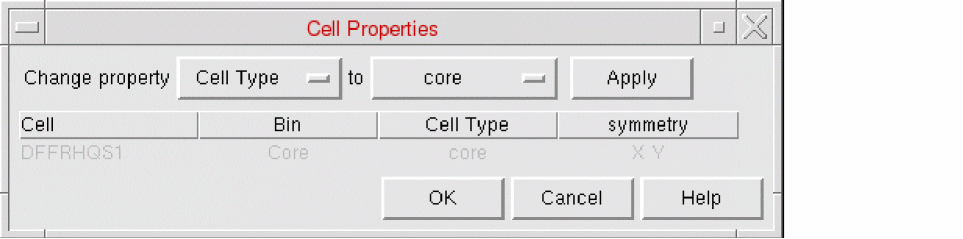
ShiftandCtrlkey bindings. -
Select one or more cells in the list and use the Change property cyclic field to select the property you want to change.
This changes the Allowed Values in the second cyclic field. - Select the new value for the selected cells.
- Click Apply to update the form. This will not update the database.
- Click OK to accept all your changes and close the form.
Related Topics
Valid Values for the prCellClass and prCellClass Properties in Abstract Generator
prCellClass
The allowed values for the prCellClass property depend on the bin in which the cell resides. The table below shows the allowed prCellClass entries and the corresponding LEF descriptions for each bin.
| Bin | Value | LEF |
|---|---|---|
symmetry
Specifies the symmetry for the selected cells.
Related Topics
Return to top