
The SimVision environment supports a unified PSFXL/SST2 database that contains both SST2 digital data and PSFXL analog data so that you do not need to manually segregate analog probes in a separate database when probing or opening databases to view the results. However, if required, you can also load data for analog and digital components separately.
Loading Unified Database
The unified database stores the results in the psf directory that contains two containers. The digital signal results are stored in a SST2 container (*.trn) and the analog signal results are stored in an analog container (*.tran). The logFile, which is created during the simulation, links these two containers in a unified database.
To open both PSFXL and SST2 database for your design:
- Select the File - Open Database menu option or click the Open an SST2 database icon.
The Open Database window appears.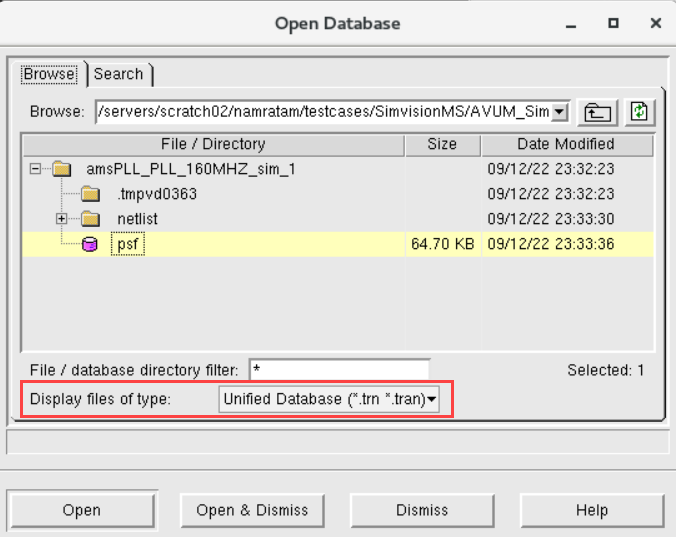
The default file type selected in the Display files of type drop-down list is Unified Database. This file type displays the psf directory from which both .tran and .trn types of files are opened. - Select the directory containing the results.
- Click Open & Dismiss.
The unified database containing both the containers is displayed in SimVisionMS.
Loading an Analog Database
To open the database containing only the analog container in SimVisionMS, expand the results directory in the Open Database form and do the following.
- Choose PSFXL Files (*.tran) from the Display files of type drop-down list.
- Select
logFilethat is created during simulation.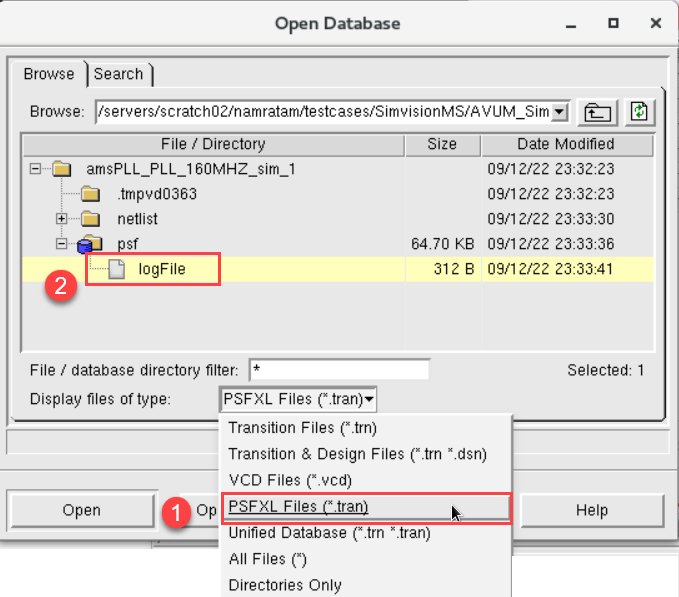
- Click Open & Dismiss.
The database containing only the analog container is displayed in SimVisionMS.
If you have selected PSFXL as the file type, but the Spectre solver option rawfmt is set to sst2 in the .scs file, the tool reports a DBOPEN error indicating that the file format is not supported. Ensure that the rawfmt setting is in sync with the type of data saved by the simulation.
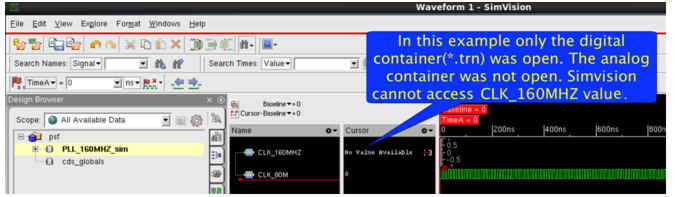
Though it is possible to open only the simulation digital (*.trn) container results during post processing by selecting Transition Files (*.trn) from the Display files of type drop-down list, it is not recommended, because in this case, SimVisionMS is not able to plot the analog vector values that are stored in the analog container. For such cases, SimVisionMS displays No Value Available, as shown below.
You need to specify the -amsformat <psfxl | psfxl_all> xmsim or xrun option to enable PSFXL/SST2 storage for analog probes.