
maxExtension
orderedSpacings( ( maxExtensiontx_layer1tx_layer2f_extension)
) ;orderedSpacings
spacingTables( ( maxExtensiontx_layer1tx_layer2(( "width" nil nil ) [f_default] )g_table)
) ;spacingTables
Specifies the maximum extension of the shape on the first layer past the shape on the second layer.
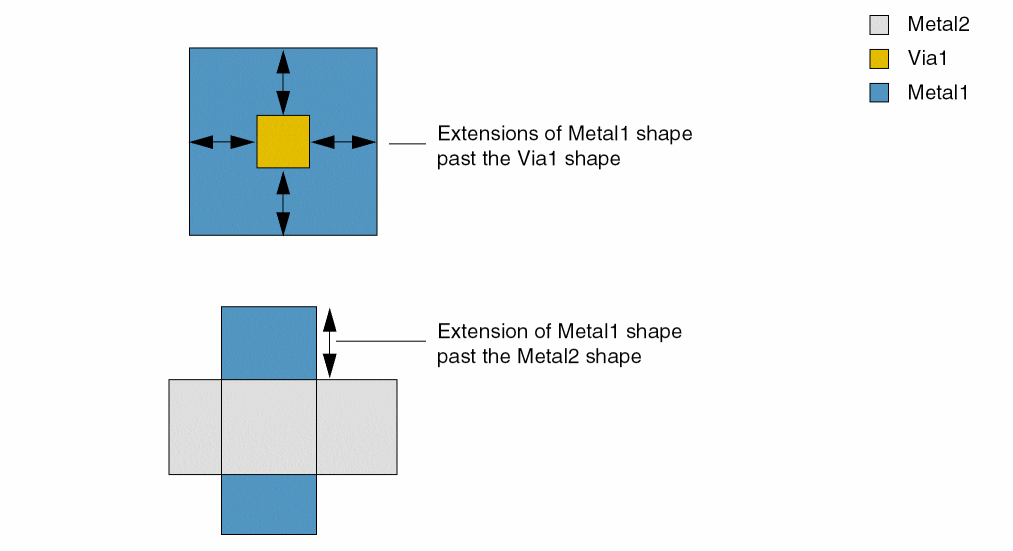
Values
Parameters
Examples
Example 1: maxExtension
The extension of a Metal1 shape past a Metal2 shape must be less than 3.0.
orderedSpacings(
    ( maxExtension "Metal1" "Metal2"
     3.0)
 )
) ;orderedSpacings
Example 2: maxExtension with 1-D table
The extension of a Metal2 shape past a Via2 shape must be as follows:
- Less than 0.21 if the width of the Metal2 shape is greater than 0.0
- Less than 0.22 if the width of the Metal2 shape is greater than 0.1
spacingTables(
    ( maxExtension "Metal2" "Via2"
     (( "width" nil nil ))
  (
    0.0 0.21
    0.1 0.22
  )
 )
) ;spacingTables
Return to top