
allowedNeighborWidthRanges (Two layers)
spacingTables( ( allowedNeighborWidthRangestx_layer1 tx_layer2(( "width" nil nil ) 'distanceWithinf_within['widthRanges (g_widthRanges)] ['otherWidthRanges (g_otherWidthRanges)] [f_default] ) (g_table) )
) ;spacingTables
(Virtuoso Advanced Node for Layout Standard) Specifies the width of a layer1 shape that is within a certain distance of a neighboring layer2 shape.
Values
|
The first layer on which the constraint is applied. Type: String (layer and purpose names) or Integer (layer number) |
|
|
The second layer on which the constraint is applied. Type: String (layer and purpose names) or Integer (layer number) |
|
|
The format of the table row is as follows:
|
|
Parameters
|
The constraint applies only if the distance between the shapes is less than this value. |
|
|
The constraint applies only if the width of the layer1 shape falls in these width ranges.
Type: Floating-point values specifying width |
|
|
The constraint applies only if the width of the layer2 shape falls in these width ranges.
Type: Floating-point values specifying width |
|
Example
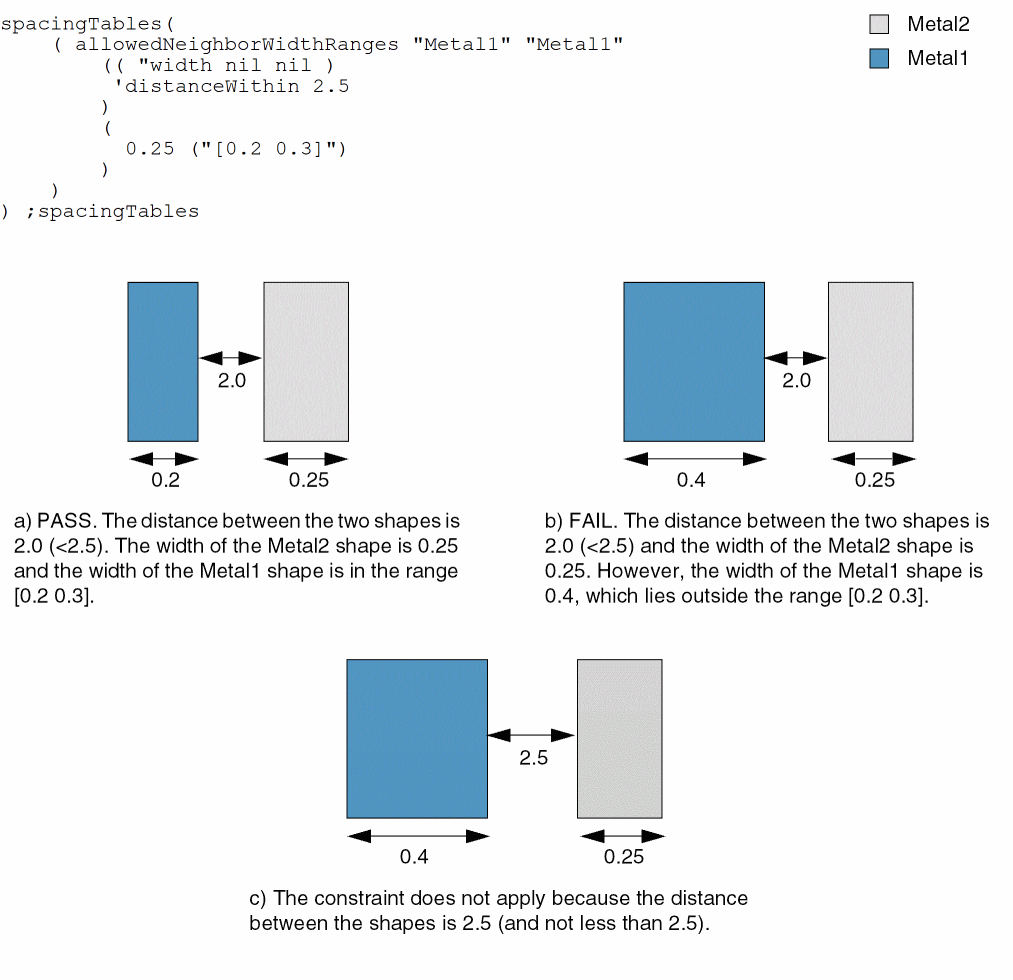
If a Metal2 shape with width greater than or equal to 0.25 is at a distance less than 2.5 from a Metal1 shape, then the width of the Metal1 shape must be greater than or equal to 0.2 and less than or equal to 0.3.
Return to top