
minStepEdgeLength
spacings( ( minStepEdgeLengthtx_layer['any | 'horizontalEdge | 'verticalEdge] ['allCorner | 'concaveCorner | 'convexCorner | 'mixedCorner] ['extendToAlign (g_widthg_spacing) ['extendOnly | 'alignOnly]] ['widthg_width['adjEolSpacingRangeg_eolSpaceRange]] ['protrusionEdge] ['jogEdge] ['adjJogEdge] ['adjNotchEdge] ['exceptExactLength ((f_exactLengthf_adjLength) …)] ['exceptExactBothLength ((f_exactLengthf_exactAdjLength) …)] ['exceptRectangle] ['fillerOnly] {f_edgeLength| (f_lengthSumf_edgeLength)} )
) ;spacings
Specifies the minimum edge length for a shape on the specified layer.
Values
|
The layer on which the constraint is applied. Type: String (layer and purpose names) or Integer (layer number) |
|
|
The length of each edge must be greater than or equal to this value. |
Parameters
Examples
- Example 1: minStepEdgeLength with adjEolSpacingRange
- Example 2: minStepEdgeLength with horizontalEdge, convexCorner, and mixedCorner
- Example 3: minStepEdgeLength with protrusionEdge
- Example 4: minStepEdgeLength with jogEdge
- Example 5: minStepEdgeLength with adjJogEdge
- Example 6: minStepEdgeLength with adjNotchEdge
- Example 7: minStepEdgeLength with extendToAlign
- Example 8: minStepEdgeLength with exceptExactLength and exceptExactBothLength
Example 1: minStepEdgeLength with adjEolSpacingRange
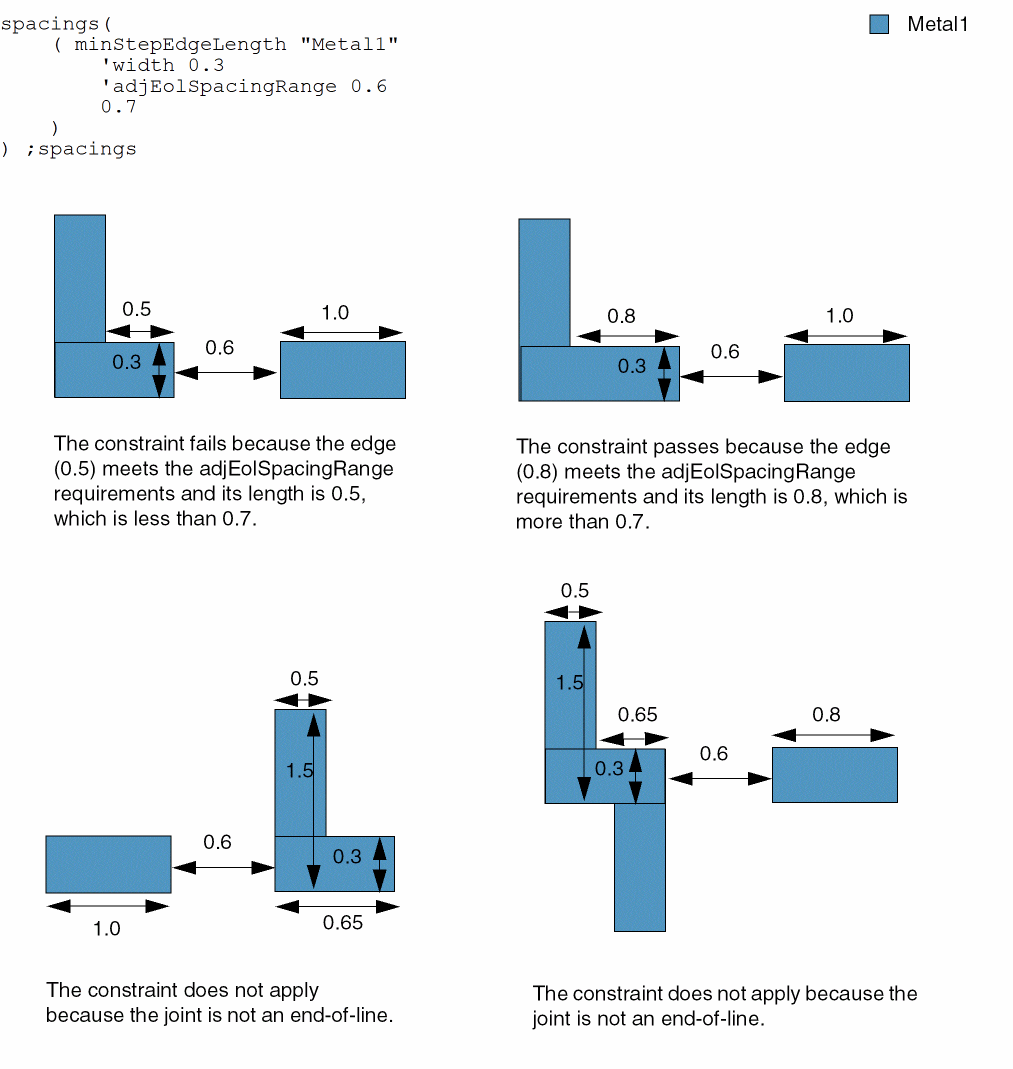
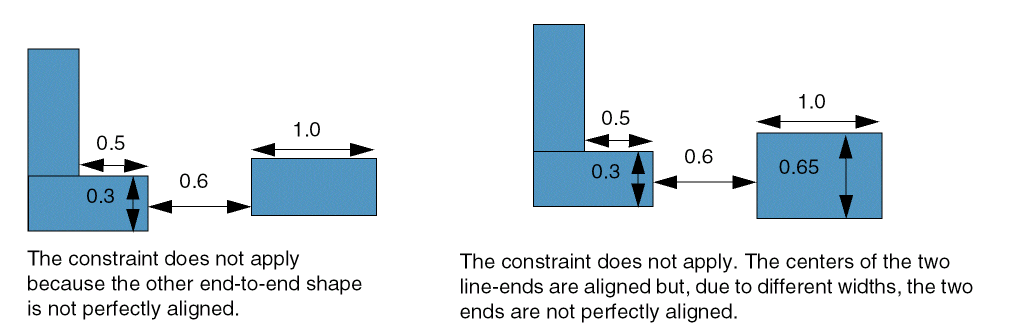
The constraint applies to an edge if any one of its adjacent edges is an end-of-line edge with width equal to 0.3 and this adjacent edge has another perfectly aligned end-to end-shape within the adjEolSpacingRange value of 0.6.
Example 2: minStepEdgeLength with horizontalEdge, convexCorner, and mixedCorner
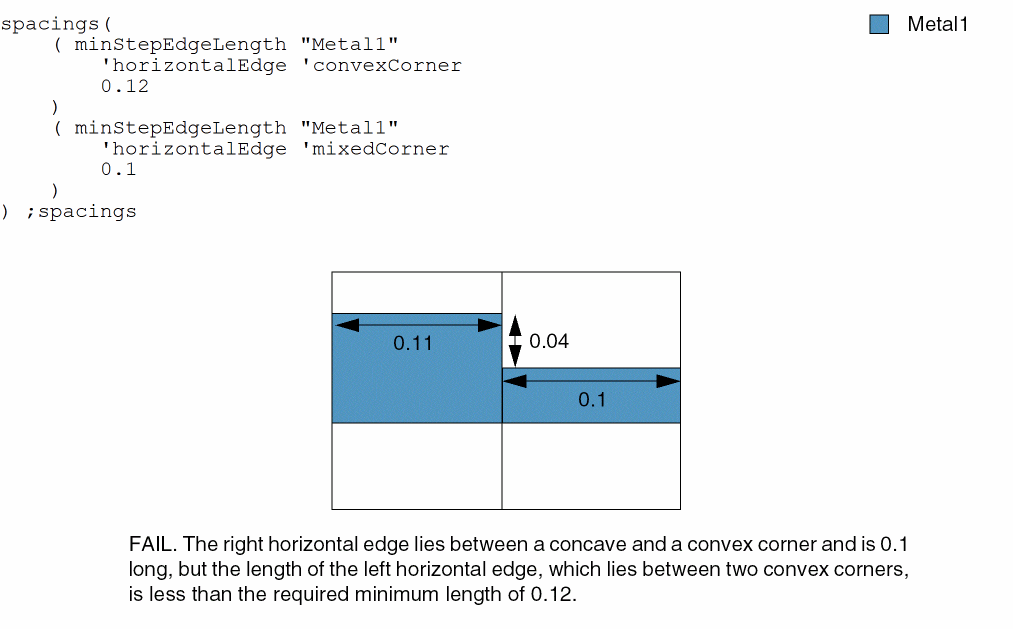
On layer Metal1, horizontal edges between convex corners must be at least 0.12 long and horizontal edges between a concave and a convex corner must be at least 0.1 long.
Example 3: minStepEdgeLength with protrusionEdge
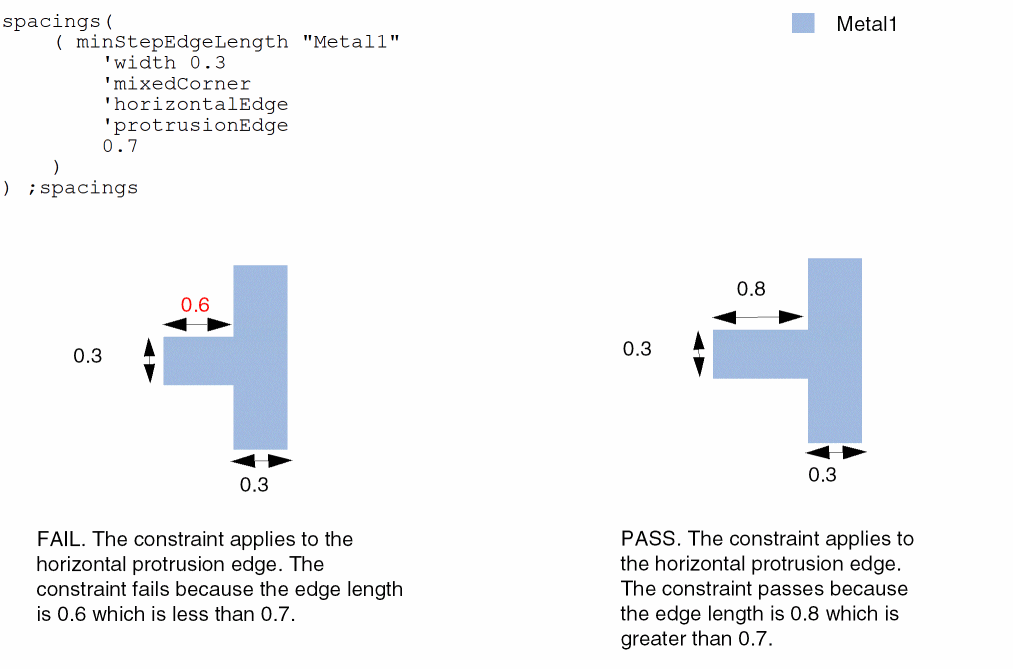
The constraint applies only to a protrusion edge.
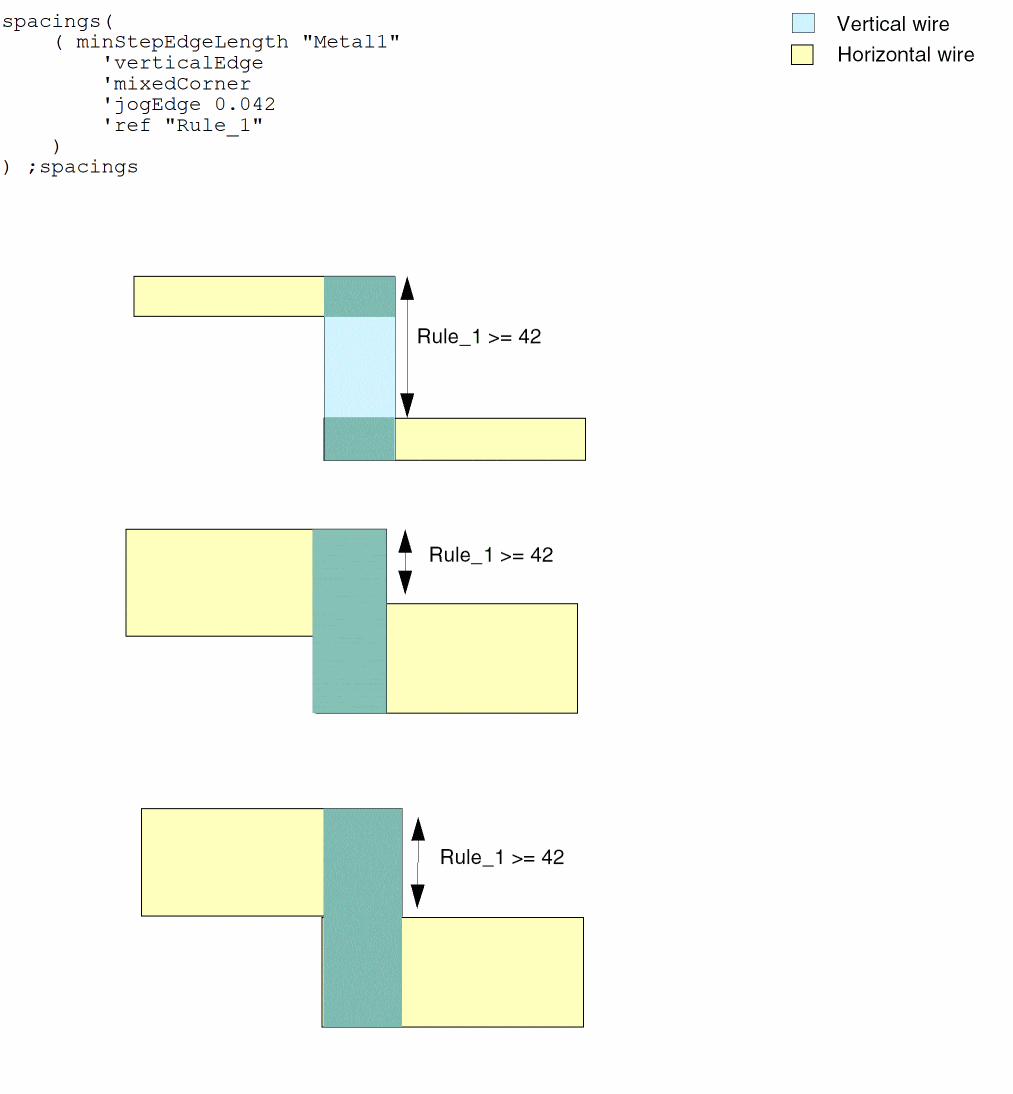
Example 4: minStepEdgeLength with jogEdge
The constraint applies only to a jog edge or a Z shape.
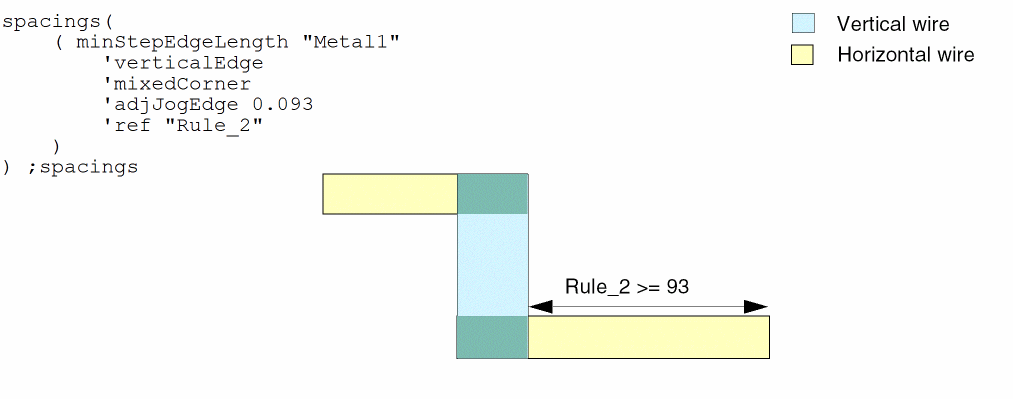
Example 5: minStepEdgeLength with adjJogEdge
The constraint applies only to an edge adjacent to a jog edge.
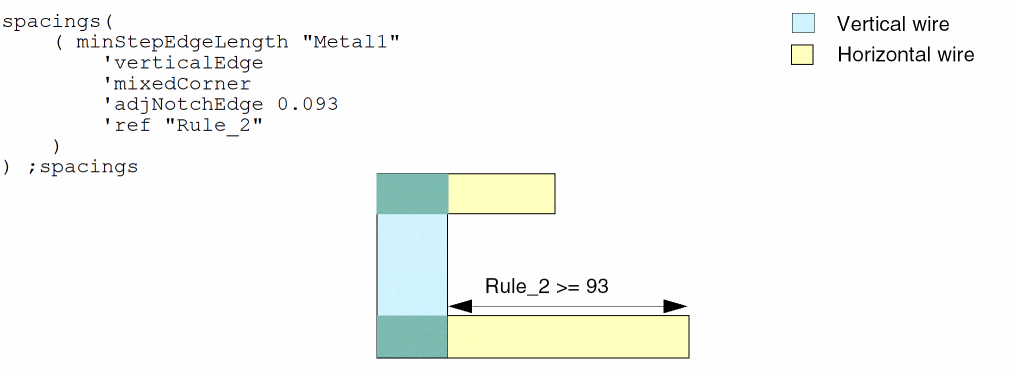
Example 6: minStepEdgeLength with adjNotchEdge
The constraint applies only to an edge adjacent to a notch edge.
Example 7: minStepEdgeLength with extendToAlign
On layer Implant1, horizontal edges between two convex corners must be at least 0.04. Shapes with width 0.05 with a gap less than or equal to 0.07 will be merged.
spacings(
    (minStepEdgeLength "Implant1"
     'convexCorner
  'horizontalEdge
  'extendToAlign (0.05 0.07)
  0.04)
) ;spacings
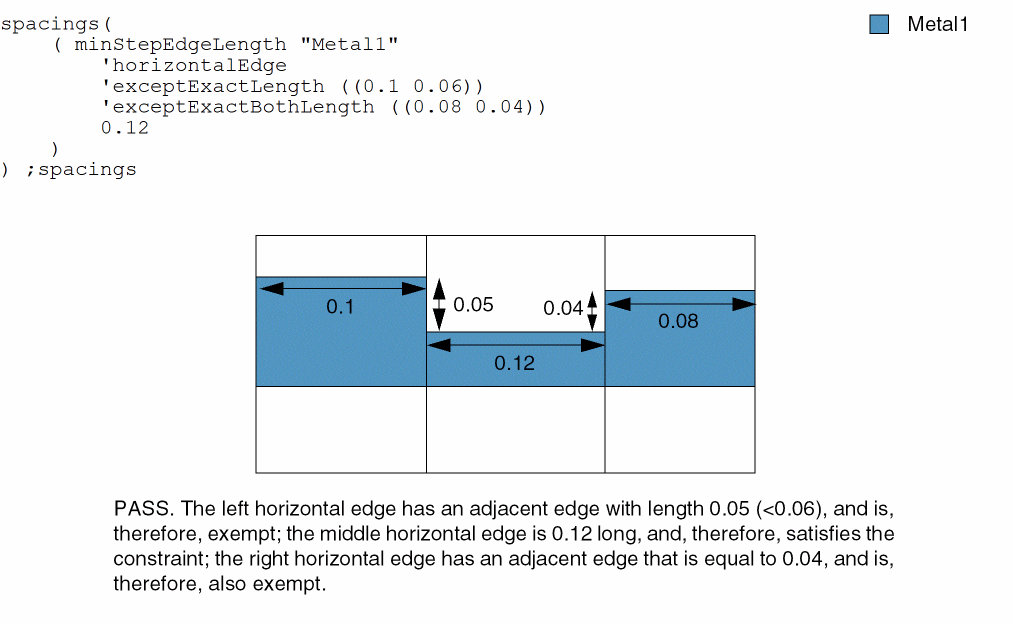
Example 8: minStepEdgeLength with exceptExactLength and exceptExactBothLength
All horizontal edges on layer Metal1 must be at least 0.12 long. The constraint does not apply if a 0.1 long horizontal edge has an adjacent edge with length less than or equal to 0.6 or if a 0.08 long horizontal edge has an adjacent edge with length equal to 0.04.
Return to top