
pinConnectBlockage
spacings( ( pinConnectBlockagetx_layer'enclosedLengthf_enclosedLength f_size)
) ;spacings
(Virtuoso Layout Suite EXL and higher tiers) Specifies a blockage area when a wire is connected to any pins on a layer. The blockage is formed by expanding the given value on the connected corners. Other corners, except for the corners formed between a wire connected to the pin or through the wire, cannot overlap with the blockage.
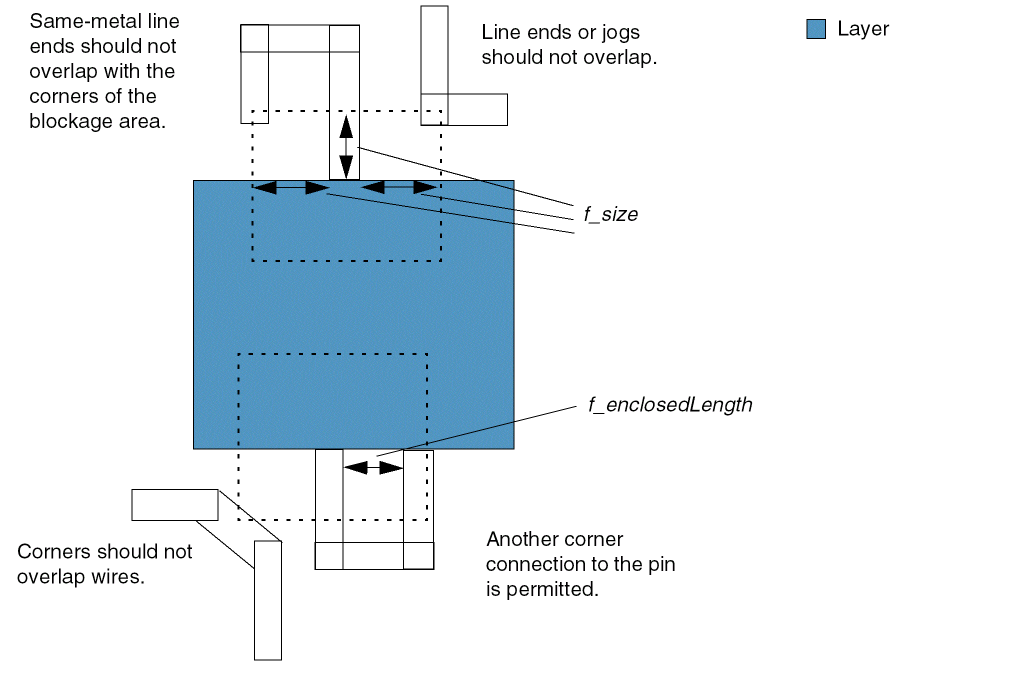
Values
|
The layer on which the constraint is applied. Type: String (layer and purpose names) or Integer (layer number) |
|
Parameters
|
Specifies that any enclosed empty area (that is, a donut hole formed by the metal) would have a length along the pin edge greater than or equal to the given value if it overlaps with blockage area. |
|
Example
Specifies a blockage area of 0.06 for the M8 layer within an enclosed length of 0.09.
spacings(
    ( pinConnectBlockage "M8"
     'enclosedLength 0.09
  0.06
 )
) ;spacings
Return to top