
overlapViaGroup
spacings( ( overlapViaGrouptx_layer'groupNamet_groupName'cutClass {f_cutWidth| (f_cutWidthf_cutLength) |t_name} 'dualDistance (g_minDistanceg_maxDistance) {'vertical | 'horizontal] ['sameMask]g_cuts)
) ;spacings
(Virtuoso Layout Suite EXL and higher tiers) Specifies the maximum number of cuts in a via group, where the spacing between cuts is within a specified range.
Values
|
The cut layer on which the constraint is applied. Type: String (layer and purpose names) or Integer (layer number) |
|
Parameters
|
The constraint applies to the cut class specified by width, by width and length, or by name (as defined in a cutClasses constraint). |
|
|
Any two cuts in the via group must have a spacing of more than g_minDistance and less than g_maxDistance. |
|
|
The constraint applies only in the specified direction on spacing between two cuts whose parallel run length is more than 0 in the orthogonal direction. |
|
Example
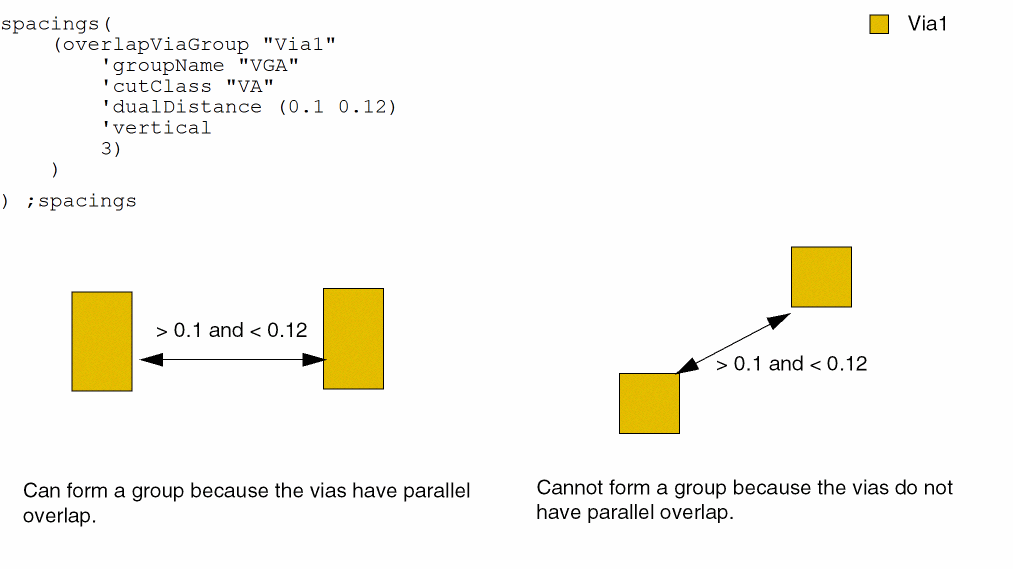
The maximum number of cuts for cutClass VA in viaGroup VGA is 3. The cuts in the group need to meet the dualDistance range.
Return to top