
routingDirections
routingDirections( (tx_layert_direction) …
) ;routingDirections
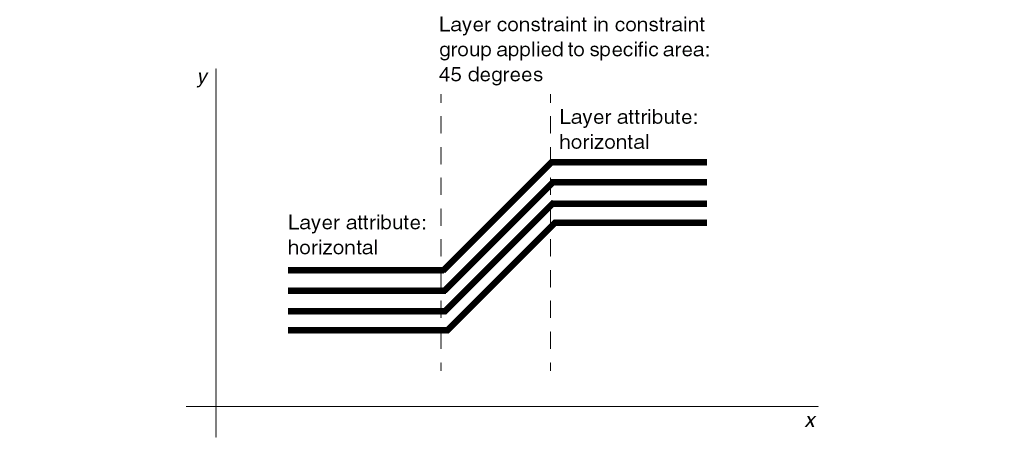
Allows you to override the routingDirections (routing layer direction) layer attribute for a defined section (bounded area) of a design. Applying a constraint group specifying routingDirections to a bounded area redefines the routing directions within that area.
Values
Parameters
Example
Layer attributes are defined as follows:
layerRules(
    routingDirections(
     ("Metal1" "horizontal")
  ("Metal2" "vertical")
  ("Metal3" "rightDiag")
  ("Diff"   "none")
  ("Via1"   "notApplicable")
 ) ;routingDirections
) ;layerRules
The routingDirections constraint group is defined as follows:
constraintGroups(
    ("myRoutingLayerOverrides"
     routingDirections(
   ("Metal1" "rightDiag")
   ("Metal2" "horizontal")
   ("Metal3" "none")
  ) ;routingDirections
 ) ;myRoutingLayerOverrides
) ;constraintGroups
Applying the myRoutingLayerOverrides constraint group to a bounded area sets the following routing directions within that area:
-
Metal1 to
rightDiaginstead ofhorizontal -
Metal2 to
horizontalinstead ofvertical -
Metal3 to
noneinstead ofrightDiag; thereby, allowing it to take any routing direction, instead of being restricted to one
Return to top