
trimMinCutSpacing
orderedSpacings( ( trimMinCutSpacingtx_trimtx_cut['cutClass {g_width| (g_widthg_length) |t_name]} ['metalLayertx_metalLayer['mask1 | 'mask2 | 'mask3]] ['trimSpacingg_trimSpacing['otherLayerg_trimLayer| 'diffMask]]g_spacing)
) ;orderedSpacings
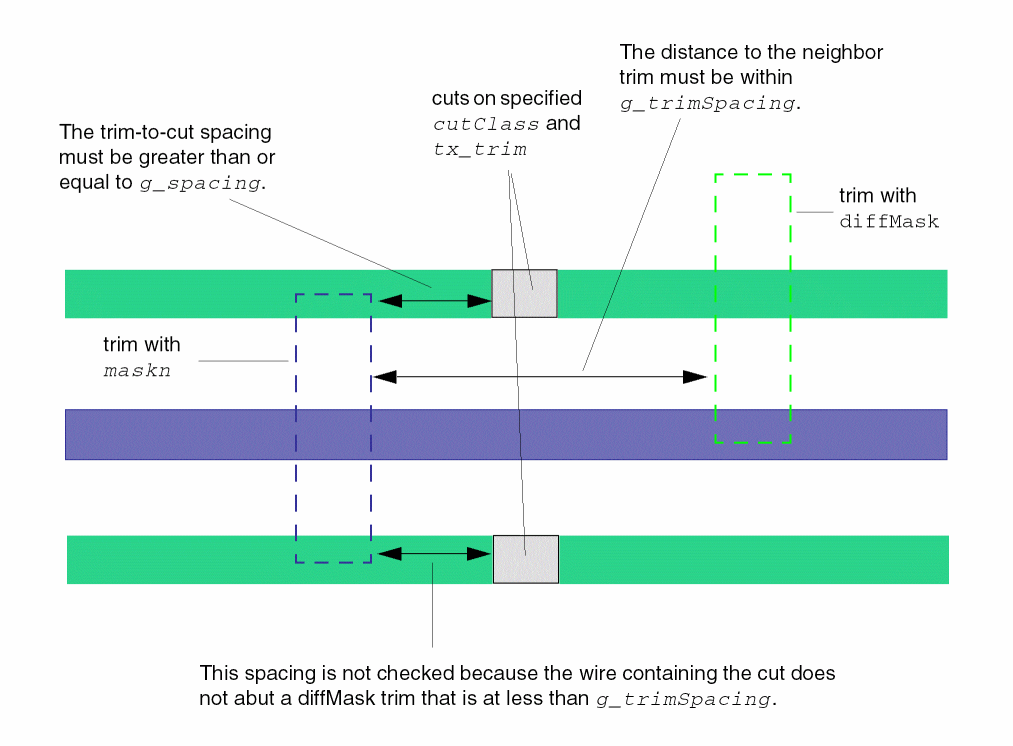
(Virtuoso Layout Suite EXL and higher tiers) Specifies the spacing between a trim and a cut.
Values
Parameters
|
The cut class to which the constraint applies, specified by width, by width and length, or by name (as defined in a cutClasses constraint). |
|
|
The constraint applies if the trim and cut are on the specified metal layer. |
|
|
The constraint applies only to trim shapes on the specified mask. |
|
|
|
|
|
The constraint applies only on a trim with a neighbor trim within the given g_trimSpacing distance. Additionally, you can also specify that the spacing applies only to either of the following: |
|
Example
The spacing between TrimMetal1A and Via1 must be greater than or equal to 0.05 when the shapes are on mask1 and the neighbor trim on layer TrimMetal1B is within 0.07.
orderedSpacings(
        (trimMinCutSpacing "TrimMetal1A" "Via1"
      'cutClass "VA"
   'metalLayer "Metal1"
   'mask1
   'trimSpacing 0.07 'otherLayer "TrimMetal1B"
   0.05
  )
) ;orderedSpacings
Return to top