
viaEdgeType
spacings( ( viaEdgeTypetx_layer['edgeExtensionf_edgeExt] ['anyOppositeExtensionf_oppEdgeExt] ['negateEdgeExtension] ['negateAnyOppositeExtension] ['metalWithin (g_metalPrlg_metalWithin) 'noMetalWithin (g_noMetalPrlg_noMetalWithin) ['noMetalLowWithing_noMetalLowWithin] {'horizontalEdge | 'verticalEdge} ['exceptSpacingg_exceptSpacing| 'exceptSpacingRangeg_exceptSpacingRange] ['sameSide] ]x_viaEdgeType)
) ;spacings
Assigns a type to the edges of a shape on a cut layer. The constraint applies only if the entire length of a cut edge has extension less than or equal to the specified value. The assigned edge type can then be referenced in other constraints.
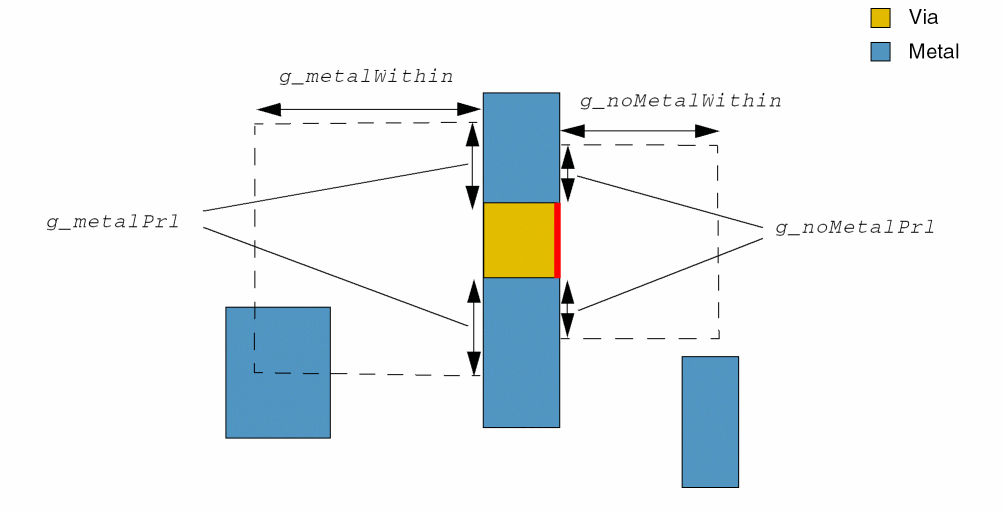
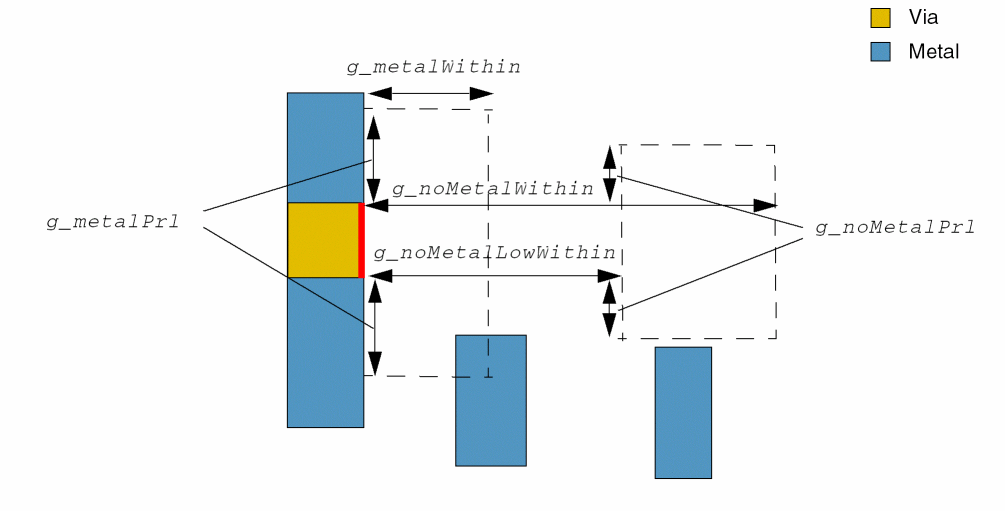
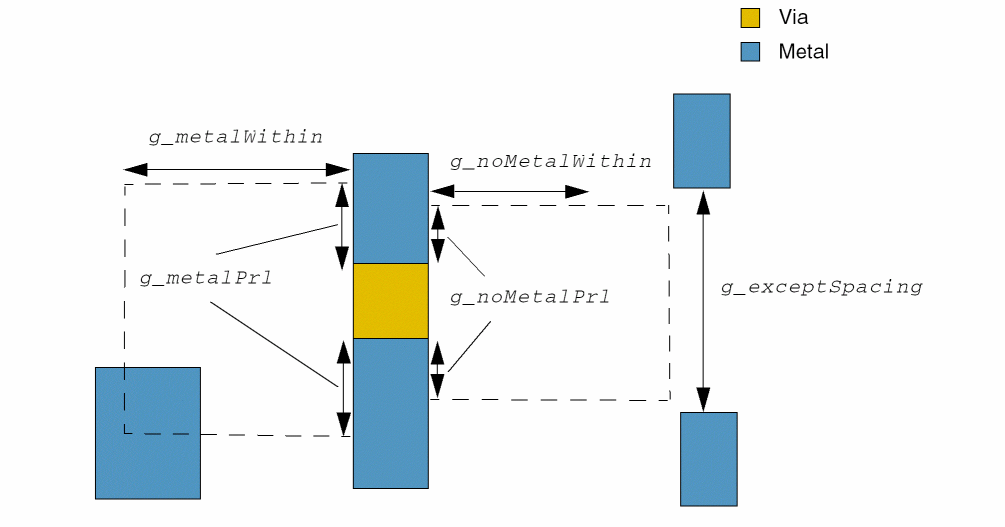
A cut edge fulfilling metalWithin and noMetalWithin conditions to any cut should be more than or equal to g_exceptSpacing. Search windows are formed on the opposite cut edges in the preferred direction on the above or below metal layers by using g_metalPrl and g_metalWithin on one of the cut edges and g_noMetalPrl and g_noMetalWithin on the opposite cut edge. The first metal search window overlaps a metal neighbor whereas the second metal search window does not overlap a metal neighbor. The cut edge without a metal neighbor is subject to this spacing rule.
In the following illustration, the preferred routing direction of the routing layer is verticalEdge. The red cut edge is subject to the cut spacing rules.
In the following illustration, the preferred routing direction of the routing layer is verticalEdge. Both windows are formed on the same cut edge. The red cut edge is subject to the cut spacing rules.
In the following illustration, the metal neighbors on the right have a spacing that is equal to g_exceptSpacing, which means that spacing rules do not apply to any cut edge in this case.
Values
|
The cut layer on which the constraint is applied. Type: String (layer and purpose names) or Integer (layer number) |
|
Parameters
Examples
- Example 1: viaEdgeType with edgeExtension
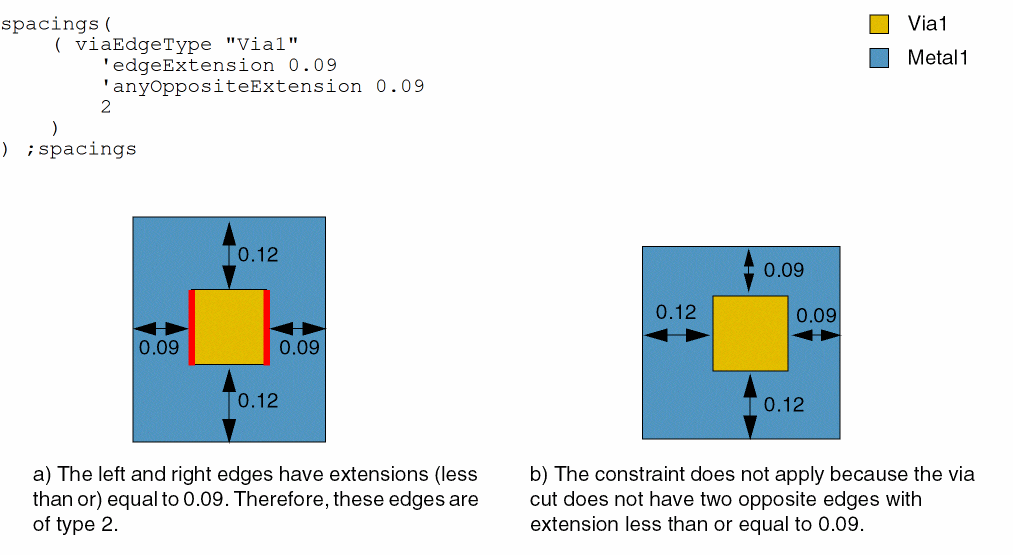
- Example 2: viaEdgeType with edgeExtension and anyOppositeExtension
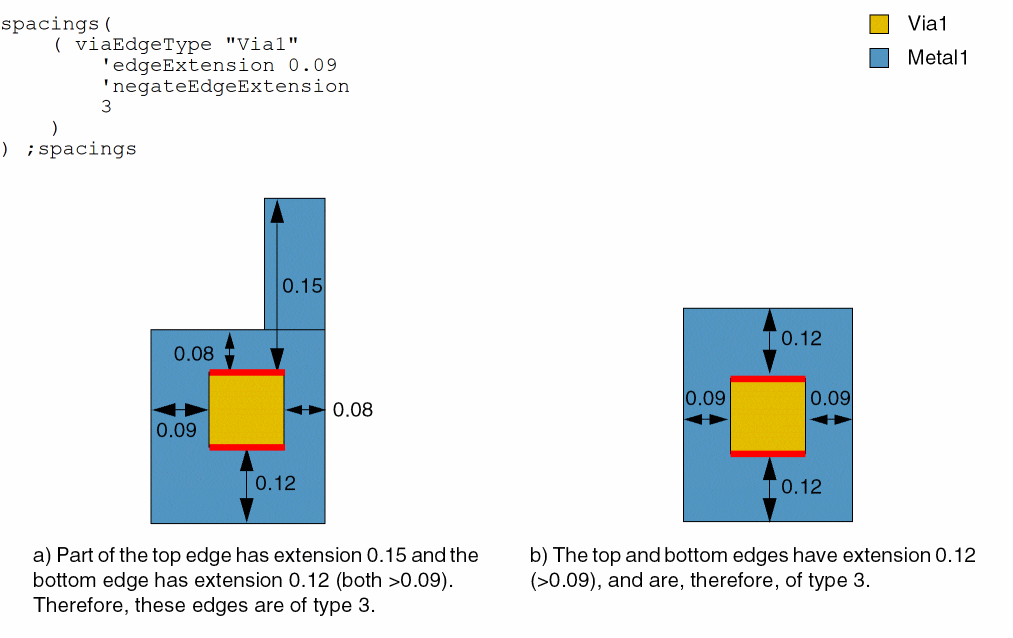
- Example 3: viaEdgeType with edgeExtension and negateEdgeExtension
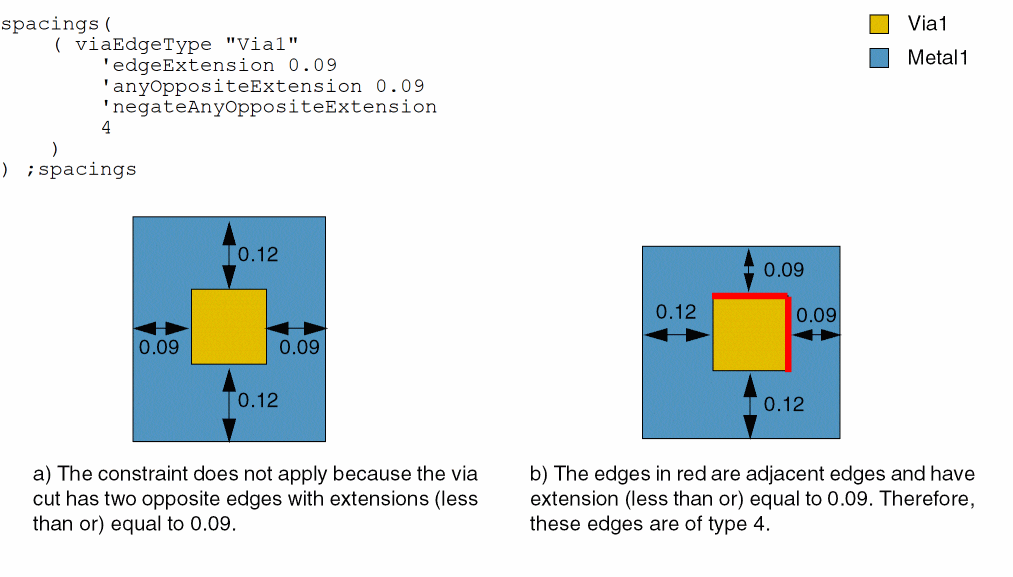
- Example 4: viaEdgeType with edgeExtension, anyOppositeExtension, and negateAnyOppositeExtension
- Example 5: viaEdgeType with metalWithin, noMetalWithin, horizontalEdge, and exceptSpacing
Example 1: viaEdgeType with edgeExtension
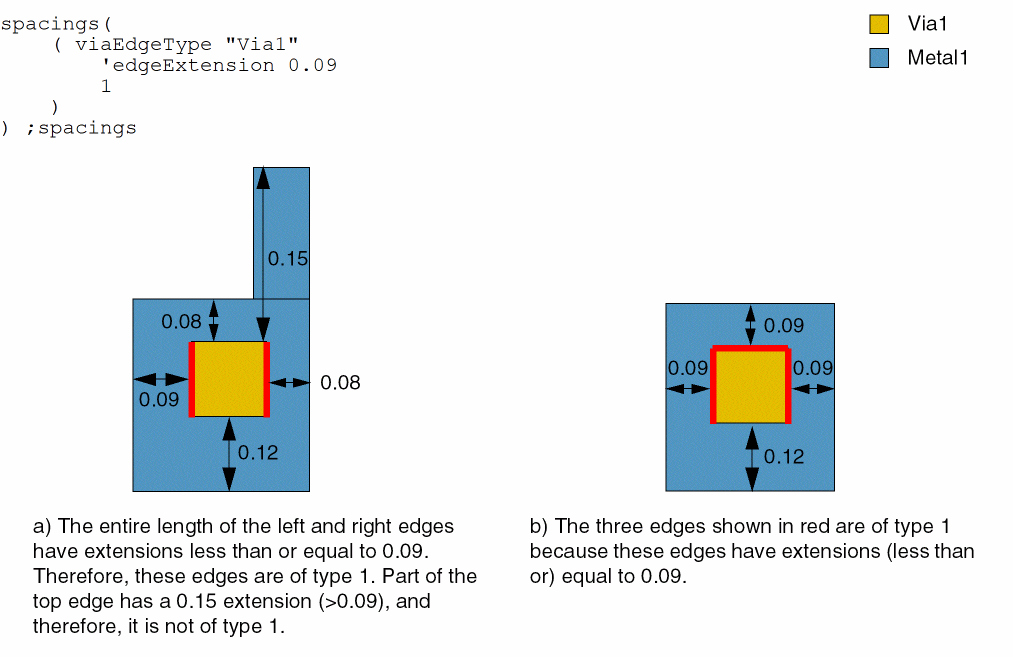
A via cut edge is of type 1 if it has an extension of less than or equal to 0.09 along the entire length of an edge.
Example 2: viaEdgeType with edgeExtension and anyOppositeExtension
A via cut edge or a pair of opposite via cut edges are of type 2 if they have extensions of less than or equal to 0.09 along the entire length of an edge.
Example 3: viaEdgeType with edgeExtension and negateEdgeExtension
A via cut edge is of type 3 if it has an extension of greater than 0.09 along the entire length of an edge.
Example 4: viaEdgeType with edgeExtension, anyOppositeExtension, and negateAnyOppositeExtension
A via cut edge is of type 4 if it has an extension of less than or equal to 0.09 along the entire length of the edge. A pair of opposite via cut edges are of type 4, if they have extensions greater than 0.09 along the entire length of the edge.
Example 5: viaEdgeType with metalWithin, noMetalWithin, horizontalEdge, and exceptSpacing
A via cut edge is of type 1 if the metalWithin and noMetalWithin values are as specified and the cut edge direction is horizontal, except when the line-end spacing of the neighbor wires is 0.1 on the cut edge not having a neighbor overlapping with the search window.
spacings(
    (viaEdgeType "Via2"
     'metalWithin (0.03 0.04) 'noMetalWithin (0.06 0.08)
  'horizontalEdge
  'exceptSpacing 0.1
  1
 )
) ;spacings
Return to top