
11
Display Resource File
The display resource file defines the packets that the Cadence® design software use to display the layers in your design. It also defines the different display devices, such as monitors and plotters, that you use.
This chapter described the sections in the display.drf file in the following topics:
drDefineDisplay
drDefineDisplay(
(t_displayName)
…
)
Description
Lists the display devices for which display resources are defined in the display resource file.
The following table lists commonly used display devices.
| Device Name | Type |
|---|---|
For more information about setting up plotters, see Plotter Configuration User Guide.
Arguments
|
The name of the display device. |
Example
drDefineDisplay(
;( DisplayName )
 ( display )
 ( psb )
)
Defines display devices display and psb.
drDefineColor
drDefineColor( (t_displayNamet_colorNamex_redx_greenx_blue[g_blink]) …
)
Description
Defines the colors for a display device.
Arguments
B to the name of the non-blinking color to name the blinking color, such as white and whiteB.Example
drDefineColor(
;( DisplayName    ColorName    Red    Green    Blue   Blink )
 ( display        white             255    255      255          )
 ( display        whiteB       255    255      255    t     )
 ( display        yellow       255    255      0            )
 ( display        silver       217    230      255          )
 ( display        cream        255    255      204          )
 ( display        pink         255    191      242          )
 ( display        magenta      255    0        255          )
 ( display        lime         0      255      0            )
 ( display        tan          255    230      191          )
 ( display        cyan         0      255      255          )
 ( display        cadetBlue    57     191      25           )
 ( display        orange       255    128      0            )
 ( display        red          255    0        0            )
 ( display        purple       153    0        230          )
 ( display        green        0      204      102          )
 ( display        brown        191    64       38           )
 ( display        blue         0      0        255          )
 ( display        blueB        0      0        255    t     )
)
Defines colors for the display device display.
drDefineStipple
drDefineStipple( (t_displayNamet_stippleNamel_stipplePattern) …
)
Description
Defines the stipple patterns for the display devices.
Arguments
Sample Stipple Patterns
The following illustrate a checker stipple pattern and a grid stipple pattern:


Example
drDefineStipple(
;( DisplayName    StippleName
;  StipplePattern )
 ( display        solid
  (
   (1 1 1 1 1 1 1 1 1 1 1 1 1 1 1 1)
   (1 1 1 1 1 1 1 1 1 1 1 1 1 1 1 1)
   (1 1 1 1 1 1 1 1 1 1 1 1 1 1 1 1)
   (1 1 1 1 1 1 1 1 1 1 1 1 1 1 1 1)
   (1 1 1 1 1 1 1 1 1 1 1 1 1 1 1 1)
   (1 1 1 1 1 1 1 1 1 1 1 1 1 1 1 1)
   (1 1 1 1 1 1 1 1 1 1 1 1 1 1 1 1)
   (1 1 1 1 1 1 1 1 1 1 1 1 1 1 1 1)
   (1 1 1 1 1 1 1 1 1 1 1 1 1 1 1 1)
   (1 1 1 1 1 1 1 1 1 1 1 1 1 1 1 1)
   (1 1 1 1 1 1 1 1 1 1 1 1 1 1 1 1)
   (1 1 1 1 1 1 1 1 1 1 1 1 1 1 1 1)
   (1 1 1 1 1 1 1 1 1 1 1 1 1 1 1 1)
   (1 1 1 1 1 1 1 1 1 1 1 1 1 1 1 1)
   (1 1 1 1 1 1 1 1 1 1 1 1 1 1 1 1)
   (1 1 1 1 1 1 1 1 1 1 1 1 1 1 1 1)
  )
 )
 ( display        dots
  (
   (0 1 0 0 0 1 0 0 0 1 0 0 0 1 0 0)
   (0 0 0 0 0 0 0 0 0 0 0 0 0 0 0 0)
   (0 0 0 1 0 0 0 1 0 0 0 1 0 0 0 1)
   (0 0 0 0 0 0 0 0 0 0 0 0 0 0 0 0)
   (0 1 0 0 0 1 0 0 0 1 0 0 0 1 0 0)
   (0 0 0 0 0 0 0 0 0 0 0 0 0 0 0 0)
   (0 0 0 1 0 0 0 1 0 0 0 1 0 0 0 1)
   (0 0 0 0 0 0 0 0 0 0 0 0 0 0 0 0)
   (0 1 0 0 0 1 0 0 0 1 0 0 0 1 0 0)
   (0 0 0 0 0 0 0 0 0 0 0 0 0 0 0 0)
   (0 0 0 1 0 0 0 1 0 0 0 1 0 0 0 1)
  )
 )
) ;drDefineStipple
Defines a solid stipple pattern and a stipple pattern with dots for the display device display.
drDefineLineStyle
drDefineLineStyle( (t_displayNamet_lineStylex_sizel_pattern) …
)
Description
Defines the line styles for the display devices.
Arguments
Sample Line Styles
The following illustrate a dashed line style, a line style made of dots, and a line style that is a combination of dashes and dots:



Example
drDefineLineStyle(
;( DisplayName       LineStyle     Size      Pattern               )
 ( display           solid          1        (1 1 1)               )
 ( display           dashed         1        (1 1 1 1 0 0)         )
 ( display           dots           1        (1 0 0)               )
 ( display           dashDot        1        (1 1 1 0 0 1 0 0)     )
 ( display           shortDash      1        (1 1 0 0)             )
 ( display           doubleDash     1        (1 1 1 1 0 0 1 1 0 0) )
 ( display           hidden         1        (1 0 0 0)             )
 ( display           thickLine      3        (1 1 1)               )
) ;drDefineLineStyle
Defines a number of line styles for the display device display.
drDefinePacket
drDefinePacket( (t_displayNamet_packetNamet_stippleName t_lineStyleNamet_fillColort_outlineColor[t_fillStyle] ) …
)
Description
Defines packets of display information. Packets are used in the technology file to define how layers look.
Arguments
|
The name of the display device. |
|
|
The name of the display packet. |
|
|
The name of the stipple pattern. |
|
|
The name of the line style. |
|
|
The name of the fill color. |
|
|
The name of the outline color. |
|
|
The name of the fill style. If specified, this value overrides stipple and line styles. |
Guidelines for Naming Display Packets
We recommend that you adhere to the guidelines outlined in this section while naming a display packet.
A display packet name must have the following structure:
color[stipple][line][_[S][L][N][B]]
|
Specifies the fill and outline colors in the following format: At least one color name must be specified. Specify colors according to the following rules:
|
|
|
Specifies a stipple pattern name. This field is optional; if a value is not specified, it indicates the default stipple pattern, |
|
|
_) must precede the SLNB extension.The following table shows sample combinations of color, stipple, and line resources and the packet names correctly built according to the packet naming convention.
| Fill Color | Outline Color | Stipple Pattern | Line Style | Packet Name |
|---|---|---|---|---|
Fill Styles
The table below defines the fill styles.
| Fill Style | Result |
|---|---|
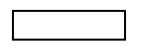

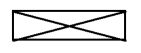
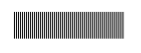 (The specified stipple pattern determines the fill.)
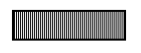 (The specified stipple pattern determines the fill.)
Customizing Display Packets for Plotting
You can set up your display resource file so that a display packet appears differently on different display devices. For example, if your plotter uses only seven colors and you display your design using 12 colors, you can modify the display packets used by the layers in your design specifically for the plotting device.
You can also define a display packet with the same name, but with different content for each display device, as shown in the following example:
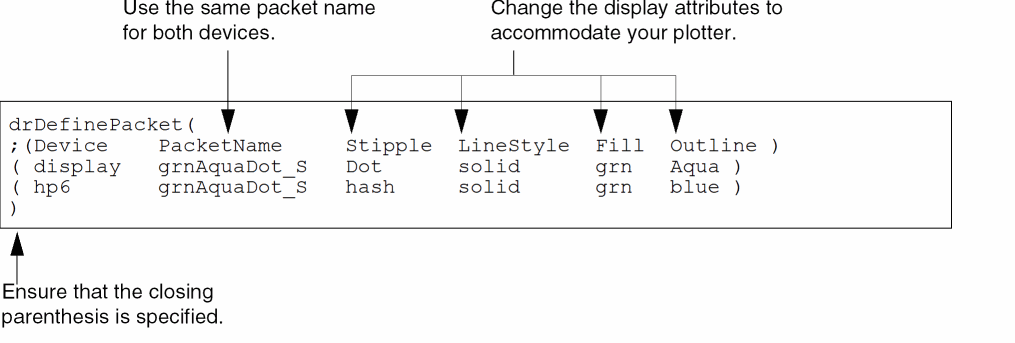
Example
drDefinePacket(
;(Display  PacketName           Stipple  LineStyl  Fill    Outline   fillSt)
 ( psb     red                  blank    solid     red     red       X     )
 ( psb     red_B                blank    solid     red     redB            )
 ( psb     redredblnk_B         blank    solid     red     redblnk   solid )
 ( psb     white                blank    solid     red     white           )
 ( psb     whitedots_L          blank    dots      red     white           )
 ( psb     redhash_SN           hash     none      red     white           )
 ( psb     blueyellowslash_S    slash    solid     blue    yellow          )
 ( psb     blueyellowslash_SN   slash    none      blue    yellow    solid )
 ( psb     whitered_N           blank    none      white   red             )
 ( psb     greenblackBdot1_SB   dot1     solid     green   blackB          )
)
Defines display packets for the display device psb.
drDefinePacketAlias
drDefinePacketAlias( (t_displayNamet_packetAliast_packetName) …
)
Description
Defines an alias for the specified packet. As a result, you can use the display packet name as well as the alias to access the display packet. This allows flexibility in assigning display packets to display devices. You can alias an existing display packet name to another display packet name to change the display packet in use for a given display device.
Arguments
Example
drDefinePacketAlias(
    ("display" "redSolid1" "redSolid")
)
Defines redSolid1 as an alias for the display packet redSolid when used with the display device display.
Return to top