ccpCopy
ccpCopy(
q_src
q_dest
[ g_overWrite ]
[ s_expFlag ]
[ l_copyViewTypeList ]
[ l_copyViewNameList ]
[ t_vNameSimExp ]
[ t_vNameSpace ]
[ s_whatToUpdate ]
[ q_updateLibList ]
[ g_addProp ]
[ g_existenceCheck ]
[ g_reReferenceCustomVias ]
)
=> t / nil
Description
Copies source data to another location.
You can expand the data while copying. If you have already expanded the design with the ccpExpand, ccpExpandDesign, or ccpExpandConfig functions, use CCP_NO_EXPAND as the value of the s_expFlag argument.
Temporary Directories: If the source data that is being copied is in a library that has a temporary directory assigned, then ccpCopy copies files from both the regular library directory and its temporary directory. If the same file exists in both the temporary directory and the library directory, the file in the temporary directory is the one that is copied, regardless of its datestamp or whether it is a source file or a derived file. Files are copied to the temporary directory of the destination library only if there are pre-existing files of the same name in the directory; otherwise they are copied into the regular destination library.
If two objects in the source list have the same name, ccpCopy will not copy them to the same location in one copy operation, unless you choose to automatically rename them.
Arguments
|
q_src
|
Sources gdmSpecList object containing the gdmSpec objects you want to copy. Each gdmSpec object represents a library, cell, view, or file.
|
|
q_dest
|
Destination gdmSpecList object containing gdmSpec objects, each of which represents a library, cell, or view.
The destination list must have the same number of gdmSpec objects as the source list and each gdmSpec object must be of the same type as its corresponding object in the source list (for example, both must be libraries or both must be cells). Otherwise, the destination list must contain only one object (typically a library, or a cell when the source list contains views).
|
|
g_overWrite
|
Overwrites the object if it already exists at the destination. If set to t and the object is managed and not already checked out, it is checked out by the system.
This argument is optional; its default value is nil.
|
|
s_expFlag
|
Expands the flag options. Can be one of the following predefined symbols:
CCP_NO_EXPAND: No expansion is done. Typically used after a call to ccpExpand.
CCP_EXPAND_COMANAGED: Expands a directory and includes only the coManaged and alsoManaged files, which are defined in the data registry.
Some applications have co-managed files stored at different directory levels. These co-managed files will also be included for copy.
The data.dm file, which is invalid in OpenAccess libraries, is no longer automatically included in co-managed sets.
CCP_EXPAND_ALL: Expands everything in a directory.
This argument is optional; its default value is CCP_NO_EXPAND.
|
|
l_copyViewTypeList
|
|
|
Displays list of strings specifying the view types to copy. If the list is empty, includes all view types in the hierarchy. This option is ignored if you use CCP_NO_EXPAND as the value of the s_expFlag argument.
This argument is optional; its default value is nil.
|
|
l_copyViewNameList
|
|
|
Displays list of view names to copy. If the list is empty, includes all view names in the hierarchy. This option is ignored if you use CCP_NO_EXPAND as the value of the s_expFlag argument.
This argument is optional; its default value is nil.
|
|
t_vNameSimExp
|
Specifies the views to copy. This option is ignored if you use CCP_NO_EXPAND as the value of the s_expFlag argument.
This is not a regular expression. CCP_NO_EXPAND is also always invalid for the view-based design and config copies.
|
|
t_vNameSpace
|
The name space in which the arguments t_vNameSimExp and l_copyViewNameList are provided. Can be one of the following strings: VHDL, Verilog, Verilog-A, CDBA, Concept, Library, LibraryUnix, or LibraryNT..
|
|
s_whatToUpdate
|
One of the following predefined symbols, which tells the cross-reference updater what to update:
CCP_UPDATE_COPIED_DATA: Updates cross-references in only the copied data.
CCP_UPDATE_DESTLIB_ONLY: Updates all cross-references in the destination library.
CCP_UPDATE_FROM_LIBLIST: Updates cross-references in the libraries you specify in the next argument, q_updateLibList.
This argument is optional; its default value is CCP_UPDATE_COPIED_DATA.
There might be a scenario where the entire destination library containing a cellview is selected for copy updates. In addition, the cellviews already existing in the destination library will also have their data references. In that case, the updates need to be made in more files other than just the copied set.
|
|
q_updateLibList
|
Valid only if the s_whatToUpdate argument has a value of CCP_UPDATE_FROM_LIBLIST. Otherwise, this argument is ignored.
q_updateLibList takes a gdmSpecList object containing library gdmSpec objects, which specify the libraries in which to update cross-references.
If q_updateLibList is empty and s_whatToUpdate is CCP_UPDATE_FROM_LIBLIST, copy proceeds but no updating is done.
|
|
g_addProp
|
Copies files from library and cell property. It is recommended that you use nil for this argument because of potential conflicts between property files. Properties are usually added by the copy updaters. Default is nil.
|
|
g_existenceCheck
|
Sets a flag for the Virtuoso post-copy updater to validate the existence of layers, purposes, viaDefs, and siteDefs in the technology database of the destination library after the copy command is completed. Default is 0.
|
|
g_reReferenceCustomVias
|
|
|
Sets a flag for the Virtuoso post-copy updater to update custom via definitions to point to cellviews in the destination library. Default is 0.
|
Value Returned
|
t
|
The source data was copied.
|
|
nil
|
The source data was not copied.
|
Additional Information
If two objects in the source list have the same name, you cannot copy them to the same location in one copy operation, unless you choose to automatically rename them.
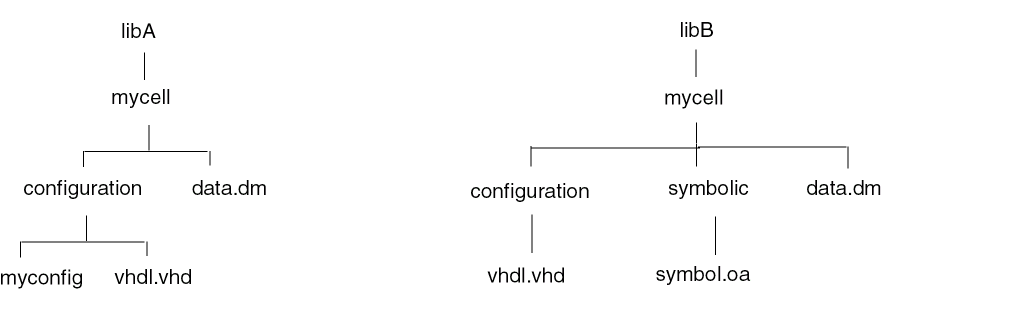
For example, if you have the following data:
and you try to copy libA/mycell and libB/mycell to the same location, nothing will be copied because libA/mycell/configuration/vhdl.vhd conflicts with libB/mycell/configuration/vhdl.vhd and libA/mycell/data.dm conflicts with libB/mycell/data.dm. In such a case, you can copy the data only if you rename the objects with conflicting names.
Therefore, it is recommended to perform only a single transaction instead of performing multiple transactions simultaneously. For example, if you are trying to copy libA/mycell/configuration/vhdl.vhd with libB/mycell/configuration/vhdl.vhd and libA/mycell/data.dm then there would be a conflict between these two transactions.
To automatically rename objects with conflicting names,
If you set this variable, cells containing the view files that have a name conflict are automatically renamed in the destination location, as mentioned below.
Only the views that have at least one file with a name conflict will trigger the auto renaming of the cell. The other views of the cell, when copied in the same operation, will also be copied to the same renamed cell.The auto renamed cell name may be generated by appending the name of the From Cell (if different), and the name of the From Library (if different). If the cell by the same name already exists, then a unique number is appended to the name. The name additions are separated by an underscore ("_") character.
Similarly, other library-level files (files in a library that are not cells) and cell-level files (files in a cell that are not views) are also renamed if they have a name conflict. These files are renamed in the following way:
file –> file_libName
file.xx –> file_libName.xx
.file –> .file_libName
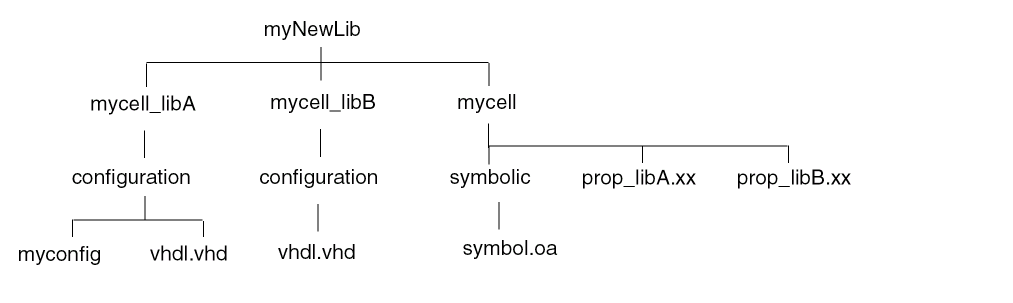
In the above example, if you set CDS_COPY_AUTO_RENAME to "yes" and then copy libA/mycell and libB/mycell to myNewLib, you get the following files in the destination:
The CDS_COPY_AUTO_RENAME variable applies to the ccpCopy, ccpCopyDesign, and ccpCopyConfig functions. However, it only applies when expansion is being done with these functions; it does not apply if s_expFlag is CCP_NO_EXPAND.
You can set the maximum cell name length allowed by using the CDS_MAX_CELL_NAME_LENGTH environment variable, which applies to the ccpCopy, ccpCopyDesign, and ccpCopyConfig functions.
The compression level of any copied library data gets adjusted to match the compression level of the destination library.
Related Topics
Generic Design Management (GDM) Functions
Name Spaces for Different Data Types
ccpExpand
ccpExpandDesign
ccpExpandConfig
gdmSpecp
Return to top