
3
Cadence Setup Search File: setup.loc
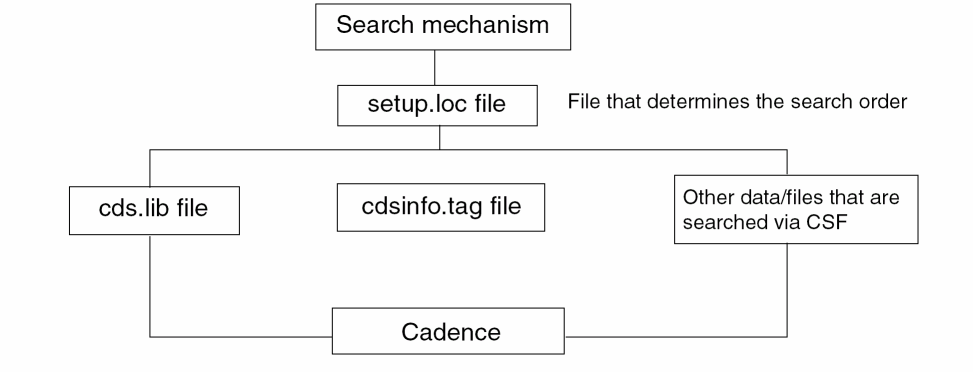
Cadence software includes the Cadence Setup Search File (CSF) mechanism to search for application setup and configuration information such as the following:
-
cds.libfiles, which define the design libraries that you use -
cdsinfo.tagfiles, which contain information such as theDMTYPEfor a library -
.cdsplotinitfiles, which contain plotting configuration
The CSF mechanism is used to find the.cdsplotinitfile if the file name is specified in thecsfLookupConfigfile.
To find the application setup and configuration information, CSF uses the setup.loc file. The setup.loc file is an ASCII file that specifies the locations to be searched and the order in which they should be searched.
Search Order to Locate the setup.loc File
To find the setup.loc file or to search for setup and configuration information if no setup.loc file is found, Cadence Setup Search File (CSF) uses the following search order. It uses the first setup.loc file that is found.
-
. -
@LIBRARY -
$CDS_WORKAREA(if defined) -
$CDS_SEARCHDIR(if defined) -
$HOME -
$CDS_PROJECT(if defined) -
$CDS_SITE(if not defined, defaults to your_install_dir/share/local) -
$(compute:THIS_TOOL_INST_ROOT)/share
For each of these locations, CSF looks in the following directories, in this order:
Cadence provides a default setup.loc file in the your_install_dir/share/cdssetup directory.
Related Topics
Locating Additional Files Using CSF
Cadence System Information File: cdsinfo.tag
Cadence Library Definition File
Cadence Data Registry File: data.reg
Search Mechanism in Cadence Setup Search File
To find setup and configuration information, Cadence Setup Search File (CSF) searches the locations specified in the setup.loc file, in the order in which they are listed, until a match is found.
For each location specified in the setup.loc file, except @LIBRARY, CSF looks in the following directories, in this order:
-
In a subdirectory named
.cadence -
In the same location specified in the
setup.locfile -
In a subdirectory named
cdssetup
If the file being searched for is found in location/.cadence, the other directories are not searched. If the file is not found in location/.cadence, the location specified in the setup.loc file is searched. If the file is not found, then location/cdssetup is searched. If the file is not found there either, CSF looks at the next entry in the setup.loc file. It continues to search each entry in the setup.loc file in the same way until a match is found.
For an @LIBRARY entry in a setup.loc file, CSF searches design libraries listed in the library definition file, in the order in which they are listed. The @LIBRARY entry is ignored if the file being searched for is not a library file. For more information, see @LIBRARY.
With this search mechanism, you do not have to store your customized Cadence application configuration information directly in $HOME. Instead, these files can be stored under a cdssetup or .cadence subdirectory so that they can be accessed without overcrowding your home directory. Similarly, site information can be stored in a $CDS_SITE directory.
Default Search Order
Cadence provides a default setup.loc file in your_install_dir/share/cdssetup. This file specifies the following default search order, which includes commonly-used storage locations:
| Location | Description |
|---|---|
If the value of CDS_LOAD_ENV is set to CSF, then the first directory found in setup.loc is considered to be the default directory to which .cdsenv to be saved.
Commonly Searched Locations
Commonly-used storage locations for setup and configuration files are described below. Most of these locations are defined in the default setup.loc file.
Related Topics
Customizing the Search Mechanism
Customizing the Search Mechanism
You can customize the search order of the setup and configuration files by creating your own setup.loc file that specifies the locations to be searched and the order in which they should be searched.
-
Create a file named
setup.locin any directory Cadence Setup Search File (CSF) searches for thesetup.locfile. You can do this by copying the defaultsetup.locfile your_install_dir/share/cdssetup/setup.locto the required location or by using a text editor to create a new ASCII file. -
Edit the file in following ways:
- Change the order of the default search locations. See Default Search Order for a list of default locations and their suggested use.
- Delete any locations that you do not want CSF to search.
-
Add new locations that you want CSF to search.
Specify the paths in the order in which you want them searched. Separate paths with newlines. Paths can contain environment variables, ~, and installation root expressions.
CSF searches the locations in thesetup.locfile in the order in which they are listed. Also, for each location, CSF searcheslocation/.cadence,location, andlocation/cdssetup.
Specifying Custom Search Order for .cdsenv
The CDS_LOAD_ENV shell environment variable is used to specify a custom search order for .cdsenv. This variable does not affect the search order of other setup files, such as cds.lib, cdsinfo.tag, setup.loc, and csfLookupConfig.
Some setup files are searched for the first match found, while others are searched for all matches found.
Related Topics
Syntax and File Formats in the setup.loc File
Search Order to Locate the setup.loc File
Syntax and File Formats in the setup.loc File
The setup.loc file consist of a set of lines with a simple syntax:
- A line is either empty, a comment, or a search location.
- There is one entry per line. Everything after the first blank space or tab is a comment.
-
A comment line begins with either a pound sign (
#) or a double hyphen (--). For example:# this is a single line comment-- this is a single line comment
- A search location is a path that ends with a blank space or new line. If a search location path ends with a blank space, additional comment characters can follow it on the same line.
- A search location path is a relative path or a fully qualified path. A relative path is processed relative to your current working directory.
-
A search location path can include environment variables in the following form:
$envvaror${envvar}. It can include~and~username, which are expanded as needed. It can also include installation root expressions such as:$(compute:THIS_TOOL_INST_ROOT).
Installation Root Expressions
You can use the following expressions in any path you specify in the setup.loc file to refer to the installation root of Cadence hierarchies. These are not environment variables and you do not need to set them in.cshrc or .login files.
Related Topics
Search Mechanism in Cadence Setup Search File
Locating Additional Files Using CSF
Some common configuration files, such as cds.lib and cdsinfo.tag, can be easily found while running a search using Cadence Setup Search File (CSF). You can specify that Cadence applications also locate other configuration files, such as .cdsinit or .cdsenv, through Cadence Setup Search File mechanism. This enables you to customize the search order for these files.
To specify files that are to be found through CSF,
-
Create an ASCII file named
csfLookupConfigin any directory that is listed in yoursetup.locfile, for example$CDS_SITEor$HOME. ThecsfLookupConfigfile itself is found through CSF. -
In the
csfLookupConfigfile, specify the files that you want found through CSF.
csfLookupConfig File Format
Use the following keywords in your csfLookupConfig file to specify the files to be found through CSF:
The following rules apply to the csfLookupConfig file:
- You can specify only one fileName per line.
- Comment lines begin with a pound sign (#).
- Keywords are case-insensitive.
-
Commands listed later in the file override any previous commands. For instance, if an
ALLcommand is followed by aNONEcommand, theALLcommand will be ignored and CSF search will not be applied to any configuration files.
Checking Files Searched Using CSF
You can check whether a specific file is found through CSF by using the cdswhich command:
cdswhich -lookupconfig fileName ...
If a csfLookupConfig file specifies that a fileName can be found through CSF, then the path of the file is returned, for example:
Info (cdswhich): ’.cdsinit’ found at:
./.cdsinit
If a csfLookupConfig file is not found or does not specify that fileName to be found through CSF, then the following message is returned:
Info (cdswhich): Cadence software is not configured to locate file ’.cdsinit’ via Cadence File Search mechanism
Related Topics
CSF Support For Third-Party Simulators
CSF Support For Third-Party Simulators
This topic contains sample information, for both end-users and EDA vendors, regarding the integration of third-party tools using Cadence Setup Search File (CSF).
For example, your csfLookupConfig contained:
SOFTLOAD $(csf_search:mentor.conf)
SOFTLOAD $(csf_search:agilent.conf)
SOFTLOAD $(csf_search:bda.conf)
SOFTLOAD $(csf_search:silvaco.conf)
Then third-party vendors can maintain their own files, and it always be possible to pick up the latest versions.
The data.reg command can also be used to perform something similar:
SOFTINCLUDE $(csf_search:mentor.reg);
SOFTINCLUDE $(csf_search:agilent.reg);
SOFTINCLUDE $(csf_search:bda.reg);
SOFTINCLUDE $(csf_search:silvaco.reg);
The idea in both of these example scenarios is that $(csf_search:…) would look for the correct file using the CSF mechanism, and consequently complete control over the specified locations could be performed using the setup.loc file. The setup.loc file could also either use hard paths, or environment variables to indicate a search order. Because SOFT versions of these commands have been used in the examples, the data.reg and csfLookupConfig files could remain unchanged, even if specific software was not enabled within your environment, for example, if a module had not been loaded.
Integration Recommendations for EDA Vendors
These guidelines contain recommendations from Cadence to third-party EDA vendors, for the integration of their tools using SOFTLOAD and SOFTINCLUDE:
-
The correct structure should be provided, for example:
-
.cdsenvdefault files
For each tool, you require acdsenvfile named “<tool>.cdsenv”(for example,eldoD.cdsenvoradit.cdsenv). These are the same registration files that were previously included in<instdir>/tools/dfII/etc/tools/<tool>/.cdsenv. -
hierEditor/templates
This directory contains the hierarchy editor templates that would previously have been placed in<instdir>/share/cdssetup/hierEditor/templates. -
menus
This directory contains any menu customisation files (previously stored in<instdir>/tools/dfII/etc/tools/menus). -
hnlandsi/caplib
This directory contains the netlister "ile" files that were previously stored in<instdir>/tools/dfII/etc/skill/hnland<instdir>/tools/dfII/etc/skill/si/caplib. -
cdssetup/registry/{data,tools}
This directory contains data and tools information that was previously held in<instdir>/share/cdssetup/registry/{data,tools}. -
data.reg
This containsINCLUDEstatements used to reference the registry files. -
csfLookupConfig
This containts statements that inform of the use of CSF mechanisms forhnlandsi/caplibfiles - all of which are listed. It also instructs to use CSF for.cdsenv lookup.
-
-
Create a unique symbolic link to the
data.regfile called, for example,mentor.reg. -
Create a unique symbolic link to the
csfLookupConfigfile, for example,mentor.conf.
Example of Vendor Site Directory
–andrewb_14> ls -lG mentor_site
total 300
-rw-r--r-- 1 andrewb 59659 Nov 19 13:24 ADVance_MS.cdsenv
-rw-r--r-- 1 andrewb 5528 Nov 19 13:24 adit.cdsenv
-rw-r--r-- 1 andrewb 6024 Nov 19 13:24 adit_sp.cdsenv
-rw-r--r-- 1 andrewb 10763 Nov 19 13:24 artist_link.cdsenv
-rw-r--r-- 1 andrewb 2111 Nov 19 13:24 auCore.cdsenv
drwxr-xr-x 4 andrewb 4096 Nov 19 12:20 cdssetup/
-rw-r--r-- 1 andrewb 1757 Nov 19 13:25 csfLookupConfig
-rw-r--r-- 1 andrewb 277 Nov 19 13:31 data.reg
-rw-r--r-- 1 andrewb 49261 Nov 19 13:24 eldoD.cdsenv
-rw-r--r-- 1 andrewb 53148 Nov 19 13:24 eldoD_sp.cdsenv
drwxr-xr-x 3 andrewb 4096 Nov 19 12:10 hierEditor/
drwxr-xr-x 2 andrewb 4096 Nov 19 12:34 hnl/
lrwxrwxrwx 1 andrewb 15 Mar 18 16:19 mentor.conf -> csfLookupConfig
lrwxrwxrwx 1 andrewb 8 Nov 19 16:53 mentor.reg -> data.reg
drwxr-xr-x 2 andrewb 4096 Nov 19 13:25 menus/
drwxr-xr-x 3 andrewb 4096 Nov 19 12:34 si/
-rw-r--r-- 1 andrewb 59537 Nov 19 13:24 spectre2eldoD.cdsenv
INCLUDE hnl/eldoD.ile
INCLUDE hnl/ADVance_MS.ile
INCLUDE hnl/adit.ile
INCLUDE hnl/eldoD_sp.ile
INCLUDE hnl/adit_sp.ile
INCLUDE si/caplib/eldoD.ile
INCLUDE si/caplib/ADVance_MS.ile
INCLUDE si/caplib/adit.ile
INCLUDE si/caplib/eldoD_sp.ile
INCLUDE si/caplib/adit_sp.ile
INCLUDE .cdsenv
INCLUDE cdssetup/registry/data/advance_ms.reg;
INCLUDE cdssetup/registry/data/netlist.reg;
INCLUDE cdssetup/registry/data/verilogAe.reg;
INCLUDE cdssetup/registry/tools/advance_ms.reg;
INCLUDE cdssetup/registry/tools/netlist.reg;
INCLUDE cdssetup/registry/tools/verilogAe.reg;
Related Topics
Locating Additional Files Using CSF
The cdswhich Command
The cdswhich command is a test, debug, and administration tool for managing the CSF search mechanism. It is located in your_install_dir/tools/bin.
cdswhich command has the following syntax:
cdswhich [-debug] [-all] filename
cdswhich [-debug] [-wherepath] [-formaldirpath]filename
cdswhich [-debug] -lookupconfig filename ...
cdswhich [-debug] -findsetuploc
Command Options
If you do not specify any options with the cdswhich command, only the first file found is reported.
Examples
cdswhich cds.lib
cdswhich -all cds.lib
cdswhich -where /usr1/mnt3/ns/Examples testFile
cdswhich -formaldir Examples testFile
cdswhich -lookupconfig .cdsinit
Related Topics
Locating Additional Files Using CSF
Locating Additional Files Using CSF
Syntax and File Formats in the setup.loc File
Return to top