
The Doc Assistant provides multiple options to share your feedback on the content, product, and the documentation viewer.
- Use the
 and
and  buttons in the topic viewer to share your feedback on the topic content.
 - Click the How was your Product experience? link at the bottom of the TOC to share feedback about the product.
- Select Application Feedback from the hamburger
 menu to share feedback about Doc Assistant.
Clicking the button shares positive feedback. In all other cases, the Share your feedback form appears in which you can provide detailed comments.
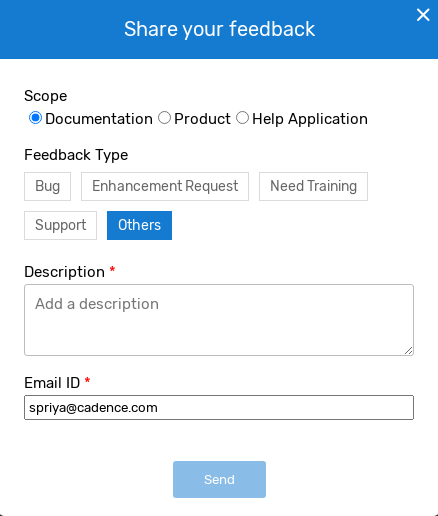
To share detailed feedback:
- Open the Share your feedback form using one of the above methods.
- Select a Scope, which is the area in which you found an issue — the Documentation, the overall Product, or the Help Application (Doc Assistant).
- Select a Feedback Type — Bug, Enhancement Request, Need Training, Support, or Others.
- Type your detailed feedback in the Description field.
- Type your corporate email id in the Email ID field.
- Click Send.
Your feedback is sent to the Cadence Doc Assistant team.