
C
Accessing Subcircuit Simulation Data
- Overview
- Accessing Subcircuit Port Currents
- Accessing Subcircuit Model Parameter and Operating Point Information
- Accessing Schematic Primitive Model and Operating Point Information
- Editing a CDF Description
Overview
This appendix describes how to access simulation data from primitive subcircuits and schematics when you use the spectre interface. By modifying the Component Description Format (CDF) description of components in a design, you can annotate and plot subcircuit port currents, primitive model parameters, and operating point parameters. You can apply the techniques described here to any simulation primitive, not just subcircuits. These techniques allow you to annotate derived parameters on the schematic.
Text-based subcircuits are frequently used to
- Provide a better model of device behavior
- Allow quick modification of the netlist representing the subcircuit
The first section describes how to modify a CDF description to obtain subcircuit port currents. The second section describes how to obtain the derived model parameters and operating point information. The third section describes how to obtain model parameters and operating point information from schematics below the level of the component in question. The last section reviews one method of editing a CDF description.
The subcircuit examples use this simplified operational amplifier model. You can find this in the file
your_install_dir/tools/dfII/samples/artist/models/spectre/vcvsOpampModels.scs
subckt opamp (plus minus output)
parameters inputCap=500e-15
C1 (plus minus) capacitor c=inputCap
E1 (aout 0 plus minus) vcvs gain=1e6
R3 (aout output) r100m
R4 (plus minus) r10M
ends
model r100m resistor r=100e-3
model r10M resistor r=10e6
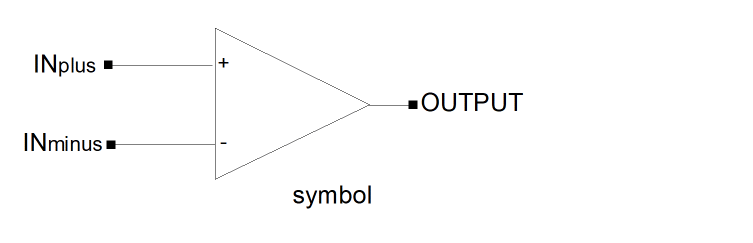
The subcircuit is represented at the next higher level in the design hierarchy by a symbol, with pins INplus, INminus, and OUTPUT. The instance I16 in the cellview vcvsOpampTest schematic in the library aExamples references the cellview.
If you update the CDF, you must generate a new netlist in order for the enhancements described here to work.
Accessing Subcircuit Port Currents
You can obtain the port current of subcircuits of a component with simple simInfo on the CDF of that component. For the Spectre® circuit simulator, the use of expressions is not necessary because this simulator handles the calculation of currents.
The required simInfo is best illustrated by an example. To provide access to the currents entering through the plus, minus, and output ports of the operational amplifier model for spectre, add the following Cadence® SKILL language lines to the text of the spectre Simulation Information section of the operational amplifier CDF description, using the symbol pin names INplus, INminus, and OUTPUT:
termMapping ( nil INplus \:1 INminus \:2 OUTPUT \:3)
The termMapping property value is a disembodied property list (DPL), which provides information to the data access code on how to obtain data for the relevant terminal. This information is also used by the simulator interface to generate appropriate save statements. The first term of the termMapping entry should always be nil.
":plus", ":1" is required.
The termMapping property describes that the schematic terminal INplus is mapped to plus, and INminus is mapped to minus, and OUTPUT is mapped to the simulator name output. The colon character (:) is the Spectre simulator’s instance-terminal delimiter.
To save currents, use the Save Options form on the simulation window, or use the Outputs – To Be Saved command. You can select the individual terminals on the I16 instance in the vcvsOpampTest schematic cellview. During simulation, only the currents you specify are saved.
Accessing Subcircuit Model Parameter and Operating Point Information
By modifying a device CDF description, you can save additional model parameters or operating point information using the following functions:
- opParamExprList for specifying DC operating point information
- optParamExprList for specifying transient operating point information
- modelParamExprList for specifying model parameters
After simulation, you can access this information from the calculator or by using the label display mechanism. This method differs from the one used in the previous example in that you must fully specify the required functions. This is demonstrated in the following example.
In this example, three additional operating point parameters are resistors: rin (input resistance), rout (output resistance), and gain. Add the following lines to the spectre Simulation Information section of the operational amplifier CDF description:
opParamExprList  ("rin"  "OP(mappedRoot(\".R4\") \"res\")")
("rout" "OP(mappedRoot(\".R3\") \"res\")")
("gain" "1e6")
The opParamExprList property is a list of pairs. The first element of each pair is the name of the new property, and the second element is the expression that must be evaluated to compute the new property. OP is the operating parameter function, which takes an instance name and an associated parameter as arguments. The second argument res is the resistance parameter for that component. The first argument, mappedRoot(\".R4\"), is the expression for the name of the instance.
The mappedRoot() function takes the string ( \".R4\" ) and prepends the simulator instance name of the current instance. The dot character (.) is the spectre subcircuit delimiter. Since the property value is a string, substrings (such as ".R4") must be escaped (\".R4\").
The root() function prepends the schematic name (rather than simulator name) of the device instance in question. The root() function also adds a slash (the schematic delimiter) before its argument.
("id" "OP(root(\"M0\") \"id\")")
("id" "OP(root(\"M2<1>\") \"id\")")
In this example, M0 is non-iterated and M2 is an iterated instance.
Use the mappedRoot() function only when you know the exact simulator name, as shown in the following example (for a spectre simulator):
("id" "OP(mappedRoot(\".M0\") \"id\")")
("id" "OP(mappedRoot(\".M2\\\\\\\\<1\\\\\\\\>\") \"id\")")
In this example, M0 is non-iterated and M2 is an iterated instance.
The other two functions provided, inst() and mappedInst(), do not take arguments and return the schematic and simulator instance names, respectively.
The following table shows the difference between the four functions.
| Function Syntax | Value Returned |
|---|---|
The SKILL function strcat is the standard SKILL string concatenate function.
Given an instance of the subcircuit with the name I16 and the simulator instance name of I16, the expressions in the example would evaluate as follows:
mappedRoot(\".R4\") -> "I16.R4"
root(\"inplus\") -> "I16/inplus"
The other functions would act as follows:
inst() -> "I16"
mappedInst() -> "I16"
Similarly, you can add transient operating point information and model parameters if you replace opParamExprList with optParamExprList and modelParamExprList respectively. Also replace OP with OPT and MP as follows:
OP(instance_name parameter)
OPT(instance_name parameter)
MP(instance_name parameter)
Following are examples of optParamExprList and modelParamExprList:
optParamExprList ("rin" "OPT(mappedRoot('.R4') 'res')")
modelParamExprList (("afin" "MP(mappedRoot(\".R4\") \"af\")")
("afout" "MP(mappedRoot(\".R3\") \"af\")"))
In the same way, you can add parameters to cells that are similar to the ones you find in analogLib. The following addition to a resistor CDF description adds a conductance property:
opParamExprList ("cond" "1.0/OP(inst() \"res\")")
You can define your own functions to perform computations. Consider the following example which adds the xyz parameter:
opParamExprList ("xyz" "userFun(inst())")
When the xyz operating point property is accessed, the function userFun() is called with the schematic name of the instance in question. The userFunc() should return an integer if the operation is successful. If userFunc() does not return an integer, then the parameter is not displayed. Some more examples of user defined functions are as follows.
opParamExprList  ("avgcurrent"   "averageCurrent(root('PLUS'))")
    ("pwr"          "instPwr(inst())")
defun( instPwr ( instName )
    (let (i v)
        i = OP(instName "i")
        v = OP(instName "v")
        (when (and i v)  i * v )
)
defun( averageCurrent (instTerm)
    (let (i)
        i = IT( instTerm)
        (when i average(i))
    )
While using a user a user defined function with opParamExprList ensure that the function is defined, otherwise it causes an error. This process can aid debugging.
The expression you use to define a given property can be arbitrary, but if the expression evaluates incorrectly or the current is not saved, the system generates an error. This can be slow down the simulation if there are many instances of the device on a schematic attempting to display this property. For example, you might add the following avecurrent property to a resistor to compute the average transient current through the resistor:
opParamExprList ("avecurrent" "average(IT(root(\"PLUS\")))")
If you did not save the current, then the IT() function returns nil, and the average() function complains about a nil argument. To prevent this, add logic to the expression as in this example:
opParamExprList ("avecurrent" "let(((i IT(root(\"PLUS\"))))(and i average(i)))")
If you did not save the current, this expression prevents the system from flagging errors.
You can use standard SKILL functions like let in these expressions. IT and average are private, internal SKILL functions that are not documented for any other use.
Accessing Schematic Primitive Model and Operating Point Information
You can apply the methods for accessing model and operating point information in subcircuits to access that same information in schematics. By modifying the CDF description of a component, you can access model or operating point information in a schematic one level below the component and display it at the component’s level.
For example, the instance I19 in the cellview vcvsOpampTest is a schematic of the same subcircuit. On the next higher level is another schematic, where the sample schematic is represented by a symbol.
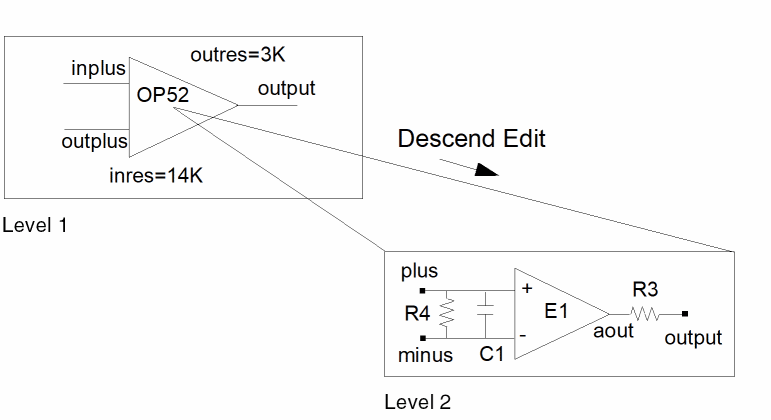
By putting a particular statement in the model or operating point expression list of the CDF simInfo section of OP52, you can define new parameters such as inres and outres, base them on primitive values one level down, such as R4 and R3, and display their values on OP52.
To create the two parameters in the example, include these statements in the simInfo section of OP52 for each simulator that you are using:
opParamExprList      ("inres" "OP(root(\"R4\") \"res\")")
    ("outres" "OP(root(\"R3\") \"res\")")
In this example, inres and outres are parameter names that you define. They derive their values from the res parameter on primitives R4 and R3, respectively. For schematics you use the root function.
To display the information produced by these CDF description entries, make sure that you have created enough labels for your component and that those labels are set to display model or operating point values. For model data, use modelParamExprList and the MP function.
To refer to primitive data several design levels below the component where you want the data displayed, you need to include all the instance names from each level.
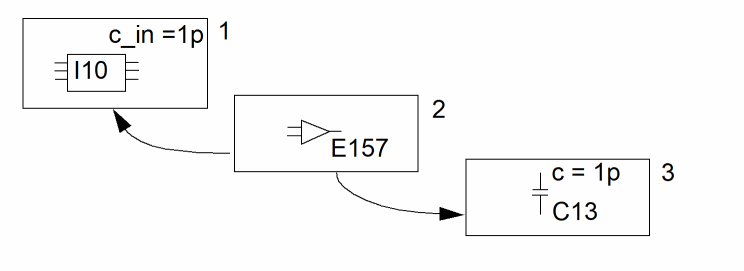
For this example, use the following statement in the CDF description of I10 to display the capacitance on C13 as the input capacitance of I10.
opParamExprList ("cin" "OP(root(\"E157/C13\") \"c\"))
Editing a CDF Description
Writable Cells
To modify a cell CDF description for which you have write access
-
In the CIW, type
cdfDump( "lib" "
and wait for a window to appear.full_path/filename" ?cellName "cell" ?edit ’t ?level ’base) - Edit the file, making the necessary changes.
-
Load the file in the CIW with
load("
full_path/filename")
Sample CDF
The aExamples library demonstrates several different methods of parameter display.
The following is a sample CDF for several of the schematics in the aExamples library. Spectre examples are given:
-
opamp (macro model)
cdfId->simInfo->spectre = '( nil
propMapping nil
instParameters nil
otherParameters (model)
netlistProcedure nil
termMapping ( nil IN\plus ":1" IN\minus ":2" OUTPUT ":3")
termOrder ("INplus" "INminus" "OUTPUT")
componentName opamp
opParamExprList ("rin" "OP(mappedRoot(".R4") "res")") ("rout" "OP(mappedRoot(".R3") "res")") ("gain" "1e6"))
-
opamp_sch (1 level display):
cdfId->simInfo->spectre = ’( nil
termOrder ("INplus" "INminus" "OUTPUT")
componentName nil
opParamExprList ("inres" "OP(root("R2") "res")") ("outres" "OP(root("R3") "res")"))
-
opamp_2Level (2 level display):
cdfId->simInfo->spectre = ’( nil
termOrder ("in_plus" "in_minus" "out_again")
componentName "subcircuit"
opParamExprList ("cin" "OP(root("I0/C0") "cap")") ("rin" "OP(root("I0/R2") "res")"))
Return to top