
Pin Checker
Pin Checker is a tool that checks the connections between an instance and it’s master in the config design. A config design can consist of both text and non-text cellviews.
Pin Checker helps you to find the mismatch in the connectivity and allows you to fix the issues before netlisting. This, in turn, helps in reducing the errors that are generated during netlisting and saves time.
Pin Checker supports the hierarchy of text and non-text views. The support for text cellview is available for VerilogD, VerilogAMS, SystemVerilog, VHDL, and VHDLAMS.
It performs the following checks:
- If the parent containing the instance is text, then it checks the connectivity of the instance and it’s switch master. It compares the number and size of terminals in the switch master with the instance.
-
If the parent containing the instance is schematic, then it performs the following checks:
- Checks the connectivity of the instance and it’s place master. It compares the number of terminals in the place master with the instance.
- Checks the connectivity of instance’s place master and switch master. It compares the number and direction of terminals between the switch master and the place master.
To enable Pin Checker, select Launch — Plugins — Pin Checker from the Virtuoso Hierarchy Editor window.
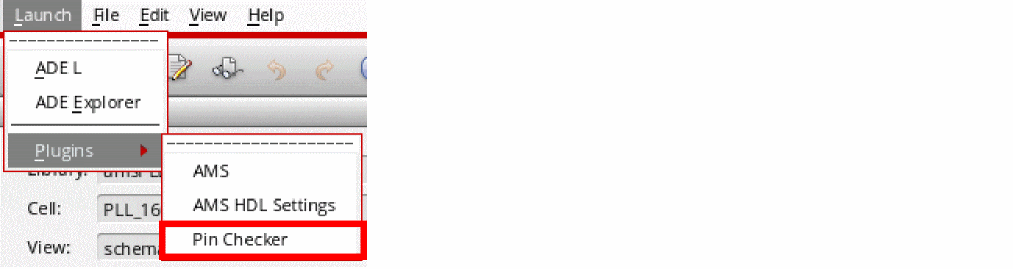
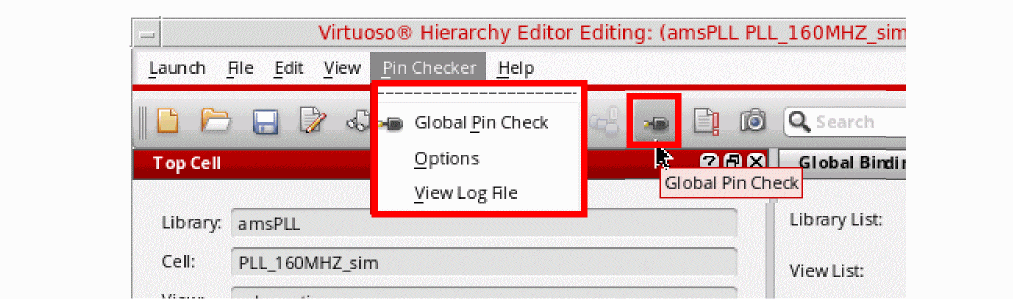
Once the plugin is enabled, the Pin Checker menu is added to the HED menu items. In addition, the Global Pin Check  button is also displayed on the HED toolbar.
Related Topics
Return to top