
Binding Check
Mostly, the top-level bindings (outside the IP block) are the native bindings by the Verilog language, which means that while searching for Virtuoso cellviews, it follows the search order set in the Xcelium simulation. This kind of native binding gets changed during a binding switch because new libraries are introduced.
Therefore, it is highly recommended to check whether the switched bindings are correctly used by the elaborator before running the post-CLIPS simulation. The existing bindings for all the remaining instances must remain intact.
You can perform a binding check by using the Check Bindings command on the toolbar. The pre-CLIPS and post-CLIPS elaboration results are compared, and any mismatch found is highlighted. The correct bindings are highlighted in green. If an incorrect binding is found, it is highlighted in red.
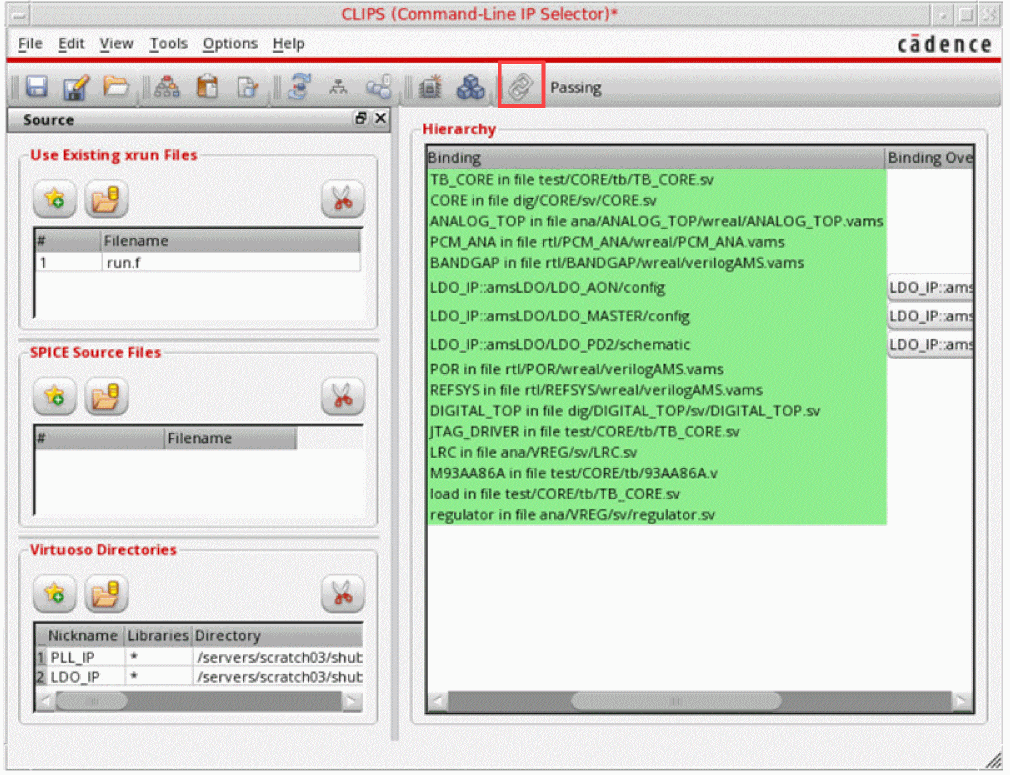
The result of binding check is displayed in the toolbar, where Passing indicates that correct bindings are confirmed.
.clips file, the binding check will be performed when CLIPS is run in batch mode, unless -checkbind no is passed on the command line. Related Topics:
Return to top