Electrically Aware Pin Sizing Form
(Virtuoso Layout Suite EXL) Use the Electrically Aware Pin Sizing form to identify pins that do not meet electrical requirements and to automatically fix the violations.
|
Field
|
Description
|
|
Run On Pins
|
Specifies the pins on which the command is to be run.
-
All: Runs the command on all top-level and level-1 pins.
-
Selected: Runs the command only on the selected pins. All selection methods are supported, for example, selection on canvas, in the Navigator assistant, and in Pin Tool.
Environment variable: eaPinResizeRunMode
|
|
Find and View UnderSized Pins
|
Identifies the violating pins.
-
Select Pin: Selects all the detected undersized pins. You can perform further actions on the selected pins, for example, you can move or resize them. Any prior selections are removed.
-
Highlight Pin: Highlights the undersized pins for better visibility. Any prior highlights are removed.
-
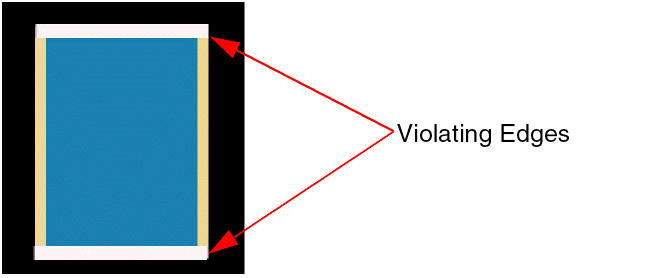
Highlight Violating Edge: Highlights only the violating edge of undersized pins. In the following example, the top and bottom edges being shorter, are the violating edges.
-
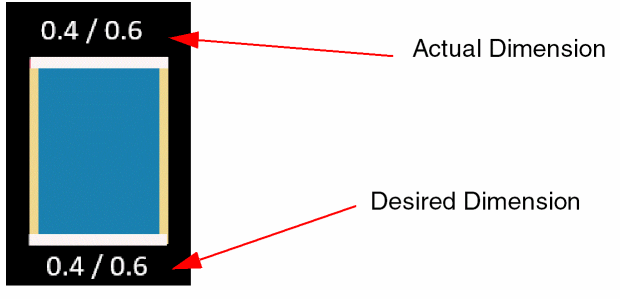
Show Edge Dimension (Actual vs Desired): Displays the current edge dimension and the desired electrically-aware dimension of the violating edge. In the following example, the violating edge dimensions are displayed.
0.4 is the current pin width, whereas 0.6 is the desired pin width.
|
|
|
Environment variables:eaPinResizeFindMode, eaPinResizeSelectPin, eaPinResizeHilightPin, eaPinResizeHilightVEdge,eaPinResizeShowVEdgeDimension
|
|
Resize UnderSized Pins
|
Fixes the pin violations.
-
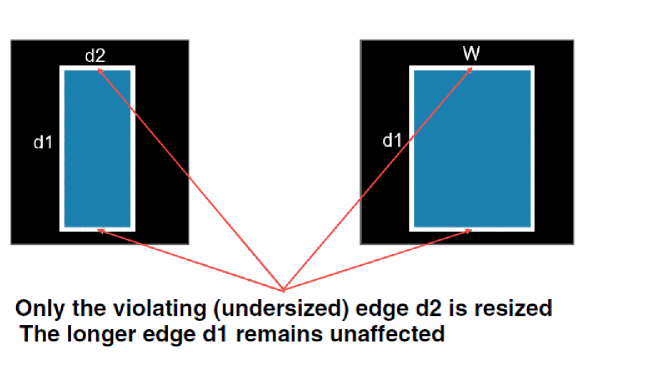
Violating Edge Only: Resizes only the violating pin edges to the desired electrically-aware width. All other edges remain unaffected.
-
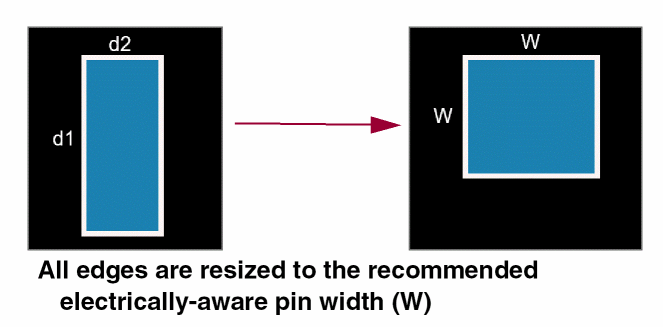
Change to All Edges (Square Pin): Resizes all edges to create square pins. For example, all edges of a rectangular pin are resized to the desired electrically-aware width (W) to create a square pin.
Environment variables:eaPinResizeEdgeSelectMode, eaPinResizeShowVEdgeDimension,
|
|
Retain Pin Selection
|
Retains the selection of pins after they are resized.
Environment variable: eaPinResizeRetainPinSelection
|
|
Retain Highlight on Original Pin
|
Retains the highlights on the pins that were selected for resize.
Environment variable: eaPinResizeHilightOrigPin,
|
|
Maintain Abutment to PR Boundary
|
Ensures that pins that are initially abutted to the PR boundary retain the abutment even after they are resized. Pins that are not initially abutted remain at the same position by maintaining the center of the pins at the same location.
Environment variable: eaPinResizePinAbutToPRB
|
|
Preview
|
-
Show: Displays a preview of the pins after they are resized before updating the layout.
-
Hide: Hides the preview.
|
Related Topics
Electrically Aware Pins in the Pin Tool
Finding and Viewing Undersized Pins in the Pin Tool
Resizing Undersized Pins in the Pin Tool
Return to top