
Pin Offset Options Form
Use the Pin Offset Options form to define pin offset values in terms of Spacing, Grids, or both.
| Field | Description |
|---|---|
|
Specifies the absolute space between the cell boundary and the first pin. Specify the spacing value for each layer individually in the following fields. 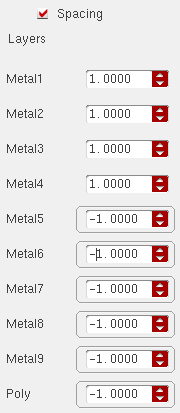 Environment variables: offSetBySpacing, perLayerOffsetBySpacingList |
|
|
Specifies the number of grids to skip before placing the first pin. Manufacturing grids apply for custom pins, and routing grids apply for digital pins. Specify these values for each layer individually in the following fields. 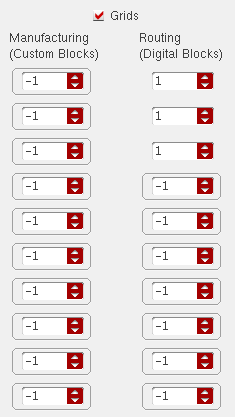 If the pin offset values are specified in terms of both, spacing and grids, then the grids values override the spacing values. If both, Spacing and Grids check boxes are turned off, then Auto is applied. If a negative pin offset value is specified, a warning for that metal and instance is displayed and the Auto offset value is used during pin optimization. If the pin offset value is specified as zero, a warning for that metal and instance is displayed and the manufacturing grid is used as the offset value during pin optimization. Environment variables: offSetByGrids, perLayerOffsetByMfgGridList, perLayerOffsetByRoutingGridList |
|
|
Changes the form values to the default values, which correspond to the original factory settings. |
Related Topics
Return to top