Pin Track Skip Options Form
(Virtuoso Layout Suite EXL) Use the Pin Track Skip Options form to specify pin spacing in terms of the number of WSP tracks to skip.
|
Field
|
Description
|
|
Spacing From
|
Specifies the reference point from which tracks are to be skipped.
|
|
Left/Bottom Pin
|
Sets the left or bottom pin as the reference from which tracks are to be skipped.
|
|
Center Pin
|
Sets the center pin as the reference from which tracks are to be skipped.
|
|
Right/Top Pin
|
Sets the right or top pin as the reference from which tracks are to be skipped.
|
|
Space Non-Edge Pins
|
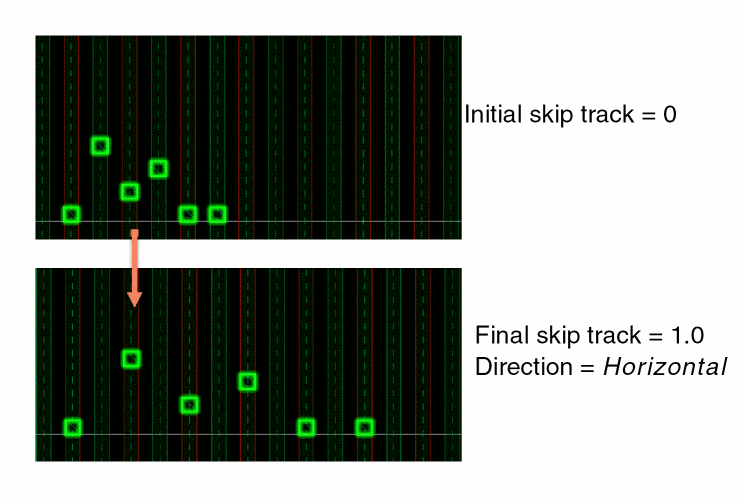
Applies the specified skip track settings to all pins, irrespective of whether they are assigned to edges. When this option is not selected, skip track values are applied only to pins that are assigned to edges.
In the following image, non-edge pins with initial skip track value 0 are selected. A skip track value of 1.0 is applied in the horizontal direction.
|
|
Horizontally, Vertically
|
Specifies the direction in which the skip track values are to be applied for non-edge pins: Horizontally or Vertically.
|
|
Define tracks to skip
|
Specifies the number of tracks to skip in each layer.
|
|
Tracks
|
Specifies the number of tracks to skip in all layers. Clicking Update All applies the value to all layers.
|
|
Layer List
|
Lists all layers in the design. You can specify skip track values individually for each layer.
|
Related Topics
Specifying Pin Spacing Based on the Number of WSP Tracks
Applying Uniform Pin Spacing Using the Pin Tool
Return to top