
Constraint Group Lookup Precedence
A constraint group lets you specify different sets of design constraints to be applied under different circumstances. This allows the flexibility to experiment with less or more stringent process rules at different stages of the design process.
In Virtuoso, you typically have the following constraint groups as a required minimum.
-
Foundry constraint group
TheFoundryconstraints group has the absolute minimum rules that must be followed to create the design. -
Active constraint group
TheActiveconstraints group typically hasvirtuosoDefaultSetupas the default value.
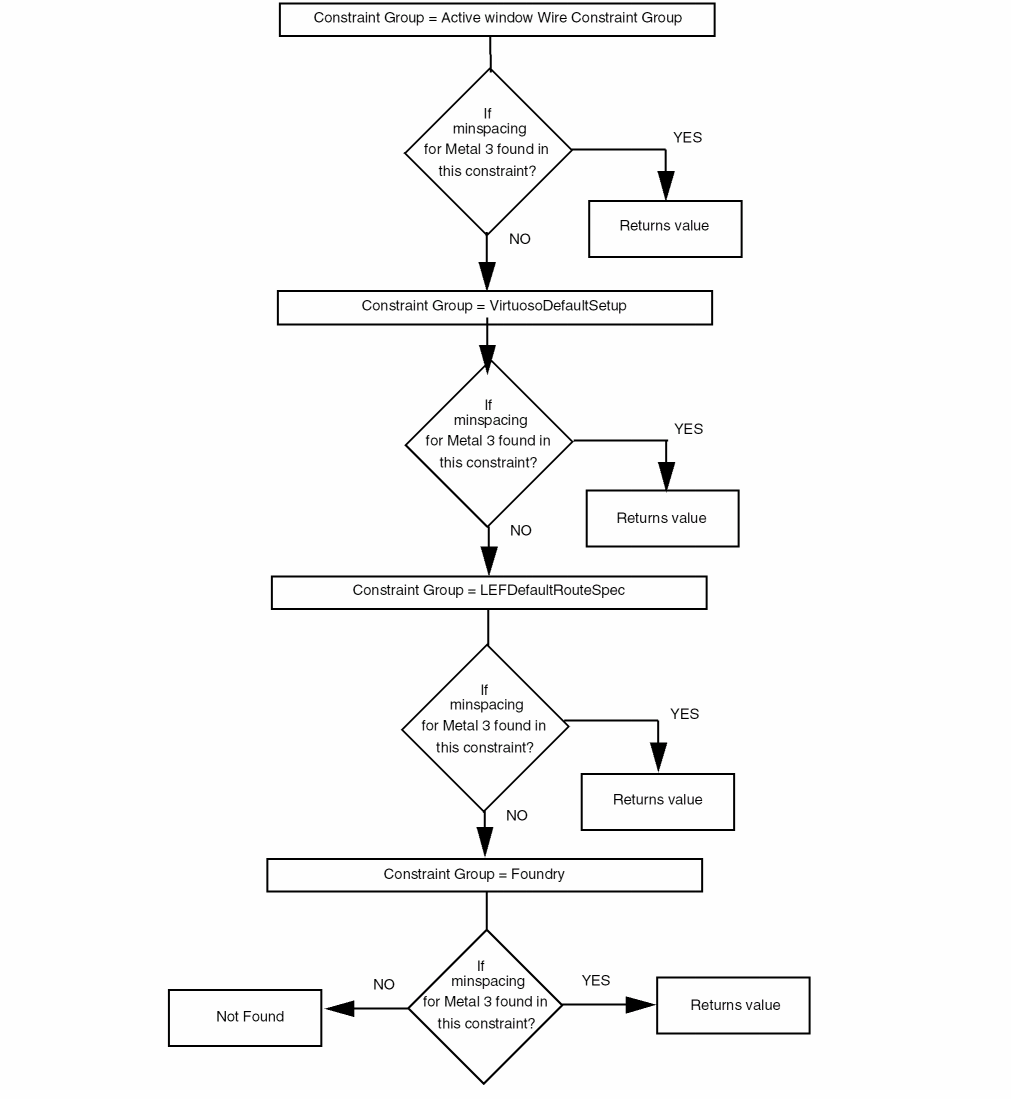
For example, during reinitialization, if the minSpacing value for metal3 is required, Floorplanner searches the minSpacing value in the Active Window Wire constraint group. If the minSpacing value is found in the Active Window Wire constraint group, it is used. Floorplanner then searches for the minSpacing value in virtuosoDefaultSetup and then LEFDefaultRouteSpec and if still not found then in foundry.
The following figure shows how the tool retrieves information from the techfile or design constraints.
Floorplanning commands do not read the constraints defined on objects.
Return to top