
Creating a Rectilinear Polygon in Reinitialize Floorplan
You can create a rectilinear design boundary by selecting Polygon in the Shape of Boundary field in the Boundary Parameters section of the Reinitialize Floorplan form.
The Boundary Parameters section is displayed as shown in the image.
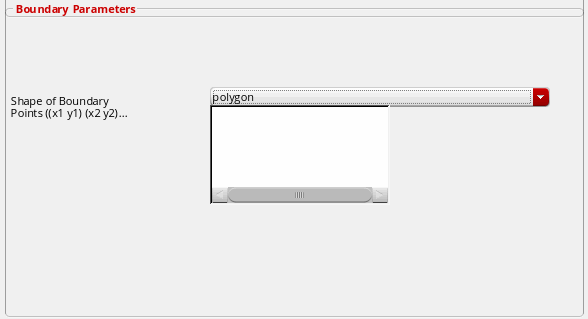
To create a rectilinear polygon:
-
Choose Floorplan – Reinitialize.
In Layout EXL and higher tiers, choose Plan – Generate – Reinitialize.
The Reinitialize Floorplan form is displayed. -
In the Boundary Parameters section, specify the options to modify the boundary parameters.
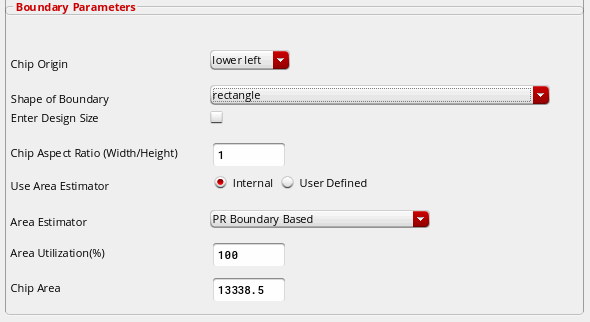
- Select Shape of Boundary to specify the boundary as rectangle or polygon.
- Specify the vertices of rectilinear polygon in the Points (x1 y1) (x2 y2)... field.
- Click OK.
Follow the rules below to enter the co-ordinates (points):
-
Specify the points as (x1 y1) (x2 y2)... or ((x1 y1) (x2 y2)).
Example1: (0 0) (0 100) (100 100) (100 50) (50 50) (50 0)
Example 2: ((0 0) (0 100) (100 100) (100 50) (50 50) (50 0)) -
Points must be rectilinear.
Example: (0 0) (0 100) (100 100)....
Non example: (0 0) (0 100) (100 150).... -
Points must be continuous.
Example: (0 0) (0 100) (100 100).....
Non example: (0 0) (100 100) (0 100).....
Related Topics
Return to top